

FortiGuard 连接问题
FortiGuard 连接问题
FortiGuard 通信机制
FortiGuard 并不是“只要买了/注册了许可证就自动生效”的服务。FortiGate 要正常使用 FortiGuard,必须同时满足以下四个条件:
- 许可证在 Fortinet 官方支持平台(support.fortinet.com)中真实有效。
- FortiGate 能够与 FortiGuard 服务器建立通信。
- 许可证信息已成功同步到 FortiGate 设备本地。
- 相关安全功能(如 IPS/AV)在策略中被实际启用并使用。
只要其中任意一个条件不满足,就可能出现“许可证异常”或“特征库不更新”的现象。
更新常见问题
- Fortinet 官方支持平台(support.fortinet.com)中显示许可证仍然有效,但 FortiGate GUI 显示 FortiGuard 服务或许可证已过期。
- 防病毒(AV)、入侵防御(IPS)等安全功能特征库长时间未更新。
- FortiGate 无法成功连接 FortiGuard 更新服务器。
上述情况并不一定代表许可证真实失效,而通常与许可证同步机制、网络连通方式或更新路径受限有关。
问题原因
- 许可证与设备同步问题。Fortinet 官方支持平台(support.fortinet.com)中显示许可证仍然有效,但 FortiGate GUI 显示 FortiGuard 服务或许可证已过期。
- 许可证刚完成激活或续费,FortiGuard 后端同步尚未完成(通常需要 24~48 小时)。
- HA 集群中存在成员设备未注册或存在已到期服务,导致集群整体被判定为许可证异常。
- FortiGate 设备长时间未与 FortiGuard 成功通信,本地的许可证状态未刷新。
- 无法访问 FortiGuard。
- 当 FortiGate 无法与 FortiGuard 服务器建立连接时,特征库和许可证状态均无法更新。
- FortiGate 无法直连互联网,或仅允许有限出口访问。
- FortiGate 自发流量(更新请求、DNS 查询)被错误地引导进入错误接口(如无法访问 Internet 的 VPN 接口)。
- 上游防火墙、ISP 或云环境限制 FortiGuard 所需的端口或目标地址。
- Anycast 启用状态与网络实际出口策略不匹配。
- DNS 解析异常或被劫持。
- FortiGuard 更新依赖域名访问,即使 IP 层可达,DNS 解析失败仍会导致更新失败。
- FortiGate 使用的 DNS 服务器无法解析 FortiGuard 相关域名。
- DNS 查询被重定向、污染或拦截。
- DNS 服务器仅允许内网解析,未放行外部域名。
- FortiGuard 查询/更新端口受限。端口受限时,更新请求可能发出但无法建立有效会话。
- Web Filter/DNS Filter 所需端口(53/443/8888)被防火墙或 ISP 阻断。
- FortiGate 使用的源端口范围被上游设备限制。
- Anycast 启用时,部分区域 FortiGuard 节点不可达。
- FortiGuard 功能未被实际启用。如果对应的安全功能未在防火墙策略中应用,即使许可证在本地有效,FortiGate 不会触发对应特征库的下载与更新。
- AV/IPS 配置文件未绑定到任何防火墙策略。
- 对应安全功能在“可见功能”中被隐藏或未启用。
- 受限网络或隔离网络架构。在受限网络中,必须额外配置 FortiGuard 通信路径,否则更新将始终失败。
- FortiGate 部署在无互联网或严格隔离网络中。
- 未配置 FortiManager 本地 FDS。
- 未通过代理服务器访问 FortiGuard。
排查步骤
排查 FortiGuard 问题必须同时检查许可证、网络连通性和更新配置,而非仅依据 GUI 显示结果判断。
手动触发更新
重要
若 AV/IPS Profile 未绑定到任何策略,即使许可证有效,特征库也不会更新。
GUI:进入“系统管理 → FortiGuard”页面,点击“立即更新许可证和定义”按钮。
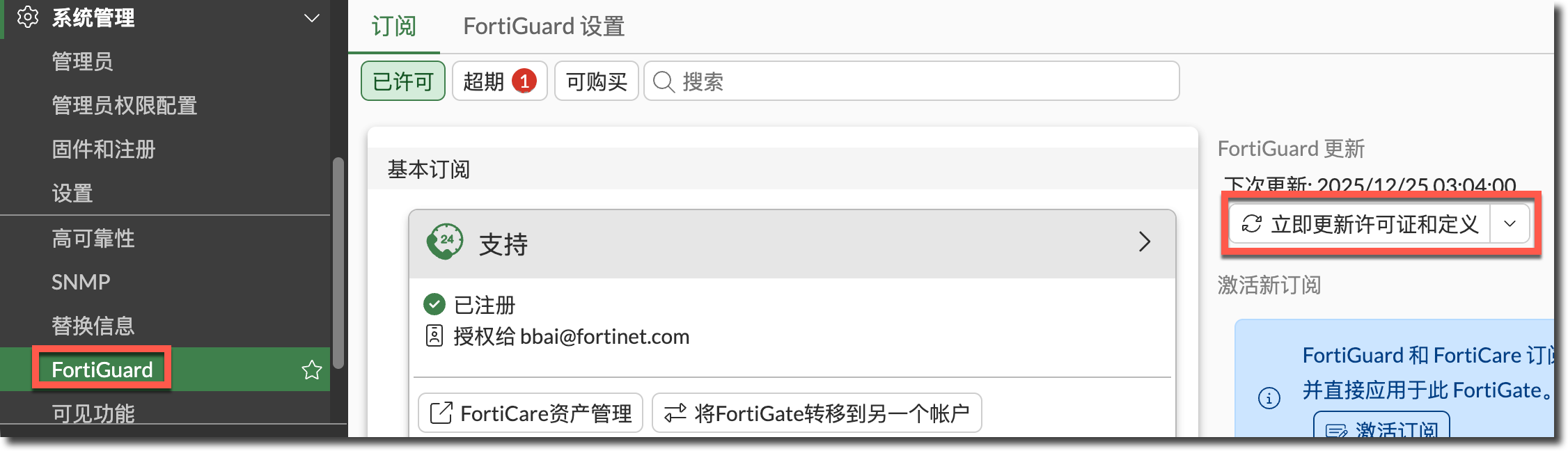
CLI:执行
execute update-now命令。查看同步过程的 Debug 信息,如果更新失败,Debug 信息中会提示对应的失败原因:
diagnose debug reset
diagnose debug application update -1
diagnose debug enable
execute update-now

完成后执行:
diagnose debug disable
其他更细化的手动更新命令:
execute update-av
execute update-ips
execute update-geo-ip
execute update-list
execute update-external-resource
execute update-ffdb-on-demand
检查 HA 成员许可证
- HA 集群中所有成员必须有有效许可证。
- 所有设备必须绑定在同一个 FortiCare 账号下。
- GUI 只会显示 HA 成员中最早到期的许可证时间。
- 若 HA 成员设备未注册,HA 集群许可证将被判定为无效。
检查自动更新与 FDS 状态
FortiGate # diagnose autoupdate status
FDN availability:  available at Wed Dec 24 03:04:03 2025
                   last successful time: Wed Dec 24 03:04:03 2025
Scheduled update: enable
        Update daily:   at 3 after 60 minutes
Virus definitions update: enable
IPS definitions update: enable
DLP Signature status:
        DLP signature json file not found.
FDN availability:是否可访问 FortiGuard 网络。Scheduled update:是否启用定时更新。Virus definitions update/IPS definitions update:更新是否开启。Web proxy tunneling:是否通过代理访问 FortiGuard。
查看特征库/引擎状态
FortiGate # diagnose autoupdate versions

AV Engine
---------
Version: 7.00048 signed
Contract Expiry Date: Tue Sep 29 2026
Last Updated using scheduled update on Mon Jun 21 18:57:22 2021
Last Update Attempt: Wed Aug 13 11:10:15 2025
Result: No Updates

Virus Definitions
---------
Version: 93.05319 signed
Contract Expiry Date: Tue Sep 29 2026
Last Updated using scheduled update on Wed Aug 13 10:40:16 2025
Last Update Attempt: Wed Aug 13 11:10:15 2025
Result: No Updates

Extended set
---------
Version: 93.05319 signed
Contract Expiry Date: Tue Sep 29 2026
Last Updated using scheduled update on Wed Aug 13 10:40:16 2025
Last Update Attempt: Wed Aug 13 11:10:15 2025
Result: No Updates

Mobile Malware Definitions
---------
Version: 93.05319 signed
Contract Expiry Date: Tue Sep 29 2026
Last Updated using scheduled update on Wed Aug 13 10:40:16 2025
Last Update Attempt: Wed Aug 13 11:10:15 2025
Result: No Updates

IPS Attack Engine
---------
Version: 7.01168 signed
Contract Expiry Date: Tue Sep 29 2026
Last Updated using scheduled update on Wed Mar 26 11:21:19 2025
Last Update Attempt: Sun Sep 28 03:27:54 2025
Result: No Updates

Attack Definitions
---------
Version: 6.00741 signed
Contract Expiry Date: Tue Sep 29 2026
Last Updated using scheduled update on Fri Jun 27 09:49:50 2025
Last Update Attempt: Sat Jun 28 12:16:04 2025
Result: No Updates

Attack Extended Definitions
---------
Version: 34.00091 signed
Contract Expiry Date: Tue Sep 29 2026
Last Updated using scheduled update on Sat Sep 27 03:28:06 2025
Last Update Attempt: Sun Sep 28 03:27:54 2025
Result: No Updates

AI/Machine Learning IPS Definitions
---------
Version: 2507.00207 signed
Contract Expiry Date: Tue Sep 29 2026
Last Updated using manual update on Thu Aug 28 10:54:15 2025
Last Update Attempt: Sun Sep 28 03:27:54 2025
Result: No Updates

Application Definitions
---------
Version: 6.00741 signed
Contract Expiry Date: Tue Sep 29 2026
Last Updated using scheduled update on Fri Jun 27 00:47:02 2025
Last Update Attempt: Sat Jun 28 12:16:04 2025
Result: No Updates

GenAI Application Definitions
---------
Version: 0.00000
Contract Expiry Date: Tue Sep 29 2026
Last Updated using manual update on Mon Jan  1 00:00:00 2001
Last Update Attempt: n/a
Result: Updates Installed

OT Threat Definitions
---------
Version: 6.00741 signed
Contract Expiry Date: n/a
Last Updated using manual update on Tue Dec  1 02:30:00 2015
Last Update Attempt: n/a
Result: Updates Installed

FMWP Definitions
---------
Version: 0.00000
Contract Expiry Date: Tue Sep 29 2026
Last Updated using scheduled update on Wed Aug 13 01:36:06 2025
Last Update Attempt: Mon Aug 18 15:55:04 2025
Result: No Updates

IPS Malicious URL Database
---------
Version: 5.00548 signed
Contract Expiry Date: Tue Sep 29 2026
Last Updated using scheduled update on Sun Sep 28 03:27:54 2025
Last Update Attempt: Sun Sep 28 03:27:54 2025
Result: Updates Installed

IoT Detect Definitions
---------
Version: 0.00000 signed
Contract Expiry Date: n/a
Last Updated using manual update on Wed Aug 17 17:31:00 2022
Last Update Attempt: n/a
Result: Updates Installed

OT Detect Definitions
---------
Version: 0.00000
Contract Expiry Date: n/a
Last Updated using manual update on Mon Jan  1 00:00:00 2001
Last Update Attempt: n/a
Result: Updates Installed

OT Patch Definitions
---------
Version: 0.00000
Contract Expiry Date: n/a
Last Updated using manual update on Mon Jan  1 00:00:00 2001
Last Update Attempt: n/a
Result: Updates Installed

Flow-based Virus Definitions
---------
Version: 93.05319 signed
Contract Expiry Date: Tue Sep 29 2026
Last Updated using scheduled update on Wed Aug 13 11:10:15 2025
Last Update Attempt: Wed Aug 13 11:10:15 2025
Result: Updates Installed

Botnet Domain Database
---------
Version: 3.01495 signed
Contract Expiry Date: Tue Sep 29 2026
Last Updated using scheduled update on Wed Dec 24 03:04:03 2025
Last Update Attempt: Wed Dec 24 03:04:03 2025
Result: Updates Installed

Proxy Attack Definitions
---------
Version: 6.00741 signed
Contract Expiry Date: Tue Sep 29 2026
Last Updated using scheduled update on Fri Jun 27 09:49:50 2025
Last Update Attempt: Sat Jun 28 12:16:04 2025
Result: No Updates

Proxy Attack Extended Definitions
---------
Version: 34.00091 signed
Contract Expiry Date: Tue Sep 29 2026
Last Updated using scheduled update on Sat Sep 27 03:28:06 2025
Last Update Attempt: Sun Sep 28 03:27:54 2025
Result: No Updates

Proxy Application Definitions
---------
Version: 6.00741 signed
Contract Expiry Date: Tue Sep 29 2026
Last Updated using scheduled update on Fri Jun 27 00:47:02 2025
Last Update Attempt: Sat Jun 28 12:16:04 2025
Result: No Updates

Internet-service Standard Database
---------
Version: 7.04386 signed
Contract Expiry Date: n/a
Last Updated using manual update on Fri Dec 19 12:04:00 2025
Last Update Attempt: Wed Dec 24 03:04:03 2025
Result: No Updates

Device and OS Identifications
---------
Version: 1.00196
Contract Expiry Date: Tue Sep 29 2026
Last Updated using scheduled update on Fri Nov 14 03:27:12 2025
Last Update Attempt: Wed Dec 24 03:04:03 2025
Result: No Updates

URL Allow list
---------
Version: 4.00812
Contract Expiry Date: Tue Sep 29 2026
Last Updated using scheduled update on Wed Dec 24 03:04:03 2025
Last Update Attempt: Wed Dec 24 03:04:03 2025
Result: Updates Installed

DLP Signatures
---------
Version: 0.00000
Contract Expiry Date: n/a
Last Updated using manual update on Mon Jan  1 00:00:00 2001
Last Update Attempt: Wed Dec 24 03:04:03 2025
Result: Unauthorized

IP Geography DB
---------
Version: 3.00311
Contract Expiry Date: n/a
Last Updated using manual update on Thu Dec 18 06:55:00 2025
Last Update Attempt: Wed Dec 24 03:04:03 2025
Result: No Updates

Certificate Bundle
---------
Version: 1.00061
Contract Expiry Date: n/a
Last Updated using manual update on Tue Dec  2 15:00:00 2025
Last Update Attempt: Wed Dec 24 03:04:03 2025
Result: No Updates

Malicious Certificate DB
---------
Version: 1.00566
Contract Expiry Date: Tue Sep 29 2026
Last Updated using scheduled update on Sun Dec 21 03:54:06 2025
Last Update Attempt: Wed Dec 24 03:04:03 2025
Result: No Updates

Mac Address Database
---------
Version: 1.00302
Contract Expiry Date: Tue Sep 29 2026
Last Updated using scheduled update on Thu Dec 18 03:48:04 2025
Last Update Attempt: Wed Dec 24 03:04:03 2025
Result: No Updates

AntiPhish Pattern DB
---------
Version: 1.00015
Contract Expiry Date: Tue Sep 29 2026
Last Updated using manual update on Mon May 20 15:52:45 2024
Last Update Attempt: Wed Dec 24 03:04:03 2025
Result: No Updates

AI/Machine Learning Malware Detection Model
---------
Version: 4.02803 signed
Contract Expiry Date: Tue Sep 29 2026
Last Updated using scheduled update on Wed Aug 13 10:10:20 2025
Last Update Attempt: Wed Aug 13 11:10:15 2025
Result: No Updates

ICDB Database
---------
Version: 1.00051 signed
Contract Expiry Date: Tue Sep 29 2026
Last Updated using scheduled update on Wed Sep 10 03:27:13 2025
Last Update Attempt: Wed Dec 24 03:04:03 2025
Result: No Updates

Inline CASB Database
---------
Version: 1.00009 signed
Contract Expiry Date: Tue Sep 29 2026
Last Updated using scheduled update on Tue Dec 23 03:04:03 2025
Last Update Attempt: Wed Dec 24 03:04:03 2025
Result: No Updates

SLA Database
---------
Version: 1.00000
Contract Expiry Date: n/a
Last Updated using manual update on Sat May  6 15:26:00 2023
Last Update Attempt: Wed Dec 24 03:04:03 2025
Result: Unauthorized

Telemetry Database
---------
Version: 1.00005
Contract Expiry Date: n/a
Last Updated using manual update on Sat Dec 20 02:25:00 2025
Last Update Attempt: Wed Dec 24 03:04:03 2025
Result: Unauthorized

Modem List
---------
Version: 0.000

Timezone Database
---------
Version: 1.0009
IANA Version: 2025b

Security Rating Data Package
---------
Version: 6.00025
Contract Expiry Date: Tue Sep 29 2026
Last Updated using scheduled update on Thu Nov 13 03:27:19 2025
Last Update Attempt: Wed Dec 24 03:04:03 2025
Result: No Updates

FDS Address
---------
173.243.141.6:443- 各 AV/IPS/ISDB/URL DB 的版本号。
- 合约到期时间。
- 最近更新时间。
- 实际使用的 FortiGuard 地址(IP: Port)。
查看合同/更新状态
相关信息
详情参考:系统管理 → FortiGuard 管理 → 查看合同/更新状态章节。
diagnose test update info检查 FortiGuard 联通性
指定 ping 命令的出接口和源 IP 为可以正常访问 Internet 的出接口和源 IP,并执行 ping 以下 FortiGuard 相关域名,查看 DNS 解析与 FortiGuard 服务器基础联通性。
execute ping-options interface wan1
execute ping-options source 202.103.1.1

execute ping service.fortiguard.net
execute ping update.fortiguard.net
execute ping guard.fortinet.net
execute ping securewf.fortiguard.net
若 DNS 解析失败,可能是 FortiGate 无法正常访问 DNS 服务器,或 FortiGate 设置的 DNS 服务器无法正常解析 FortiGuard 相关域名,需要检查 DNS 相关配置,建议使用公网知名可信的 DNS 服务器,避免 DNS 域名污染。
相关信息
详情参考:网络管理 → DNS → DNS 配置章节。
config system dns
    set primary 223.5.5.5
    set secondary 114.114.114.114
end
若 DNS 解析成功,但 Ping 失败,可能是由于上游设备、ISP 或云环境限制 FortiGuard 所需的端口或目标地址。需要在上游设备、ISP 或云环境排查。
若 DNS 解析成功,Ping 也可以成功,但 FortiGuard 更新仍然失败,则可能是 FortiGuard 更新流量走错了接口。
默认配置下,FortiGuard 更新流量是 FortiGate 自身发起的流量,依赖路由表自动选择出接口与源 IP,如果默认路由在多个接口上负载,其中有接口无法正常访问 Internet,则可能会导致 FortiGate 连接 FortiGuard 服务器失败(
diagnose debug application update -1会显示实际更新时使用的出接口)。如下所示,FortiGate 的默认路由在 wan1 和 vpn_line1 之间负载,wan1 可以正常访问 Internet,vpn_line1 是 IPSec 隧道,无法访问 Internet。
FortiGate-101F # get router info routing-table all
......

Routing table for VRF=0
S*      0.0.0.0/0 [1/0] via 202.103.1.1, wan1, [1/0]
S*                [1/0] via 169.254.10.1, vpn_line1, [1/0]
......
解决方法是在 FortiGuard 配置中手工指定出接口,与源 IP(可选,默认会使用出接口 IP),
interface-select-method也可以使用 SD-WAN 规则来选路。config system fortiguard set interface-select-method specify set interface wan1 set source-ip 202.103.1.12 end如果仍然更新失败,
diagnose debug application update -1提示与服务器连接失败,可以尝试调整更新服务器的位置:进入“系统管理 → FortiGuard → FortiGuard 设置”页面,更新服务器位置默认为“仅美国”。
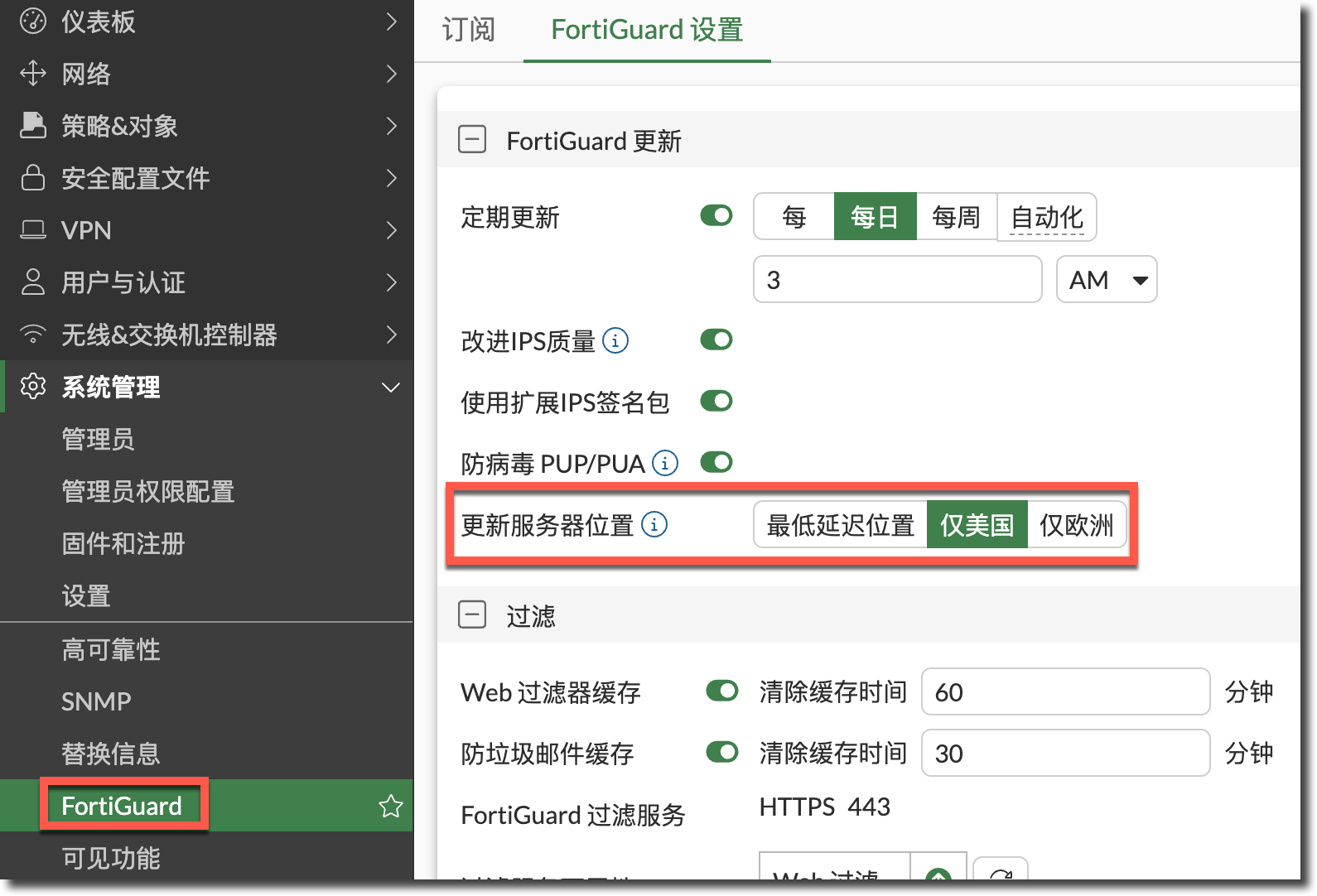
可尝试修改为“最低延迟位置”或“仅欧洲”后,再进行更新尝试。
config system fortiguard
    set update-server-location { usa | eu | automatic }
end
Web/DNS Filter 查询
Web/DNS Filter 分类服务是基于 FortiGuard 服务器实时查询获取分类结果的,查询分类时默认会使用这 3 个端口之一:TCP 53/443/8888。当 Web/DNS Filter 分类服务失败时,可以尝试以下步骤排查。
使用如下命令可以查看当前 FortiGuard 分类服务器的状态。
FortiGate # diagnose debug rating
Locale       : simch

Service      : Web-filter
Status       : Enable
License      : Contract

Service      : Antispam
Status       : Disable

Service      : Virus Outbreak Prevention
Status       : Disable

Num. of servers : 3
Protocol        : https
Port            : 443
Anycast         : Disable
Default servers : Included

-=- Server List (Wed Dec 24 16:48:37 2025) -=-

IP                                             Weight    RTT Flags   TZ   FortiGuard-requests  Curr Lost Total Lost             Updated Time
12.34.97.18                                       120    202 DI      -5                     7          0          0 Wed Dec 24 16:48:05 2025
209.40.106.70                                     120    727         -6                     1          0          0 Wed Dec 24 16:48:05 2025
140.174.22.68                                     120    873         -5                     1          0          0 Wed Dec 24 16:48:05 2025
默认配置下 FortIGate 使用 Anycast 方式查询 FortiGuard,当 Anycast 地址不可用时,会出现查询失败的情况。可以尝试关闭 FortiGuard Anycast 功能。
config system fortiguard
    set fortiguard-anycast disable
end
调整 FortiGate 源端口范围(ISP 限制场景)。
调整 Web/DNS Filter 分类服务查询时使用的端口,默认为 443(开启 Anycast 后只能选择 443)。
config system fortiguard
    set fortiguard-anycast disable
    set port { 8888 | 53 | 443 }
end
受限网络
在受限网络或隔离网络架构中,必须额外配置 FortiGuard 通信路径,否则更新将始终失败。
Anycast 配置相关:
确认 FortiGuard anycast 状态。
config system fortiguard
    get | grep fortiguard-anycast
Anycast 关闭/开启时上游设备需放行的 FQDN。
FortiGuard 服务 Anycast 关闭 Anycast 开启 FortiGuard Object download update.fortiguard.netglobalupdate.fortinet.netQuerying service (web-filtering, anti-spam ratings) over HTTPS securewf.fortiguard.netglobalguardservice.fortinet.netQuerying service (web-filtering, anti-spam ratings) over UDP service.fortiguard.netService only in Unicast Device info Collection Service only in Anycast globaldevcollect.fortinet.netDevice info Query Service only in Anycast globaldevquery.fortinet.netFortiGate Cloud logging logctrl1.fortinet.comgloballogctrl.fortinet.netFortiGate Cloud management mgrctrl1.fortinet.comglobalmgrctrl.fortinet.netFortiGate Cloud messaging msgctrl1.fortinet.comglobalmsgctrl.fortinet.netFortiGate Cloud sandbox aptctrl1.fortinet.comglobalaptctrl.fortinet.netProduct API used by OCVPN registration and GUI icon download productapi.fortinet.netglobalproductapi.fortinet.netFortiCare registration directregistration.fortinet.comglobalregistration.fortinet.netSecure DNS sdns.fortinet.netglobalsdns.fortinet.netFortiCloud FortiClient forticlient.fortinet.netglobalfctupdate.fortinet.netFortiMobile Tokens directregistration.fortinet.comglobalftm.fortinet.netEMS cloud forticlient-emsproxy.forticloud.comService only in Unicast DDNS ddns.fortinet.netglobalddns.fortinet.netGeoIP gip.fortinet.netglobalgip.fortinet.netIP blocklist ipbl.fortinet.netN/A
尝试调整 FortiGate 自身发起流量使用的源端口。
config system global
    set ip-src-port-range 1024-25000
end
使用代理服务器连接 FortiGuard 服务器。
< FortiOS 7.6.4:
config system autoupdate tunneling
    set address <proxy_address>
    set password <password>
    set port <proxy_port>
    set status {enable | disable}
    set username <username>
end

≥ FortiOS 7.6.4:
config system fortiguard
    set proxy-server-ip <proxy_address>
    set proxy-server-port <proxy_port>
    set proxy-username <username>
    set proxy-password <password>
end
使用 FortiManager 作为 FortiGuard 更新/查询服务器。
联系 Fortinet
在以下情况下建议提交 Fortinet Ticket:
- 已确认许可证有效。
- DNS/路由/端口配置无误。
- Debug/Sniffer 显示请求异常或无响应。
提交 Ticket 时建议附带设备配置文件及以下 CLI 的输出结果:
diagnose autoupdate status
diagnose autoupdate versions
get router info routing-table all
diagnose debug application update -1
diagnose debug enable
execute update-now