

DNS 配置
DNS 配置
功能介绍
FortiGate 在需要将域名解析为 IP 地址(如被域名定义的 NTP 服务器、FortiGuard 更新服务器、FQDN 地址对象、FortiGate 作为 DNS 服务器、SD-WAN SLA 使用域名作为探测服务器等场景)时会查询已配置的 DNS 服务器。默认配置下,FortiGate 使用 FortiGuard 的 DoT(DNS over TLS)作为自身的 IPv4 DNS 服务器。
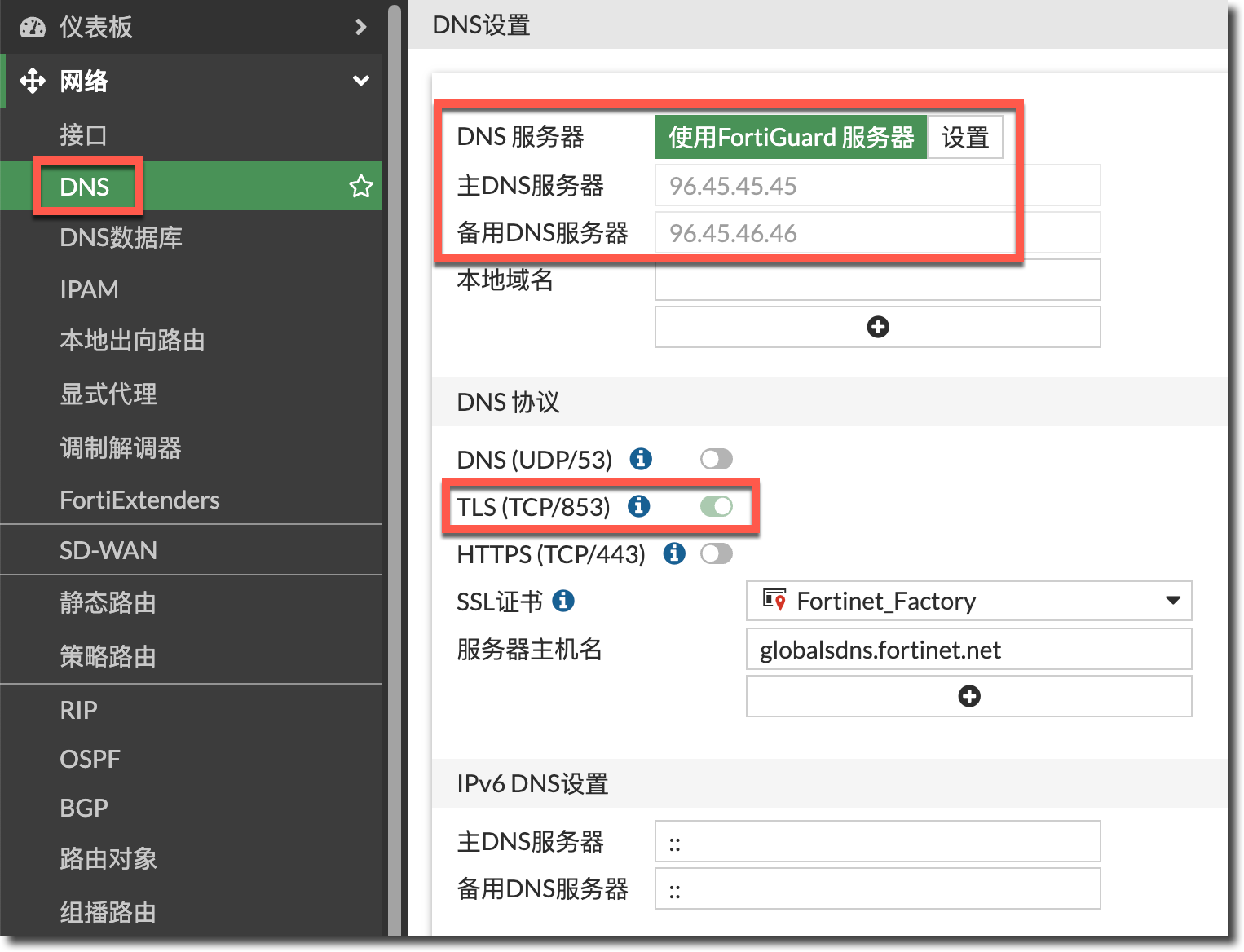
config system dns
    set primary 96.45.45.45
    set secondary 96.45.46.46
    set protocol dot
    set server-hostname "globalsdns.fortinet.net"
end
自定义 DNS 服务器
如果需要修改为自定义的 DNS 服务器,需要点击“设置”按钮,然后填入自定义的 DNS 服务器并选择 DNS 协议。
重要
在取消使用 FortiGuard 服务器后,DNS 协议默认会选择“TLS (TCP/853)”,需要手动修改为自定义 DNS 服务器使用的 DNS 协议。
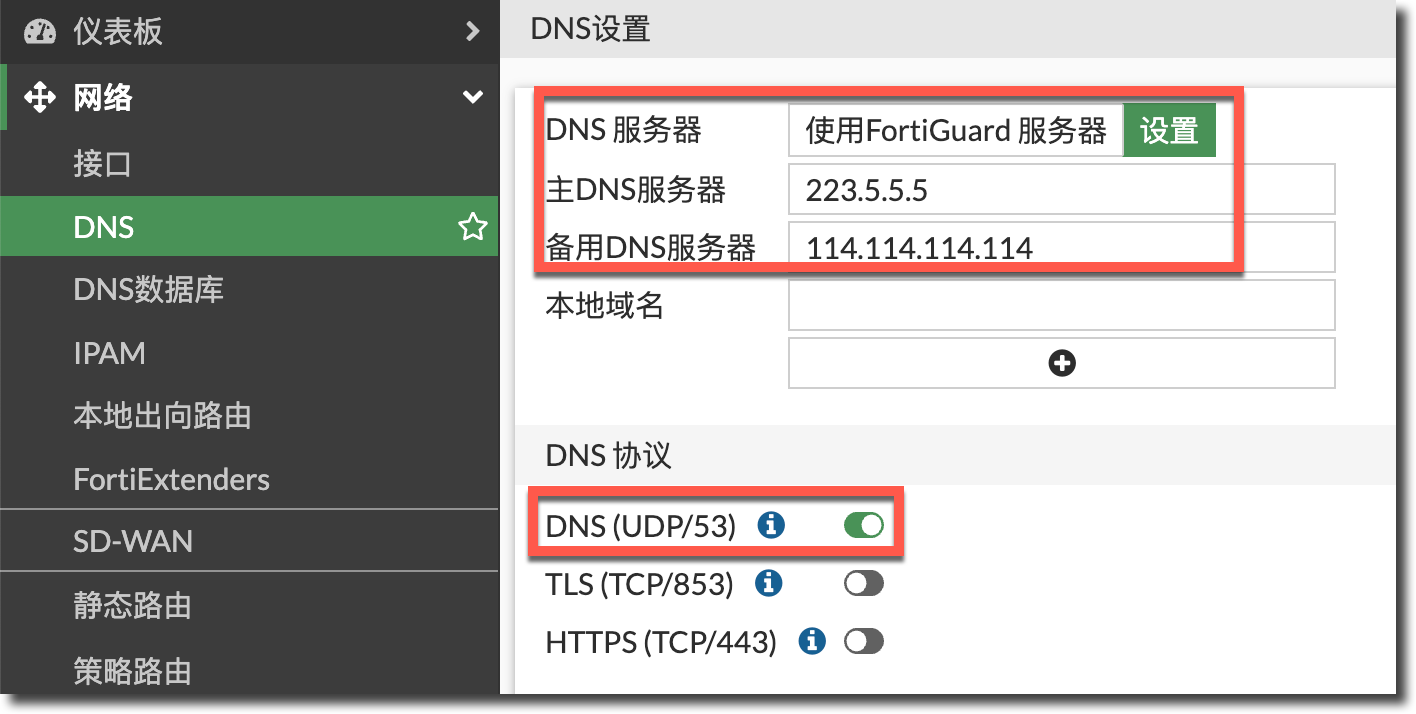
config system dns
    set primary 223.5.5.5
    set secondary 114.114.114.114
end
DNS 服务器主备模式
DNS 服务器在主备的选择上有两种模式:
-least-rtt(默认配置):根据最后一次往返时间(RTT)最短的作为当前 DNS 服务器。 -failover:根据服务器的配置顺序选择服务器,首先选择主 DNS 服务器进行解析,主 DNS 服务器无法访问或出现问题时裁切换到备用 DNS 服务器。
该选项只能通过 CLI 进行更改。
config system dns
    set server-select-method {least-rtt | failover}
end
通过
diagnose test application dnsproxy 2命令可以看到两个服务器的延迟差距,如下所示,使用least-rtt模式时,FortiGate 会选择 223.5.5.5 作为 DNS 服务器,使用failover模式时,FortiGate 会选择 8.8.8.8 作为 DNS 服务器。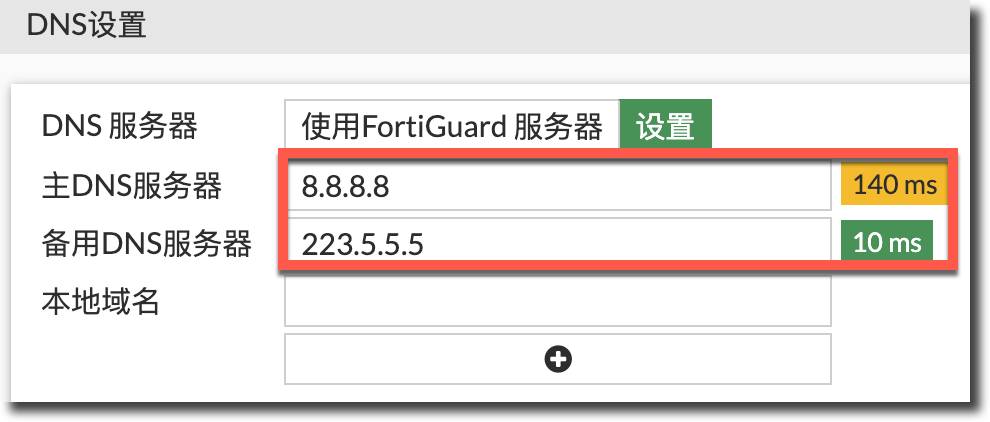
FortiGate # diagnose test application dnsproxy 2
......
DNS latency info:
vfid=0 server=8.8.8.8 latency=14 updated=126
vfid=0 server=223.5.5.5 latency=1 updated=41
......
当其中一个 DNS 服务器无法访问时,会使用另一个 DNS 服务器进行解析,
diagnose test application dnsproxy 3命令可以看到服务器的探测失败的次数(failure)以及距离上次探测失败过去的时间(last_failed)。FortiGate # diagnose test application dnsproxy 3 ...... DNS servers: 8.8.8.8:53 vrf=0 tz=0 encrypt=none req=4 to=4 res=0 rt=0 ready=1 timer=0 probe=0 failure=5 last_failed=1215 223.5.5.5:53 vrf=0 tz=0 encrypt=none req=5 to=0 res=5 rt=1 ready=1 timer=0 probe=0 failure=0 last_failed=0 ......
DNS 服务器覆盖
要特别注意,如果配置了 PPPoE 或 DHCP,并从 ISP 侧获取了 IP 地址与 DNS 服务器。默认配置下,从 ISP 获取的 DNS 服务器会覆盖手动配置的 DNS 服务器。如下所示,wan1 接口 DHCP 获取的 DNS 服务器 172.22.6.1 覆盖了手工配置的 223.5.5.5/114.114.114.114。

如果需要手工配置的 DNS 服务器生效,需要在相关 PPPoE/DHCP 接口下关闭“DNS 覆盖”功能。
重要
如果使用的是将普通接口修改为 PPPoE 的模式,在接口上关闭“DNS 覆盖”功能,会导致接口重新拨号,请务必在窗口期进行操作。
所以强烈建议新建 PPPoE 接口来作为拨号接口,而不要使用普通接口上的 PPPoE 模式(参考:部署前注意事项 → PPPoE 接口配置。
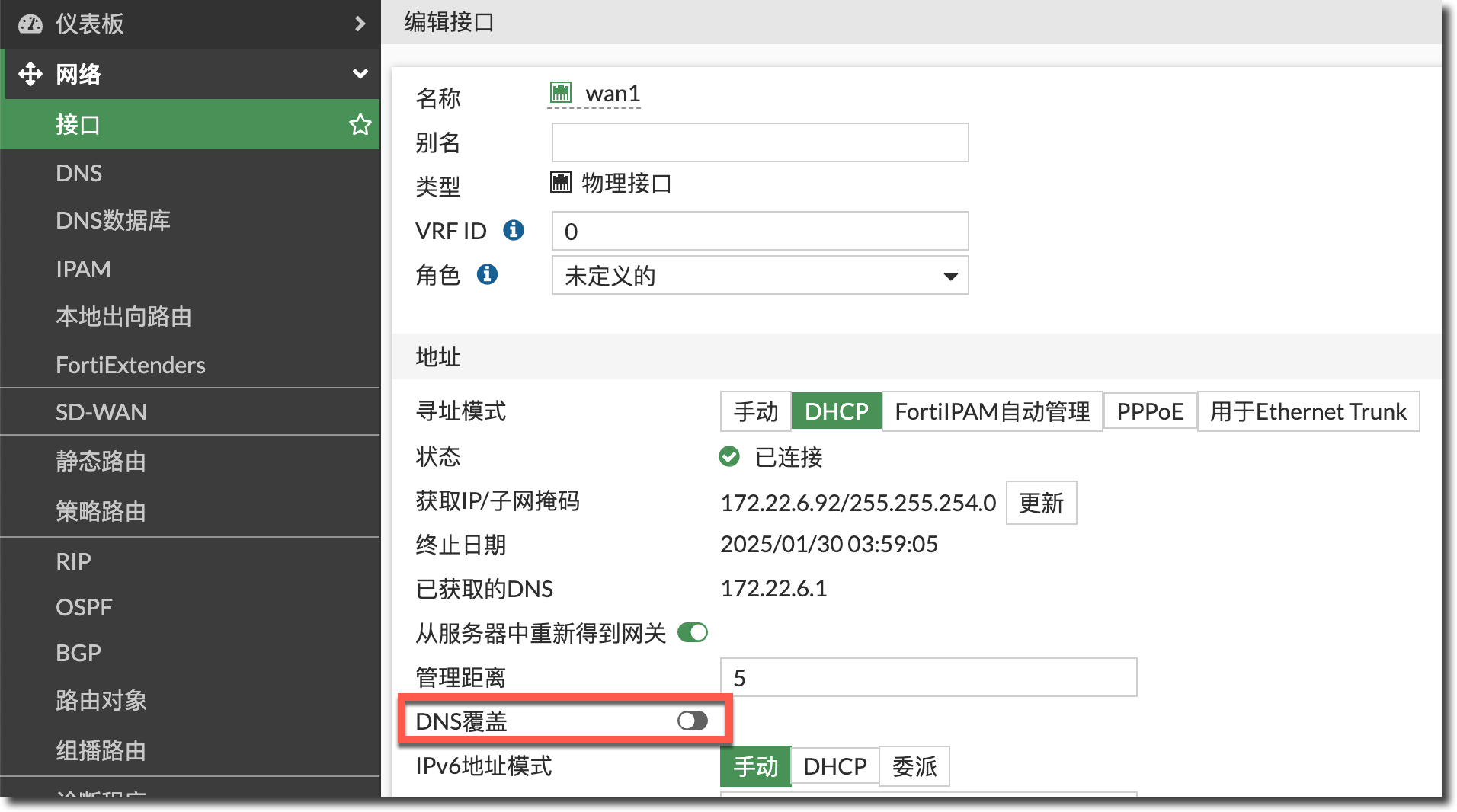
config system interface
    edit "wan1"
        set dns-server-override disable
    next
end
VDOM DNS
当 FortiGate 处于多 VDOM 模式时,DNS 解析由管理 VDOM(默认为 root VDOM)处理。但在某些情况下,用户可能希望在非管理 VDOM 上配置自定义 DNS 设置。例如在多租户情况下,每个 VDOM 可能被不同的租户占用,每个租户可能需要自己的 DNS 服务器。
config vdom
    edit <vdom>
        config system vdom-dns
            set vdom-dns enable
            set primary <primary_DNS>
            set secondary <secondary_DNS>
            set protocol {cleartext dot doh}
            set ip6-primary <primary_IPv6_DNS>
            set ip6-secondary <secondary_IPv6_DNS>
            set source-ip <IP_address>
            set interface-select-method {auto | sdwan | specify}
        end
    next
end
DNS CLI 配置
interface-select-method
当有多个线路可以访问 DNS 服务器时,可以配置 DNS 请求的选路方式(默认为 auto),选择 specify 模式时,可以选择具体的接口。
config system dns
    set interface-select-method {auto | sdwan | specify}
    set interface <interface>
end
source-ip
设置 DNS 请求报文使用的源 IP 地址。
config system dns
    set source-ip <class_ip>
end
dns-cache-limit
FortiGate 会将 DNS 服务器返回的解析结果缓存起来,需要再次解析缓存中的相同域名时,FortiGate 会根据缓存条目快速返回结果,避免每次都需通过互联网重新获取相同的解析结果。此参数可以设置缓存中可以存储的最大 DNS 条目数(0~4294967295,默认值为 5000)。
config system dns
    set dns-cache-limit <integer>
end
通过
diagnose test application dnsproxy 7可以查看已有的 DNS 缓存条目。FortiGate # diagnose test application dnsproxy 7 worker idx: 0 vfid=0, name=docs.fortinet.com, ttl=360:36:1476 154.52.22.201 (ttl=360) vfid=0, name=api.forticonverter.com, ttl=300:0:1455 3.223.208.97 (ttl=300) vfid=0, name=ntp2.fortiguard.com, ttl=5382:4934:1352 208.91.112.62 (ttl=5382) 208.91.112.60 (ttl=5382) vfid=0, name=ntp1.fortiguard.com, ttl=18545:17755:1010 208.91.112.61 (ttl=18704) 208.91.112.63 (ttl=18704) vfid=0, name=globalmsgctrl.fortinet.net, ttl=51:0:948 38.21.192.4 (ttl=51) vfid=0, name=globalfctupdate.fortinet.net, ttl=18608:17585:777 173.243.143.6 (ttl=18608) vfid=0, name=globalfctupdate.fortinet.net, ttl=14975:13947:772 2620:101:9000:143:173:243:143:6 (ttl=14975) vfid=0, name=globalupdate.fortinet.net, ttl=16397:15288:691 173.243.129.6 (ttl=21498) 173.243.140.6 (ttl=21498) vfid=0, name=globalupdate.fortinet.net, ttl=11075:9966:691 2620:101:9000:140:173:243:140:6 (ttl=11075) vfid=0, name=globaldevquery.fortinet.net, ttl=19376:18265:689 173.243.140.16 (ttl=19376) CACHE num=10通过
diagnose test application dnsproxy 1可以清空 DNS 缓存条目。
dns-cache-ttl
DNS 缓存条目保留的时间(单位为 s,60~86400,默认值为 1800)。
config system dns
    set dns-cache-limit <integer>
end
fqdn-cache-ttl
重要
如果设备开启了多 VDOM 模式,且 VDOM 下的 FQDN 没有自定义 cache-ttl,在全局下修改 fqdn-cache-ttl,也会覆盖 VDOM 下的 FQDN 的 cache-ttl(如果 VDOM 下的 FQDN 自定义了 cache-ttl,则还是以 VDOM 下的 FQDN 自定义 cache-ttl 为准)。
配置 FQDN 类型的地址对象后,FQDN 地址对象会用 2 种方式学习域名对应的 IP 地址:
- FortiGate 会主动定期去配置的 DNS 服务器查询 FQDN 对应的解析结果(适用于明确的 FQDN,如
www.fortinet.com,不适用于通配符 FQDN,如*.fortinet.com)。 - 只要穿过防火墙的 DNS 请求与响应(A/AAAA 记录),匹配上了 FQDN 中的域名,FortiGate 就会记录该 IP 地址到 FQDN 地址对象中(同时适用于明确的 FQDN,如
www.fortinet.com,也适用于通配符 FQDN,如*.fortinet.com)。
FQDN 地址对象会将解析结果缓存在 FortiGate 中。以下选项可以配置 FQDN 地址对象每个解析结果缓存的最大存活时间 (TTL,单位为 s,0~86400,默认值为 0,即使用 DNS 服务器返回的解析结果中的 TTL)。这是 FQDN 地址对象在没有主动刷新的情况下的最大 TTL。
config system dns
    set fqdn-cache-ttl 2000
end
通过
diagnose test application dnsproxy 6可以看到所有 FQDN 类型的地址对象已解析到的缓存条目,其中cache_ttl字段表示 FQDN 地址对象每个缓存 IP 条目的最大 TTL。FortiGate # diagnose test application dnsproxy 6 worker idx: 0 vfid=0 name=handbook.fortinet.com.cn ver=IPv4 wait_list=0 timer=590 min_ttl=600 cache_ttl=2000 slot=-1 num=1 wildcard=0 39.105.115.226 (ttl=600:596:1996) vfid=0 name=www.baidu.com ver=IPv4 wait_list=0 timer=50 min_ttl=32 cache_ttl=2000 slot=-1 num=2 wildcard=0 220.181.111.1 (ttl=32:28:1996) 220.181.111.232 (ttl=32:28:1996)重要
TTL 的 3 个数字解释(如上所示的 ttl = 600:596:1996):
第 1 个数字(600):DNS 服务器返回的解析结果中的最大 TTL。
第 2 个数字(596):DNS 服务器返回的解析结果中的剩余 TTL。
第 3 个数字(1996):DNS 缓存条目的剩余 TTL。
fqdn-cache-ttl为全局设置。如果为某个 FQDN 地址单独配置了cache-ttl值,它将取代该地址的全局fqdn-cache-ttl设置。如下所示,单独配置 FQDN 地址对象www.baidu.com的cache-ttl为 800,diagnose test application dnsproxy 6命令的结果中显示www.baidu.com的cache_ttl为 800,而handbook.fortinet.com.cn的cache_ttl仍为全局配置fqdn-cache-ttl中配置的 2000。config firewall address edit "www.baidu.com" set type fqdn set fqdn "www.baidu.com" set cache-ttl 800 next endFortiGate # diagnose test application dnsproxy 6 worker idx: 0 vfid=0 name=handbook.fortinet.com.cn ver=IPv4 wait_list=0 timer=370 min_ttl=600 cache_ttl=2000 slot=-1 num=1 wildcard=0 39.105.115.226 (ttl=600:376:1776) vfid=0 name=www.baidu.com ver=IPv4 wait_list=0 timer=17 min_ttl=11 cache_ttl=800 slot=-1 num=4 wildcard=0 103.235.47.188 (ttl=247:155:708) 103.235.46.96 (ttl=247:155:708) 220.181.111.232 (ttl=11:0:763) 220.181.111.1 (ttl=11:0:763)使用
diagnose test application dnsproxy 4可以清空当前的 FQDN 缓存。
fqdn-min-refresh
FQDN 缓存最小刷新时间(单位 s,10~3600,默认为 60s)。FQDN 根据 DNS 服务器返回的所有该条目解析结果中最小的 TTL 间隔重新获取更新。默认配置下(fqdn-min-refresh=60,fqdn-cache-ttl=0),如果 DNS 服务器返回的解析结果中的最小 TTL 小于 60s,FortiGate 仍需要至少 60s 来重新查询 FQDN。如果 DNS 服务器返回的解析结果中的最小 TTL 大于 60s,FQDN 根据 DNS 服务器返回的所有该条目解析结果中最小的 TTL 间隔重新获取更新。刷新动作不会删除已有的 FQDN 缓存 IP 条目。
重要
实际的 FQDN 刷新动作会在 fqdn-min-refresh 时间到期前 5s 执行。
默认配置(
fqdn-min-refresh=60,fqdn-cache-ttl=0)下,使用diagnose test application dnsproxy 3查看当前fqdn-min-refresh配置。FortiGate # diagnose test application dnsproxy 3 ...... FQDN: min_refresh=60 max_refresh=3600 ......执行
diagnose test application dnsproxy 6命令,如下所示www.baidu.com的解析结果有 4 个,DNS 服务器返回的所有该条目解析结果中最小的 TTL(min_ttl)为 48,但重新查询域名的等待时间(timer)仍然按照fqdn-min-refresh的默认配置 60s 进行倒计时。FortiGate # diagnose test application dnsproxy 6 worker idx: 0 vfid=0 name=www.baidu.com ver=IPv4 wait_list=0 timer=56 min_ttl=48 cache_ttl=0 slot=-1 num=4 wildcard=0 220.181.111.1 (ttl=69:54:54) 220.181.111.232 (ttl=69:54:54) 110.242.70.57 (ttl=48:47:47) 110.242.69.21 (ttl=48:47:47) FQDN num=2min_ttl:DNS 服务器返回的所有该条目解析结果中最小的 TTL。timer:重新查询域名的等待时间计时器。
将
fqdn-min-refresh设置为 20,小于min_ttl。config system dns set fqdn-min-refresh 20 end执行
diagnose test application dnsproxy 6命令,如下所示www.baidu.com的解析结果有 2 个,DNS 服务器返回的所有该条目解析结果中最小的 TTL(min_ttl)为 54,重新查询域名的等待时间(timer)按照min_ttl的 54s 进行倒计时。FortiGate # diagnose test application dnsproxy 6 worker idx: 0 ...... vfid=0 name=www.baidu.com ver=IPv4 wait_list=0 timer=52 min_ttl=54 cache_ttl=0 slot=-1 num=2 wildcard=0 110.242.70.57 (ttl=54:52:52) 110.242.69.21 (ttl=54:52:52) FQDN num=2fqdn-min-refresh可与fqdn-cache-ttl、cache-ttl结合使用,以发送更频繁的查询并在缓存中存储更多已解析的地址。这在 FQDN 有较多解析结果且变化非常频繁的情况下非常有用。总结如下:
min_ttl<fqdn-min-refresh:使用fqdn-min-refresh作为重新请求 FQDN 的计时器(timer)。min_ttl>fqdn-min-refresh:使用min_ttl作为重新请求 FQDN 的计时器(timer)。fqdn-min-refresh/min_ttl<fqdn-cache-ttl/cache-ttl:使用fqdn-min-refresh/min_ttl作为重新请求 FQDN 的计时器(timer)。fqdn-min-refresh/min_ttl>fqdn-cache-ttl/cache-ttl:使用fqdn-cache-ttl/cache-ttl作为重新请求 FQDN 的计时器(timer)。
fqdn-max-refresh
FQDN 缓存最大刷新时间(单位为 s,3600~86400,默认值为 3600)。fqdn-max-refresh 用于控制 FQDN 刷新计时器的全局上限。最小 TTL 大于 fqdn-max-refresh 值的 FQDN 条目,其刷新定时器将减少到该上限。最小 TTL 小于 fqdn-max-refresh 值的 FQDN 条目,其刷新定时器将取决于该条目所有解析结果中最小的 TTL 值。
fqdn-max-refresh 的测试结果与 fqdn-min-refresh 类似,这里就不再赘述。
dnsproxy-worker-count
对于有多个逻辑 CPU 核心的 FortiGate,可以设置用于运行 dnsproxy 进程的 CPU 核心数,默认配置为 1。
config system global
    set dnsproxy-worker-count <integer>
end
在有大量 FDQN 地址对象的情况下,编辑 DNS 相关配置时,dnsproxy 进程可能会消耗大量 CPU 资源,它会同时处理 DNS 相关配置更改和 DNS 解析任务。当 dnsproxy-worker-count 从 1 增加到 2 时:
- dnsproxy-worker-1:处理 DNS 相关配置更改。
- dnsproxy-worker-2:处理 DNS 解析任务。
其他 CLI 配置
config system dns
    set primary <ip_address>
    set secondary <ip_address>
    set protocol {cleartext dot doh}
    set ssl-certificate <string>
    set server-hostname <hostname>
    set domain <domains>
    set ip6-primary <ip6_address>
    set ip6-secondary <ip6_address>
    set timeout <integer>
    set retry <integer>
    set dns-cache-limit <integer>
    set dns-cache-ttl <integer>
    set cache-notfound-responses {enable | disable}
    set interface-select-method {auto | sdwan | specify}
    set interface <interface>
    set source-ip <class_ip>
    set root-servers <DNS root name server IP address>
    set server-select-method {least-rtt | failover}
    set alt-primary <ip_address>
    set alt-secondary <ip_address>
    set log {disable |error | all}
    set fqdn-cache-ttl <integer>
    set fqdn-min-refresh <integer>
    set fqdn-max-refresh <integer>
end