

IPSec 多用户组访问控制
IPSec 多用户组访问控制
功能简介
在 IPsec VPN 远程接入场景中,用户组用于在建立隧道前对远程用户进行身份认证。一个 IPsec VPN 隧道可以关联单个用户组或多个用户组。
用户组在 IPSec VPN 隧道中的配置位置可以存在于 2 处位置:
- 配置在 IPSec Phase 1(P1)中:只能使用一个用户组。
- 配置在防火墙策略(Policy)中:
- 同一条防火墙策略可以同时配置多个用户组。
- 不同的防火墙策略可以配置不同的用户组,为不同的用户组分配不同的访问权限。
- 类似 SSL VPN 的 Portal(门户)功能,这在将 SSL VPN 迁移到 IPSec 时非常有用。
网络拓扑
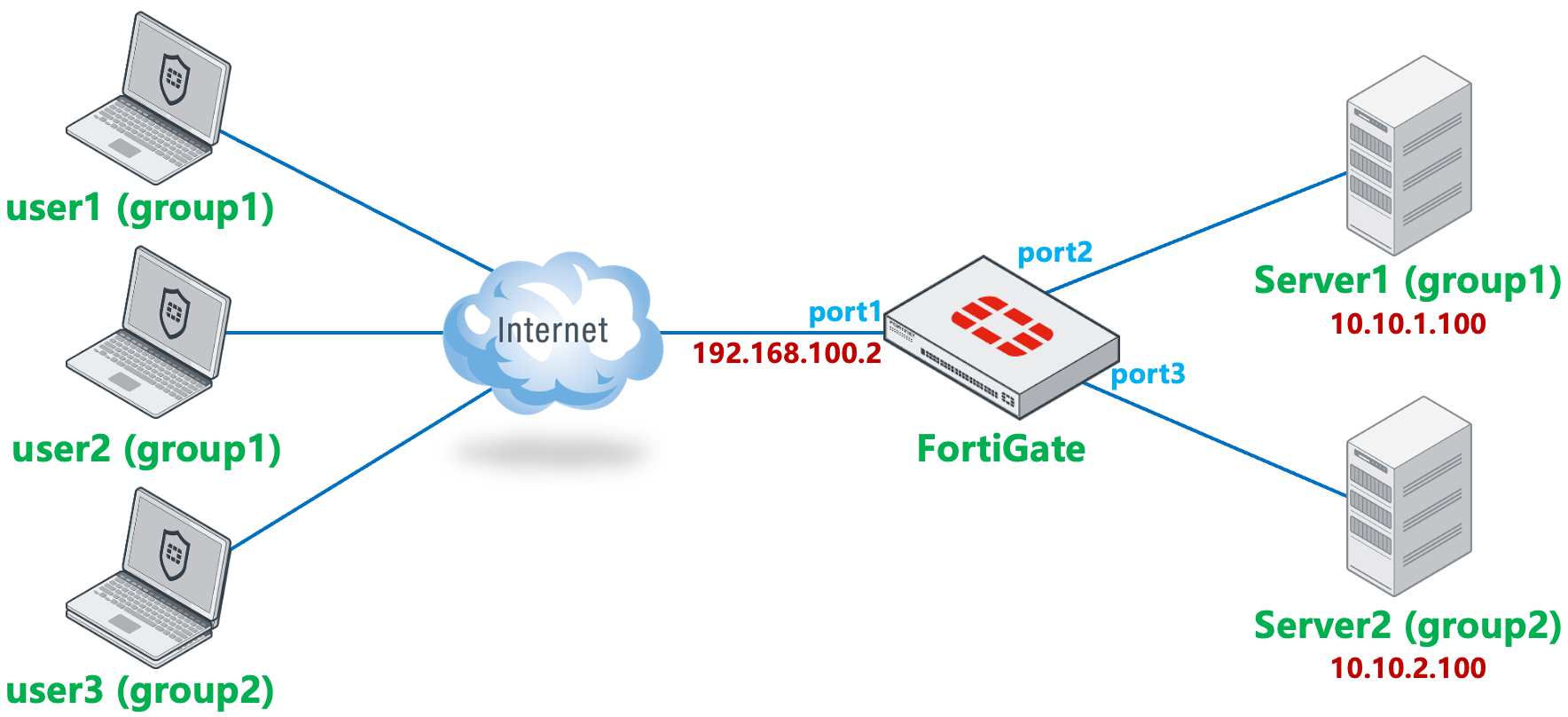
- 用户 user1、user2 属于用户组 group1,用户 user3 属于用户组 group2。
- user1/user2/user3 分别通过 FortiClient IPSec VPN 拨号连接 FortiGate,访问 Server1/Server2。
- 在防火墙策略中控制:
- 用户组 group1(user1/user2)拨号后只能访问 Server1,无法访问 Server2。
- 用户组 group2(user3)拨号后只能访问 Server2,无法访问 Server1。
配置方法
基础网络配置略。
IPSec 一阶段配置用户组
只能使用一个用户组,配置方法请参考:VPN → IPSec VPN → 拨号 VPN → FortiClient 拨号章节。参考配置如下:
config vpn ipsec phase1-interface
    edit "IPSec_Dialup"
        set type dynamic
        set interface "port1"
        set ike-version 2
        set peertype any
        set net-device disable
        set mode-cfg enable
        set proposal aes128-sha256 aes256-sha256 aes128gcm-prfsha256 aes256gcm-prfsha384 chacha20poly1305-prfsha256
        set dhgrp 20 21
        set eap enable
        set eap-identity send-request
        set authusrgrp "group1"
        set transport udp
        set ipv4-start-ip 10.100.1.100
        set ipv4-end-ip 10.100.1.200
        set dns-mode auto
        set ipv4-split-include "Server"
        set save-password enable
        set psksecret xxxxxx
    next
end

config vpn ipsec phase2-interface
    edit "IPSec_Dialup"
        set phase1name "IPSec_Dialup"
        set proposal aes128-sha1 aes256-sha1 aes128-sha256 aes256-sha256 aes128gcm aes256gcm chacha20poly1305
        set dhgrp 20 21
    next
end
防火墙策略配置用户组
根据网络拓扑中的内容创建用户与用户组。
config user local
    edit "guest"
        set type password
        set xxxxxx
    next
    edit "user1"
        set type password
        set passwd xxxxxx
    next
    edit "user2"
        set type password
        set passwd xxxxxx
    next
    edit "user3"
        set type password
        set xxxxxx
    next
end

config user group
    edit "group1"
        set member "user1" "user2"
    next
    edit "group2"
        set member "user3"
    next
end
进入“VPN → VPN 向导”页面,模板选择“远程访问”,填写隧道名称,并点击“开始”按钮。
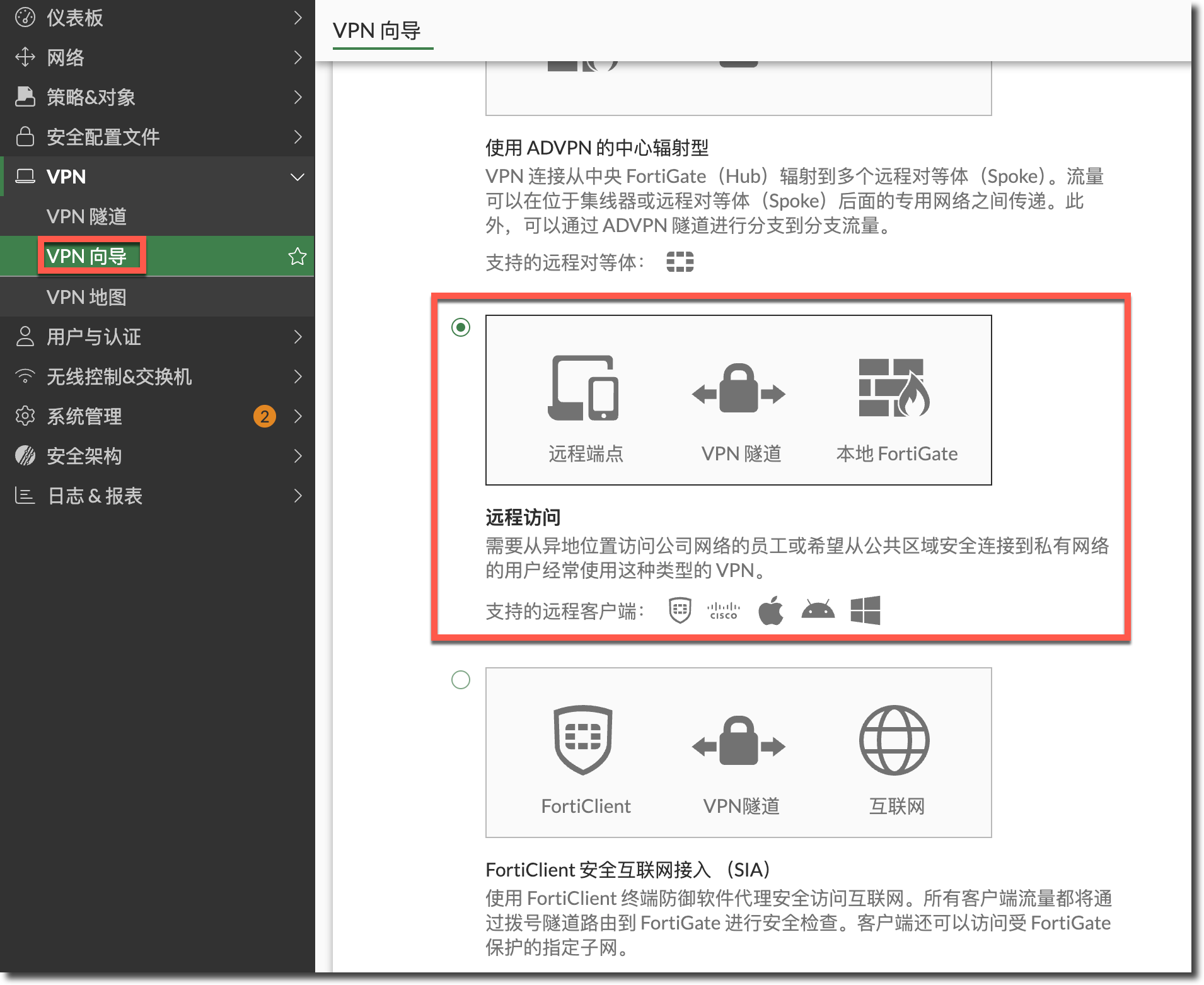
配置 VPN 隧道相关信息。

认证方法:根据需求选择,这里以预共享密钥为例。
IKE:由于 FortiClient 在 7.4.4 版本开始不再支持 IKEv1,这里推荐使用 IKEv2。
传输:使用 UDP,如使用 UDP 协商失败,再尝试使用自动方式。
EAP 对等体识别:使用默认的 EAP 认证。
用户身份验证方法:选择“从策略继承”,并选择用户组 group1 和 group2。如果选择“阶段 1 接口”,则只能选择一个用户组。
提示
FortiOS 7.6 以下版本的 GUI 向导没有“从策略继承”选项,可以在 GUI 向导配置时先选择一个用户组,在向导配置结束后,修改 IPSec 隧道配置,在 XAUTH 处将用户组的模式修改为“从策略继承”。
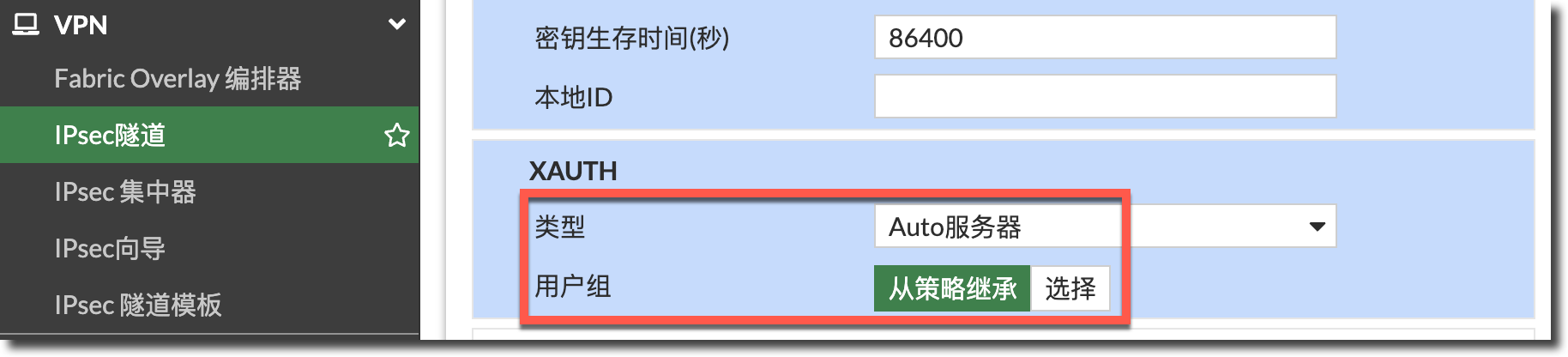
也可以在 IPSec 一阶段的 CLI 配置中取消引用用户组,即可达到“从策略继承”相同的配置效果。
config vpn ipsec phase1-interface
    edit "IPSec_Dialup"
        unset authusrgrp "group1"
    next
end
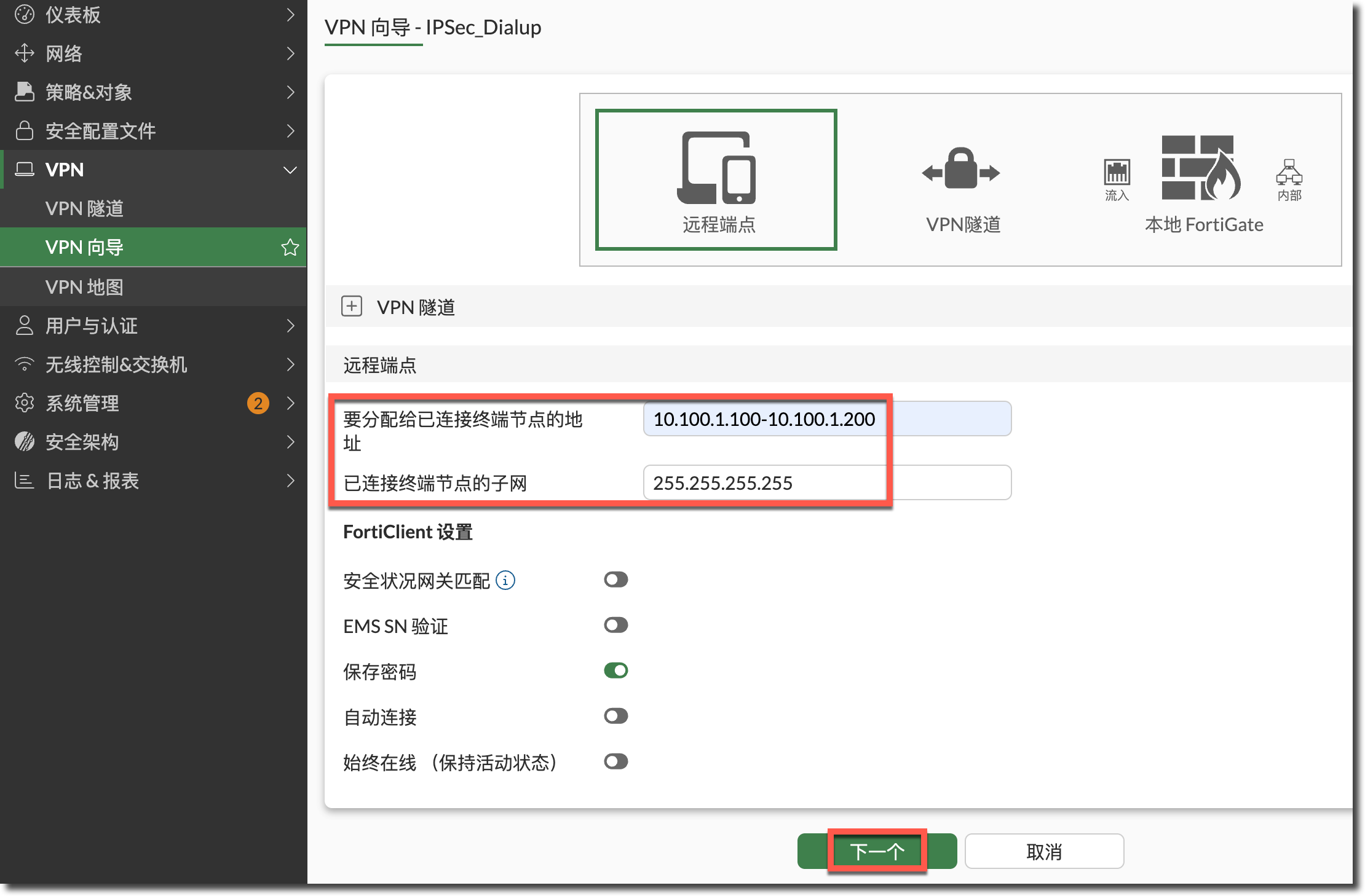
配置给客户端分配的 IP 地址范围。
配置本地 FortiGate 相关信息。
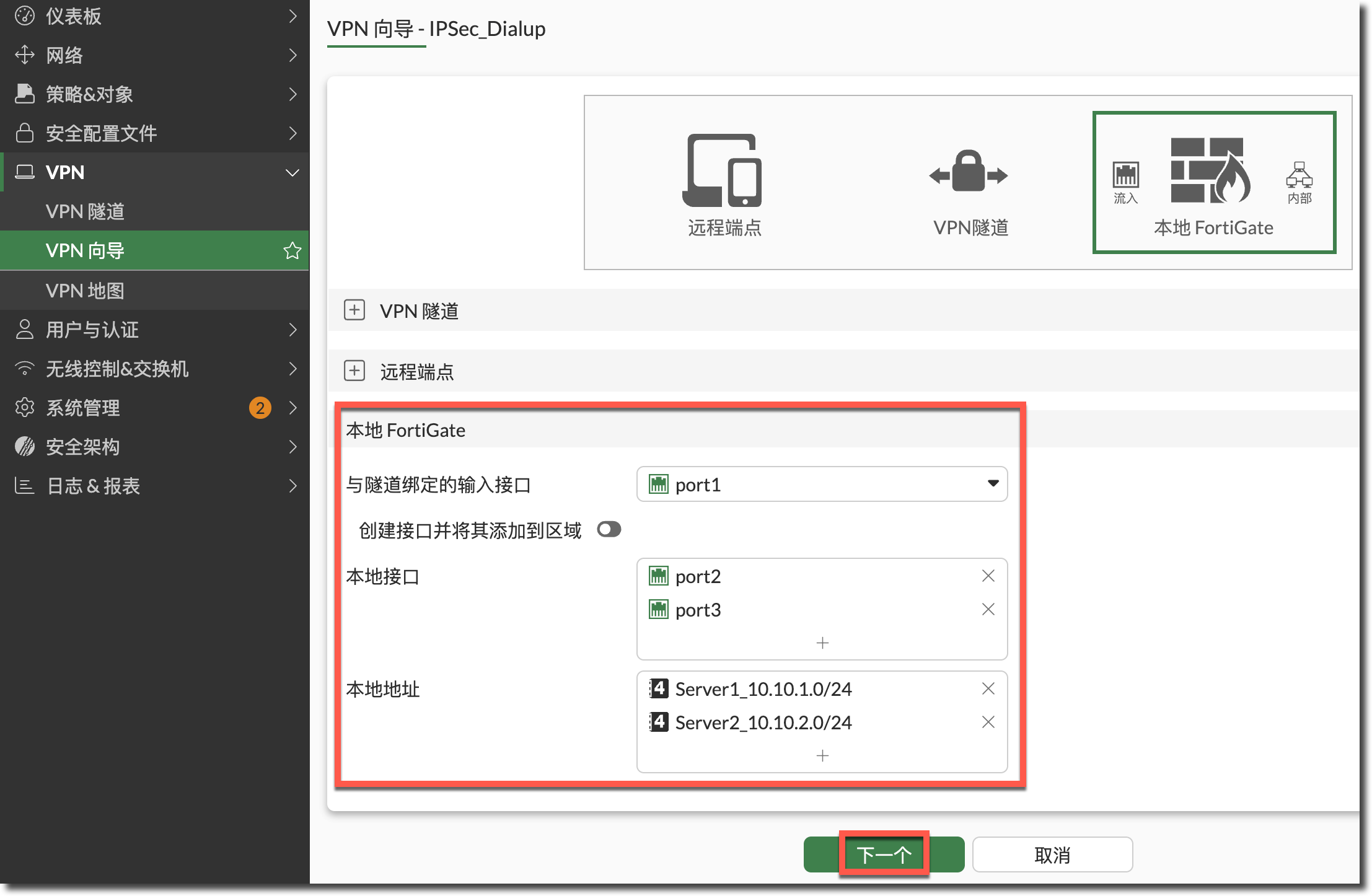
- 与隧道绑定的输入接口:选择用于接入 VPN 的互联网接口。
- 本地接口:面向内网服务器 Server1 和 Server2 的接口。
- 本地地址:客户端拨号成功后访问的内网资源(隧道分割),这里以 Server1 和 Server2 所在的网段为例。
检查配置无误后,提交配置(可以修改自动生成的隧道分割地址/地址组、防火墙策略名称)。
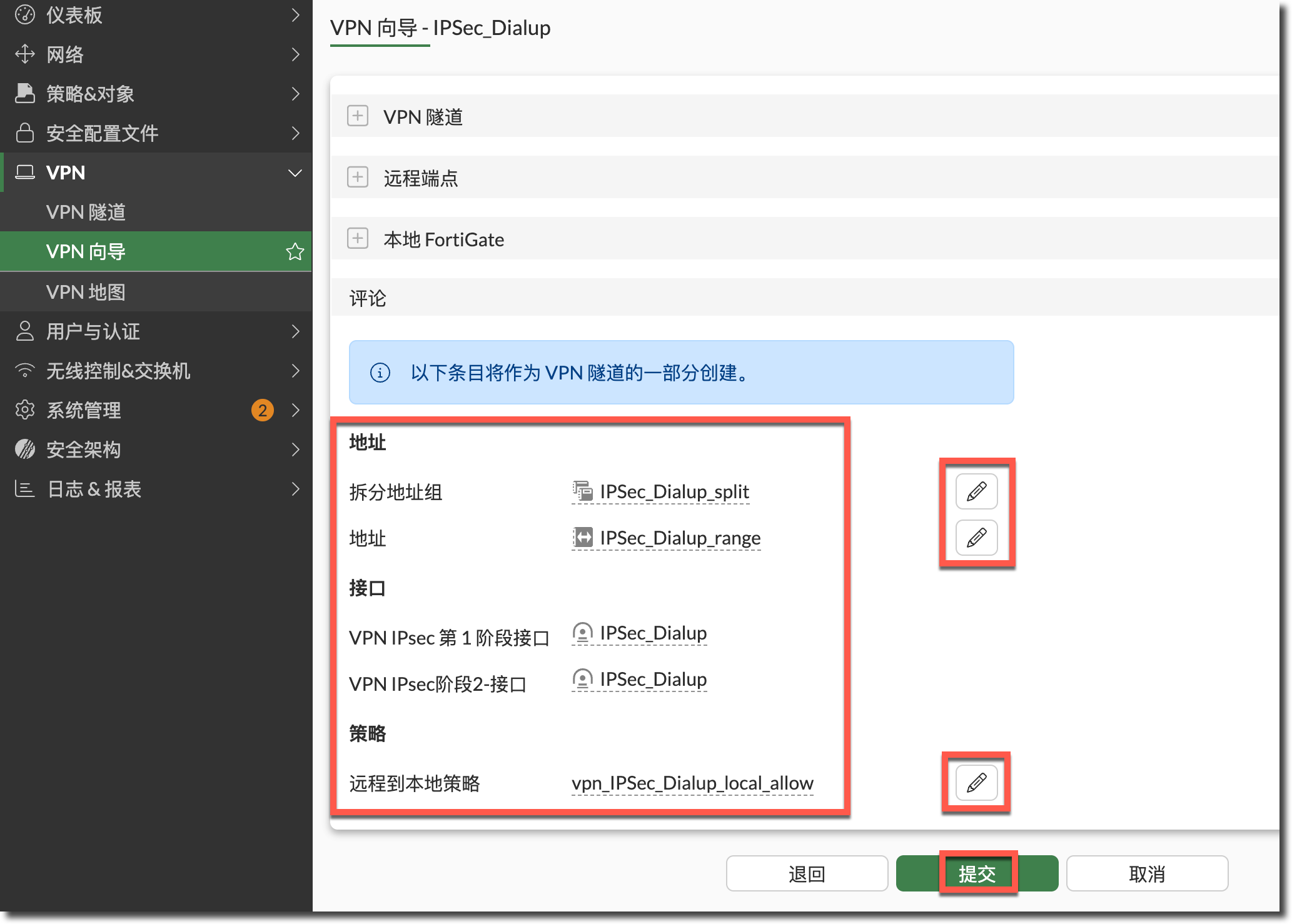
向导自动生成的隧道分割地址组与 IPSec 一阶段/二阶段配置 CLI 命令。
config firewall addrgrp
    edit "IPSec_Dialup_split"
        set member "Server1_10.10.1.0/24" "Server2_10.10.2.0/24"
        set comment "VPN: IPSec_Dialup -- Created by VPN wizard"
        set uuid be3f392e-fdaf-51f0-431c-681b8197a201
    next
end

config vpn ipsec phase1-interface
    edit "IPSec_Dialup"
        set type dynamic
        set interface "port1"
        set ike-version 2
        set peertype any
        set net-device disable
        set mode-cfg enable
        set proposal aes128-sha256 aes256-sha256 aes128gcm-prfsha256 aes256gcm-prfsha384 chacha20poly1305-prfsha256
        set comments "VPN: IPSec_Dialup -- Created by VPN wizard"
        set dhgrp 20 21
        set eap enable
        set eap-identity send-request
        set wizard-type dialup-forticlient
        set transport udp
        set ipv4-start-ip 10.100.1.100
        set ipv4-end-ip 10.100.1.200
        set dns-mode auto
        set ipv4-split-include "Server"
        set save-password enable
        set psksecret ENC aZFKK834W6UFV39Tkp9enmmHi5ke2PbXeCsnrExTfzHtYHqaUgcirBnxASvBdeCVQjph+8WW2MJXd59ZWSr2OcfpbNK5k3AGqNBzbXvSY/Is4Yo5nUKmhBEH9oPkuUlhyp4+ibXcYd4Eq1Di0aIfloxfPCFCn5MNPQDOQ0YH6BTu+gCTcU8kIaiysXW7gytAEa0HLllmMjY3dkVA
    next
end

config vpn ipsec phase2-interface
    edit "IPSec_Dialup"
        set phase1name "IPSec_Dialup"
        set proposal aes128-sha1 aes256-sha1 aes128-sha256 aes256-sha256 aes128gcm aes256gcm chacha20poly1305
        set dhgrp 20 21
        set comments "VPN: IPSec_Dialup -- Created by VPN wizard"
    next
end
查看自动生成的防火墙策略,只有 1 条。

config firewall policy
    edit 1
        set name "vpn_IPSec_Dialup_local_allow"
        set uuid be44468a-fdaf-51f0-0db3-180ea9115c6d
        set srcintf "IPSec_Dialup"
        set dstintf "port2"
        set action accept
        set srcaddr "IPSec_Dialup_range"
        set dstaddr "Server1_10.10.1.0/24" "Server2_10.10.2.0/24"
        set schedule "always"
        set service "ALL"
        set nat enable
        set groups "group1" "group2"
        set comments "VPN: IPSec_Dialup -- Created by VPN wizard"
    next
end
为了实现网络拓扑中的需求,需要将其拆分成 2 条策略。
提示
- VPN 向导自动创建的防火墙策略开启了 NAT,在此拓扑下防火墙策略不需要 NAT(Server 配置的网关均为 FortiGate),所以这里关闭了 2 条防火墙策略的 NAT。
- 为了后续验证结果,开启了防火墙策略的日志记录功能,与隐含策略的日志记录功能。
重要
不要在 IPSec 一阶段(
config vpn ipsec phase1-interface)和防火墙策略(config firewall policy)中同时配置用户组,可能会产生匹配逻辑问题。- 用户组 group1(user1/user2)拨号后只能访问 Server1,无法访问 Server2。
- 用户组 group2(user3)拨号后只能访问 Server2,无法访问 Server1。

config firewall policy
    edit 1
        set name "IPSec_Dialup_Server1"
        set srcintf "IPSec_Dialup"
        set dstintf "port2"
        set action accept
        set srcaddr "IPSec_Dialup_range"
        set dstaddr "Server1_10.10.1.0/24"
        set schedule "always"
        set service "ALL"
        set logtraffic all
        set groups "group1" "group2"
    next
    edit 2
        set name "IPSec_Dialup_Server2"
        set srcintf "IPSec_Dialup"
        set dstintf "port3"
        set action accept
        set srcaddr "IPSec_Dialup_range"
        set dstaddr "Server2_10.10.2.0/24"
        set schedule "always"
        set service "ALL"
        set logtraffic all
        set groups "group2"
    next
end

config log setting
    set fwpolicy-implicit-log enable
end
结果验证
用户组 group1(user1/user2)拨号后只能访问 Server1,无法访问 Server2
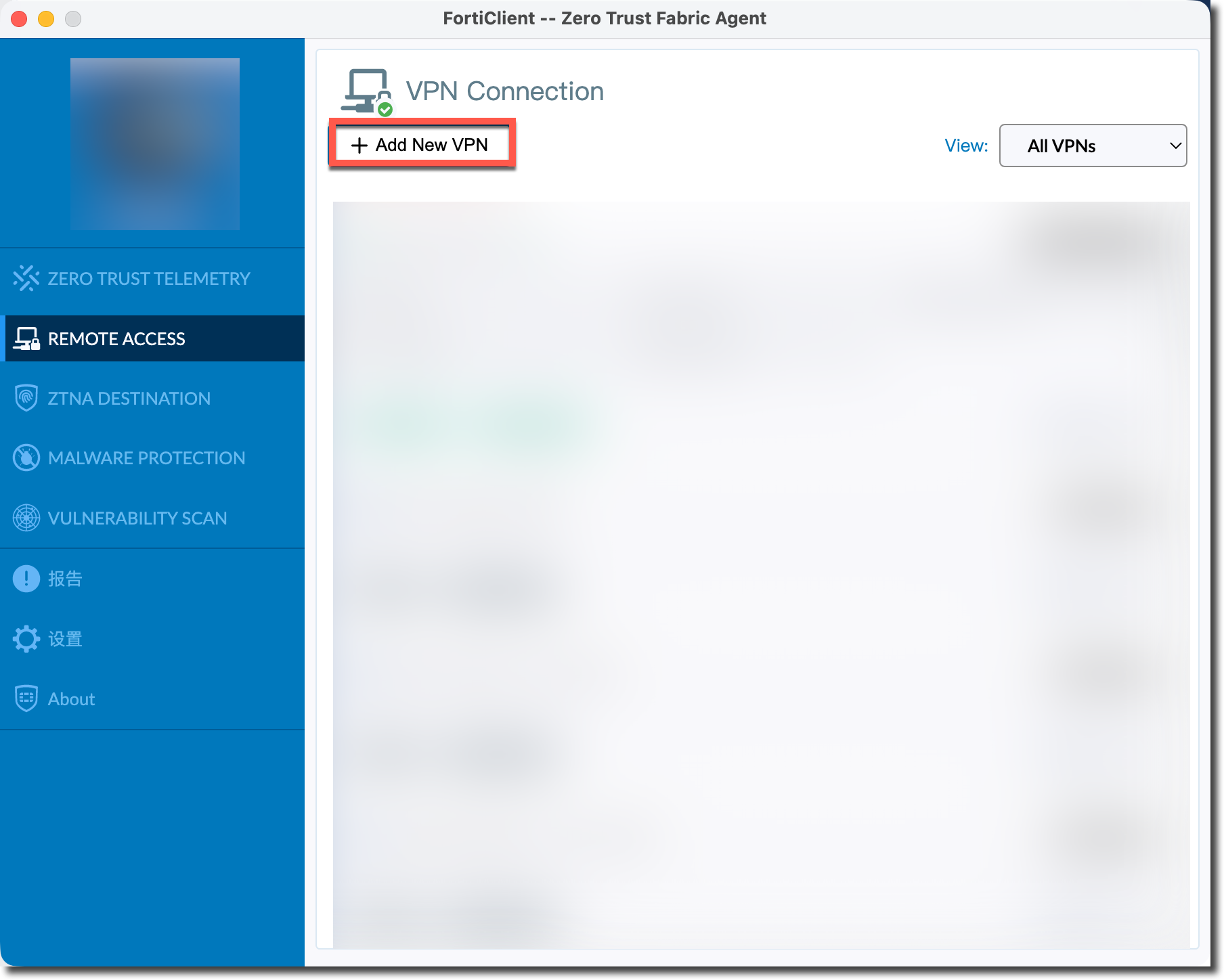
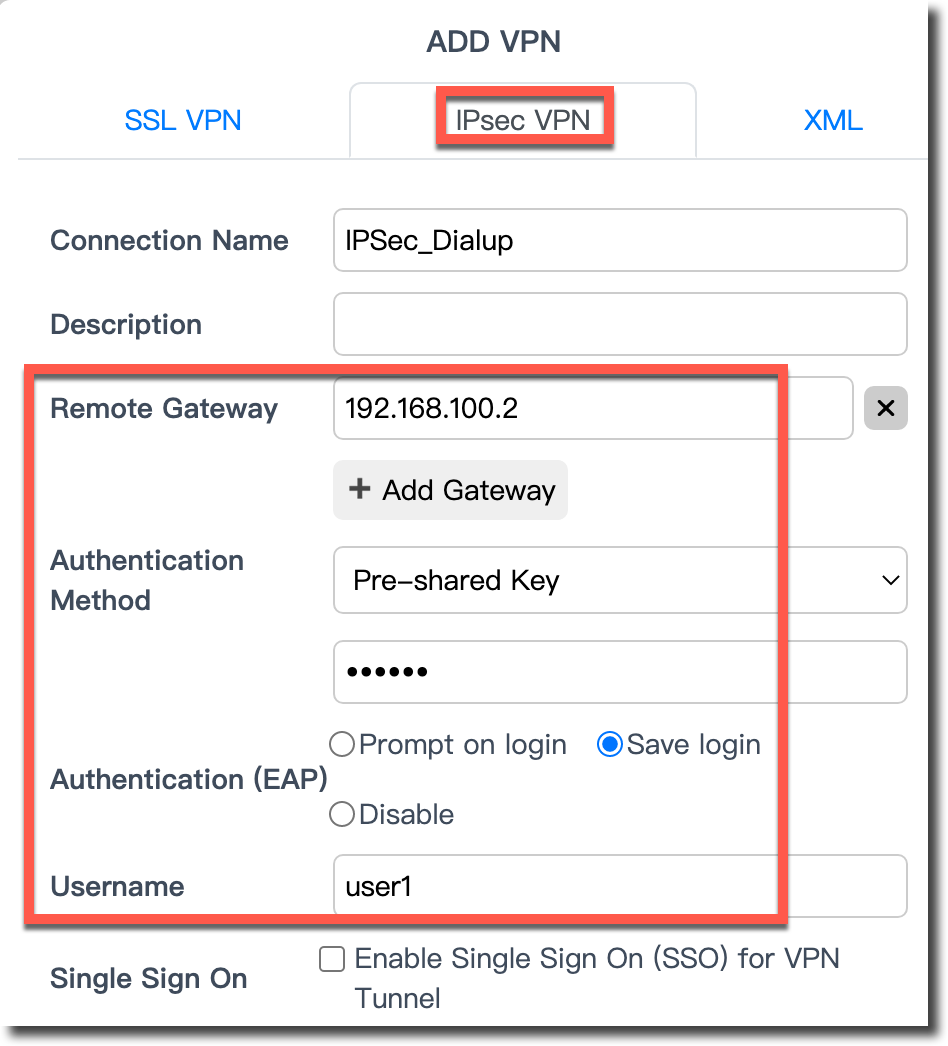
- user1 在 FortiClient 客户端(这里以 FortiClient 7.4.5 为例)创建新的 VPN 连接。
配置 IPSec VPN 服务器 IP、预共享密钥、用户名等信息。
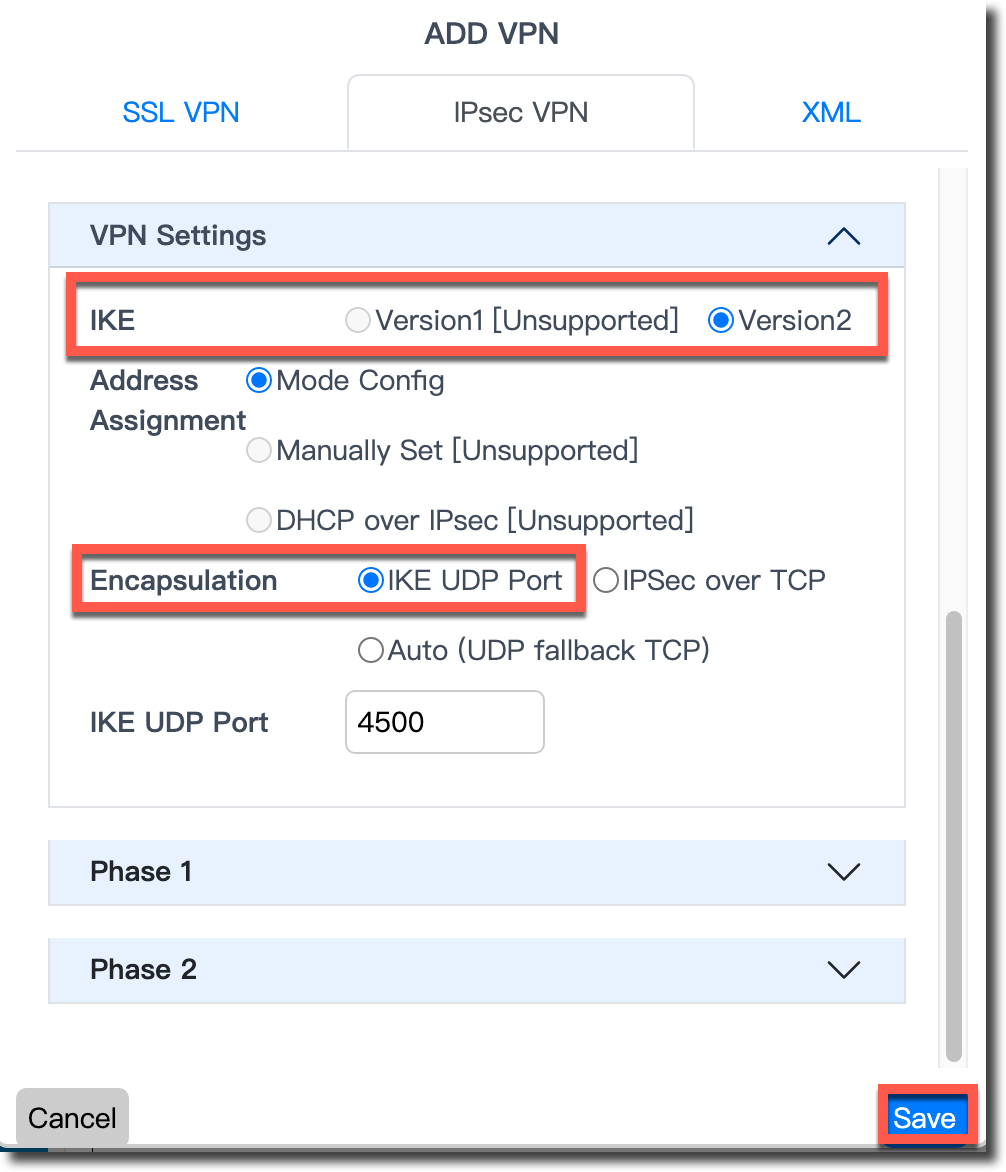
配置 IKE 版本为 IKEv2,封装模式选择 IKE UDP Port,保存配置。
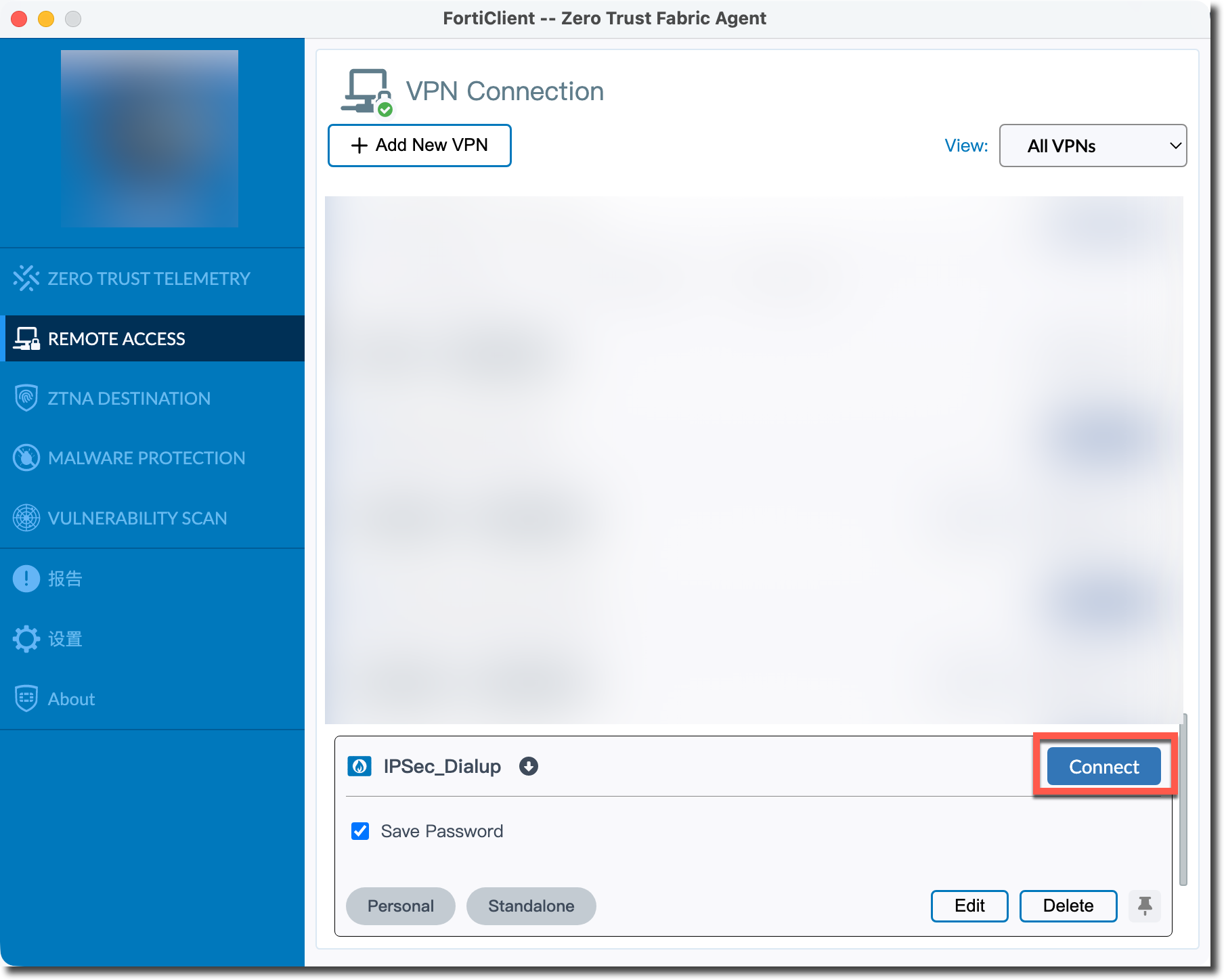
在已创建的 IPSec VPN 连接处点击“Connect”按钮。
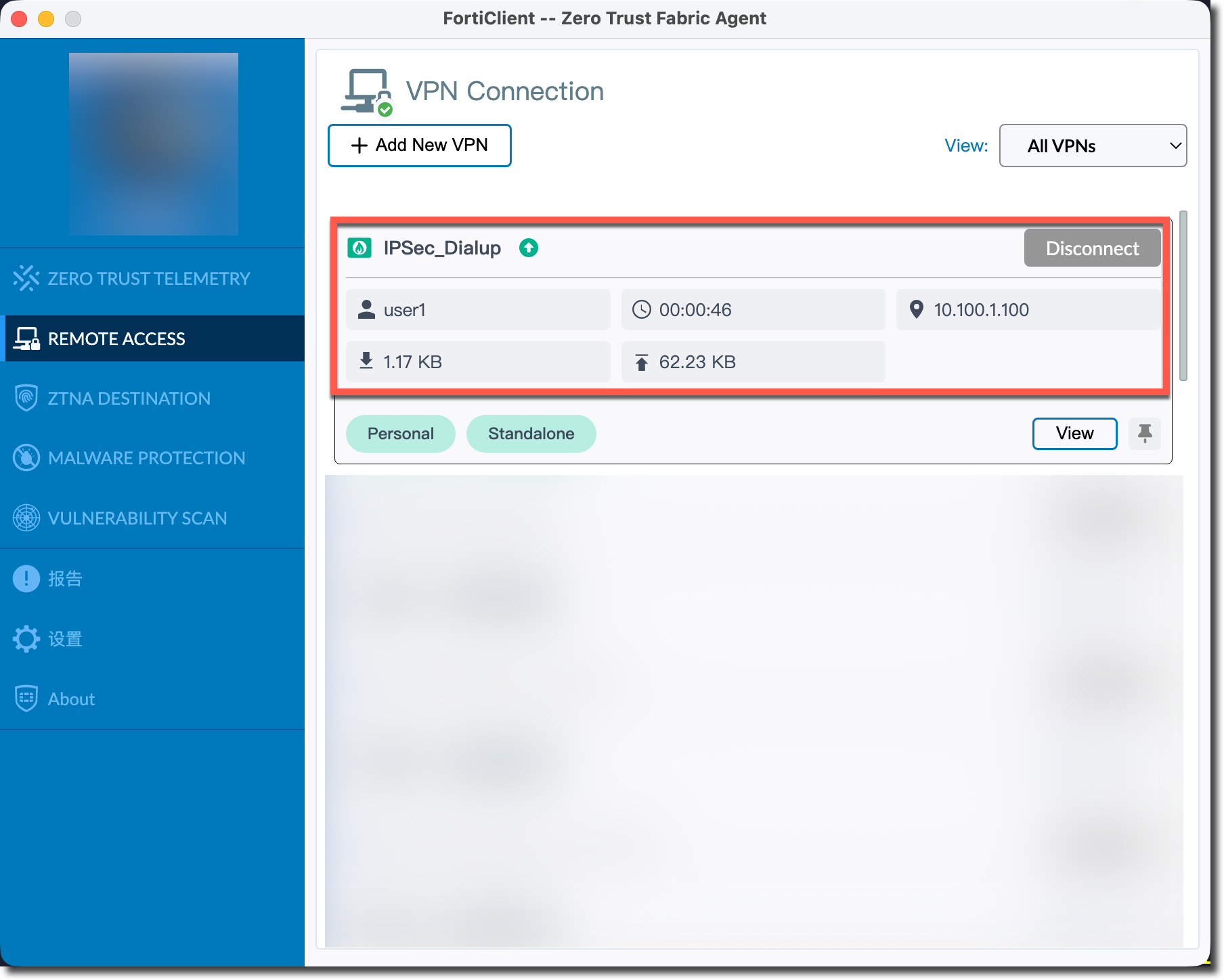
填写账号与密码信息后,连接成功,客户端获取到 IP 地址。
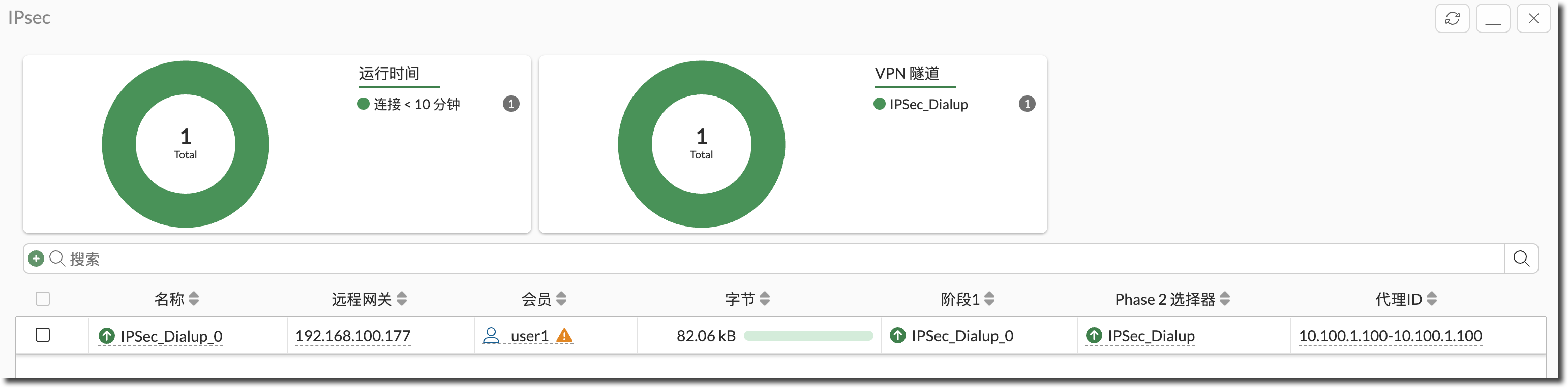
在 FortiGate 查看 IPSec VPN 连接状态,可以看到用户、分配 IP 等信息。
FortiGate # diagnose vpn ike gateway list

vd: root/0
name: IPSec_Dialup_0
version: 2
interface: port1 3
addr: 192.168.100.2:4500 -> 192.168.100.177:60054
tun_id: 10.100.1.100/::10.0.0.3
remote_location: 0.0.0.0
network-id: 0
transport: UDP
created: 226s ago
eap-user: user1
2FA: no
groups:
  group1 2
peer-id: Summerices-MacBook-Pro.local
peer-id-auth: no
FortiClient UID: 20835405F599455B9842348F3C690201
assigned IPv4 address: 10.100.1.100/255.255.255.255
nat: me peer
pending-queue: 0
PPK: no
IKE SA: created 1/1  established 1/1  time 90/90/90 ms
IPsec SA: created 1/1  established 1/1  time 0/0/0 ms

  id/spi: 1 6407f45520af6972/d9cb1bf711638b46
  direction: responder
  status: established 226-226s ago = 90ms
  proposal: aes128-sha256
  child: no
  SK_ei: 9efb8e596a94ba16-e8413fbb04e8b1e4
  SK_er: 18498c9de912c217-262cf929e0f6fb69
  SK_ai: 07232eb37b90dc57-dc1fff11d04b9aa9-a4243c35bd248fe6-a5184bfd5cface85
  SK_ar: 576c723eb43b4c88-bdedd73cafa477e2-da3e2da3074321e9-3c603271b327927e
  PPK: no
  message-id sent/recv: 0/17
  QKD: no
  PQC-KEM (IKE): no
  PQC-KEM (all IPsec): no
  lifetime/rekey: 86400/85903
  DPD sent/recv: 00000000/00000000
  peer-id: Summerices-MacBook-Pro.local
在 user1 的 PC 查看路由表,可以看到 FortiGate 给 user1 的 PC 推送了 Server1 和 Server2 两个网段的路由。
提示
这里以 macOS 为例,Windows 请在 CMD 下使用
route print -4命令查看。user1 # netstat -nr -f inet Routing tables Internet: Destination Gateway Flags Netif Expire ...... 10.10.1/24 10.100.1.100 UGSc utun8 10.10.2/24 10.100.1.100 UGSc utun8 ......user1 的 IPSec 拨号成功后,访问 Server1,可以正常访问,相关流量日志显示匹配防火墙策略 ID 1。
user1 # ping 10.10.1.100 -c 3
PING 10.10.1.100 (10.10.1.100): 56 data bytes
64 bytes from 10.10.1.100: icmp_seq=0 ttl=127 time=4.712 ms
64 bytes from 10.10.1.100: icmp_seq=1 ttl=127 time=4.943 ms
64 bytes from 10.10.1.100: icmp_seq=2 ttl=127 time=3.157 ms

--- 10.10.1.100 ping statistics ---
3 packets transmitted, 3 packets received, 0.0% packet loss
round-trip min/avg/max/stddev = 3.157/4.271/4.943/0.793 ms

date=2026-01-30 time=16:36:20 eventtime=1769762179464495516 tz="+0800" logid="0000000013" type="traffic" subtype="forward" level="notice" vd="root" srcip=10.100.1.100 identifier=55135 srcintf="IPSec_Dialup" srcintfrole="undefined" dstip=10.10.1.100 dstintf="port2" dstintfrole="undefined" srccountry="Reserved" dstcountry="Reserved" sessionid=557 proto=1 action="accept" policyid=1 policytype="policy" poluuid="be44468a-fdaf-51f0-0db3-180ea9115c6d" policyname="IPSec_Dialup_Server1" user="user1" group="group1" authserver="user1" service="PING" trandisp="noop" appcat="unscanned" duration=62 sentbyte=252 rcvdbyte=252 sentpkt=3 rcvdpkt=3 vpntype="ipsecvpn"
user1 的 IPSec 拨号成功后,访问 Server2,无法访问,相关流量日志显示匹配防火墙隐含策略(ID 0)被丢弃。
user1 # ping 10.10.2.100 -c 3
PING 10.10.2.100 (10.10.2.100): 56 data bytes
Request timeout for icmp_seq 0
Request timeout for icmp_seq 1
Request timeout for icmp_seq 2

--- 10.10.2.100 ping statistics ---
3 packets transmitted, 0 packets received, 100.0% packet loss

date=2026-01-30 time=16:38:30 eventtime=1769762310115699448 tz="+0800" logid="0000000013" type="traffic" subtype="forward" level="notice" vd="root" srcip=10.100.1.100 identifier=40802 srcintf="IPSec_Dialup" srcintfrole="undefined" dstip=10.10.2.100 dstintf="port3" dstintfrole="undefined" srccountry="Reserved" dstcountry="Reserved" sessionid=718 proto=1 action="deny" policyid=0 policytype="policy" user="user1" authserver="user1" service="PING" trandisp="noop" appcat="unscanned" duration=0 sentbyte=0 rcvdbyte=0 sentpkt=0 rcvdpkt=0 vpntype="ipsecvpn" crscore=30 craction=131072 crlevel="high"
用户组 group2(user3)拨号后只能访问 Server2,无法访问 Server1
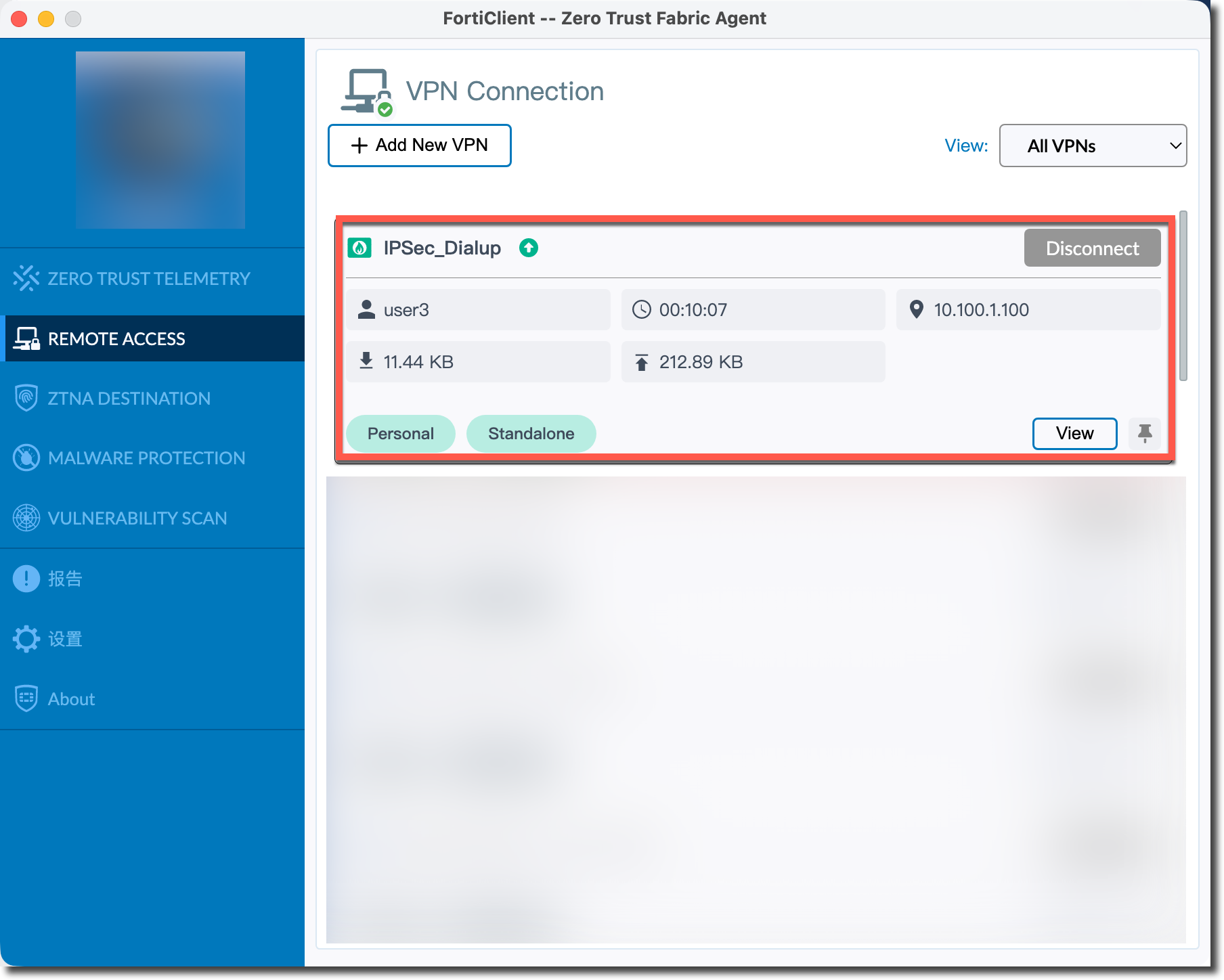
使用 user3 的 FortiClient 连接 FortiGate 的 IPSec 。
user3 的 IPSec 拨号成功后,访问 Server1,无法访问,相关流量日志显示匹配防火墙隐含策略(ID 0)被丢弃。
user3 # ping 10.10.1.100 -c 3
PING 10.10.1.100 (10.10.1.100): 56 data bytes
Request timeout for icmp_seq 0
Request timeout for icmp_seq 1
--- 10.10.1.100 ping statistics ---
3 packets transmitted, 0 packets received, 100.0% packet loss
user3 的 IPSec 拨号成功后,访问 Server2,可以正常访问,相关流量日志显示匹配防火墙策略 ID 2。
user3 # ping 10.10.2.100 -c 3
PING 10.10.2.100 (10.10.2.100): 56 data bytes
64 bytes from 10.10.2.100: icmp_seq=0 ttl=127 time=3.327 ms
64 bytes from 10.10.2.100: icmp_seq=1 ttl=127 time=3.262 ms
64 bytes from 10.10.2.100: icmp_seq=2 ttl=127 time=3.159 ms

--- 10.10.2.100 ping statistics ---
3 packets transmitted, 3 packets received, 0.0% packet loss
round-trip min/avg/max/stddev = 3.159/3.249/3.327/0.069 ms

date=2026-01-30 time=16:55:15 eventtime=1769763315534392580 tz="+0800" logid="0000000013" type="traffic" subtype="forward" level="notice" vd="root" srcip=10.100.1.100 identifier=55664 srcintf="IPSec_Dialup" srcintfrole="undefined" dstip=10.10.2.100 dstintf="port3" dstintfrole="undefined" srccountry="Reserved" dstcountry="Reserved" sessionid=2181 proto=1 action="accept" policyid=2 policytype="policy" poluuid="642d9c36-fdb0-51f0-e2ae-322fc0df415e" policyname="IPSec_Dialup_Server2" user="user3" group="group2" authserver="user3" service="PING" trandisp="noop" appcat="unscanned" duration=60 sentbyte=84 rcvdbyte=84 sentpkt=1 rcvdpkt=1 vpntype="ipsecvpn"