

组播转发
组播转发
功能简介
在术语使用上,组播 "转发(forwarding)" 和 "路由(routing)" 这两个功能有时会让人混淆。这两个功能不应同时进行:
- 当 FortiGate 处于 NAT 模式并且需要在组播路由器和接收者之间转发组播数据包时,应启用组播转发。
- 当 FortiGate 本身作为组播路由器运行,或者具有使用组播的适用路由协议时,应启用 PIM 协议。
重要
组播转发不支持 EMAC VLAN 接口。要在 EMAC VLAN 接口上使用组播,请使用 PIM 协议。
组播转发行为
组播转发的行为在 NAT 模式和透明模式下有所区别。
NAT 模式
config system settings
    set multicast-forward {enable | disable}
endenable(默认):FortiGate 会将 TTL ≥ 2 的所有组播 IP 数据包转发到所有接口和 VLAN 接口(接收接口除外)。IP 报文头中的 TTL 值会减 1,必须添加组播策略以允许组播数据包通过 FortiGate。相关信息
如需转发 TTL=1 的组播,请参考:路由 → 组播 → TTL=1 的组播无法转发章节。
disable:不会转发任何组播报文,即使配置了放通的组播策略。
透明模式
config system settings
    set multicast-skip-policy disable
endenable:允许通过 FortiGate 传输组播流量,无需创建组播策略。disable(默认):需要配置组播策略才能放通对应的组播流量(但透明模式下默认存在一条 any ↔any 的全放通组播策略,所以组播在默认配置下是放通的)。
组播策略
提示
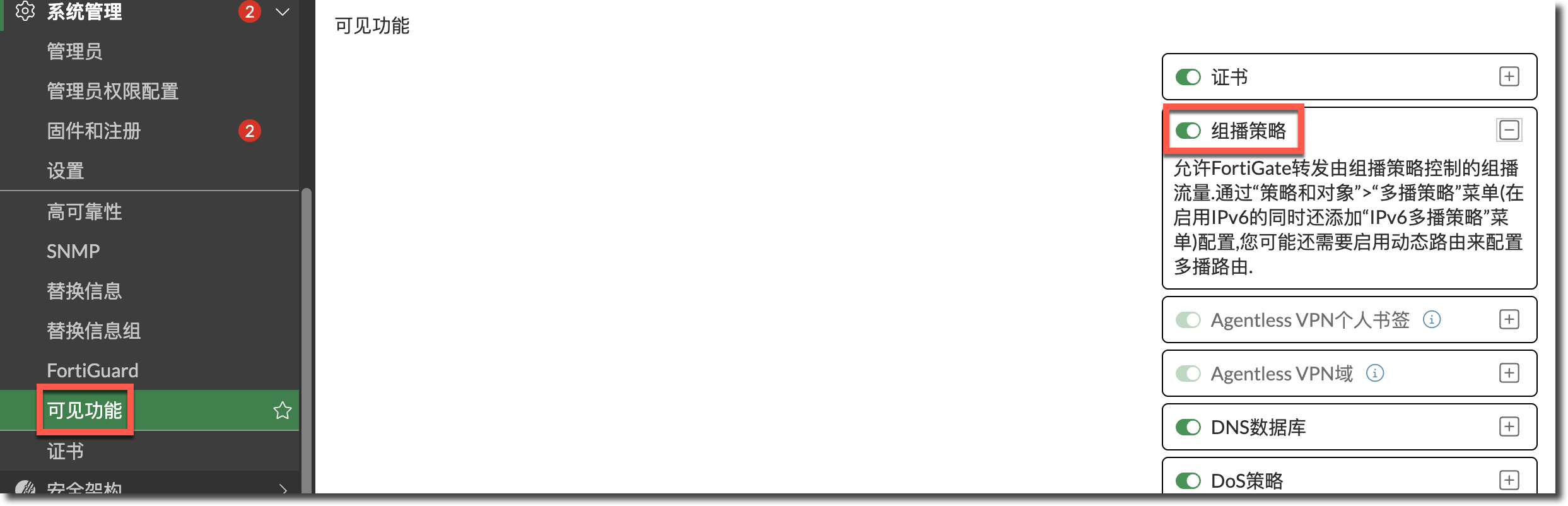
IPv4 和 IPv6 组播策略可以在 GUI 中配置。进入系统管理 > 可见功能,启用组播策略和 IPv6。
config firewall multicast-policy
    edit <policy_id>
        set name "<policy_name>"
        set srcintf "<interface>"
        set dstintf "<interface>"
        set srcaddr "<address_object>"
        set dstaddr "<multicast_address>"
        set action {accept | deny}
        set status {enable | disable}
        set snat {enable | disable}          # 是否启用源 NAT
        set snat-ip <IP_address>             # SNAT 转换的 IP 地址
        set dnat <IP_address>                # 目标 NAT 地址
        set comments "<string>"
    next
end- 默认配置下,无论是 NAT 模式还是透明模式,组播数据包都需要组播策略才能允许数据包从一个接口传递到另一个接口。
- 与防火墙策略类似,在组播策略中,需要指定源接口和目标接口,以及数据包源地址和目标地址允许的地址范围。还可以使用组播策略为组播数据包配置 SNAT 和 DNAT。
配置示例
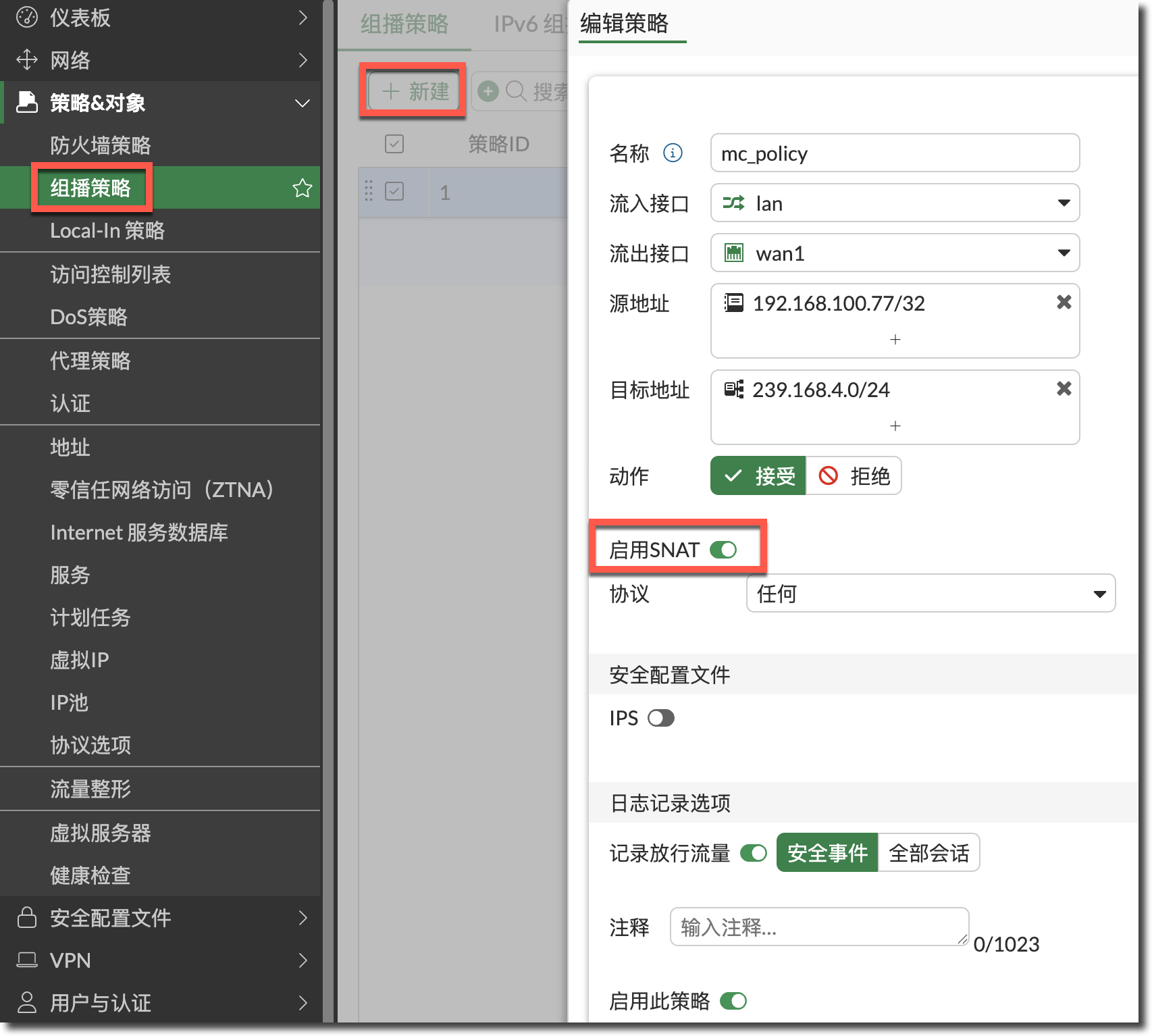
FortiGate(NAT 模式)接受从 IP 地址为 192.168.100.77 的 PC 发送到目标地址范围 239.168.4.0-255 的组播数据包。该策略允许组播数据包进入 lan 接口,然后从 wan1 接口发出。当数据包离开 wan1 接口时,其源地址将转换为 10.10.12.2。
创建源地址对象。
config firewall address
    edit "192.168.100.77/32"
        set subnet 192.168.100.77 255.255.255.255
    next
end
创建组播目标地址对象。
config firewall multicast-address
    edit "239.168.4.0/24"
        set start-ip 239.168.4.0
        set end-ip 239.168.4.255
    next
end
配置包含 SNAT 的组播策略。
提示
- SNAT 转换的源地址默认为出接口 wan1 的 IP。
- 如需修改 SNAT 转换的源地址,需要在 CLI 中配置。
config firewall multicast-policy
    edit 1
        set srcintf "lan"
        set dstintf "wan1"
        set srcaddr "192.168.100.77/32"
        set dstaddr "239.168.4.0/24"
        set snat enable         # 启用 SNAT
        set snat-ip 10.10.12.2  # SNAT 转换后的 IP 地址
    next
end
多 VDOM 模式
在 FortiGate 开启多 VDOM 模式时,避免创建全通(any-to-any)的全通组播策略引起组播网络环路。
- 默认情况下,在支持 NPU 虚拟链路的型号上,将
vdom-mode更改为multi-vdom时会在同一个 root VDOM 中创建一对 npu0_vlink0 和 npu0_vlink1 接口。 - 由于全通组播策略和 npu0_vlink 接口实际上是虚拟连接的,因此会形成组播网络环路。
因此,在开启多 VDOM 模式时:
在将 FortiGate 切换到多 VDOM 模式之前,确保不存在全通的组播策略。
如果必须定义全通组播策略,确保没有两个相连的接口(如 npu0_vlink0 和 npu0_vlink1)属于同一个 VDOM。
组播环路配置示例
警告
如下配置可能会引起组播环路。
启用 multi-VDOM 模式。
config system global
    set vdom-mode multi-vdom
end
配置全放通的组播策略。
config firewall multicast-policy
    edit 1
        set logtraffic enable
        set srcintf "any"
        set dstintf "any"
        set srcaddr "all"
        set dstaddr "all"
    next
end
查看接口配置,两个 vlink 接口都在同一个 root VDOM 中。
show system interface
config system interface
    edit "npu0_vlink0"
        set vdom "root"    ←---两个虚拟链路接口在同一个 VDOM
        set type physical
    next
    edit "npu0_vlink1"
        set vdom "root"    ←---两个虚拟链路接口在同一个 VDOM
        set type physical
    next
end
调试命令
查看组播策略组(0010000a)的 iprope 列表。
注
- 格式为
diagnose firewall iprope list <policy-group>。 <policy-group>的类别请参考:策略与对象 → iprope 列表章节。
FortiGate # diagnose firewall iprope list 0010000a policy index=1 uuid_idx=689 action=accept flag (8050104): f_p nat master use_src pol_stats schedule() cos_fwd=0 cos_rev=0 group=0010000a av=00000000 au=00000000 split=00000000 host=0 chk_client_info=0x0 app_list=0 ips_view=0 misc=0 zone(1): 41 -> zone(1): 7 source(1): 192.168.100.77-192.168.100.77, uuid_idx=688, dest(1): 239.168.4.0-239.168.4.255, uuid_idx=0, service(1): [0:0x0:0/(0,65535)->(1,65535)] flags:0 helper:auto nat(1): flag=0 base=192.168.100.77:0 10.10.12.222-10.10.12.222(0:0) policy index=4294967295 uuid_idx=30 action=drop flag (800): d_rm schedule() cos_fwd=0 cos_rev=0 group=0010000a av=00000000 au=00000000 split=00000000 host=0 chk_client_info=0x0 app_list=0 ips_view=0 misc=0 zone(1): 0 -> zone(1): 0 source(1): 0.0.0.0-255.255.255.255, uuid_idx=0, dest(1): 0.0.0.0-255.255.255.255, uuid_idx=0, service(1): [0:0x0:0/(0,0)->(0,0)] flags:0 helper:auto- 格式为
查看组播策略 ID1 的命中统计。
注
- 格式为
diagnose firewall iprope show <policy-group> <policy-idx> [<policy-idx2> ...]。 <policy-group>的类别请参考:策略与对象 → iprope 列表章节。
FortiGate-101F # diagnose firewall iprope show 0010000a 1 idx:1 pkts:976636032 (3441885 8086085 13636702 8140295 8402592 12647607 6949171 7675145) bytes:596025890544 (1029042774 3908006492 8871865919 3137288791 3349698158 7678746102 3996182994 5052661371) asic_pkts:724249323 (0 0 0 0 0 0 0 0) asic_bytes:537390769164 (0 0 0 0 0 0 0 0) nturbo_pkts:4804934 (0 0 0 0 0 0 0 0) nturbo_bytes:2351221290 (0 0 0 0 0 0 0 0) flag:0x0 hit count:20314739 (202119 397770 465433 483860 489723 287429 311404 161334) first hit:2025-09-18 14:46:27 last hit:2026-02-04 11:31:45 established session count:8 first est:2025-09-18 14:46:27 last est:2026-02-04 11:31:05- 格式为
Debug Flow 调试组播流量(与普通单播流量一样)。
diagnose debug console timestamp enable
diagnose debug flow show function-name enable
diagnose debug flow filter addr <multicast_address>
diagnose debug enable
diagnose debug flow trace start 100