

OSPF GR
OSPF GR
网络需求
FortiGate HA 集群与上下游路由器运行 OSPF 协议,并开启 GR。在 FortiGate 的 HA 发生主备切换时,GR 需要确保每个路由器(包括 FortiGate 及其它路由器)在 HA 切换期间保持其路由表中的 OSPF 路由(GR Helper),以避免流量中断。
在 FortiGate HA 集群中,OSPF 进程相关工作仅在主设备上运行。当发生 HA 切换时,将在新选举的主机上启动一个新的 OSPF 协商过程,在此过程中,新的主机需要在路由 Kernel 表中维持从原主机学习到的 OSPF 路由,直至新的 OSPF 邻居形成。
网络拓扑
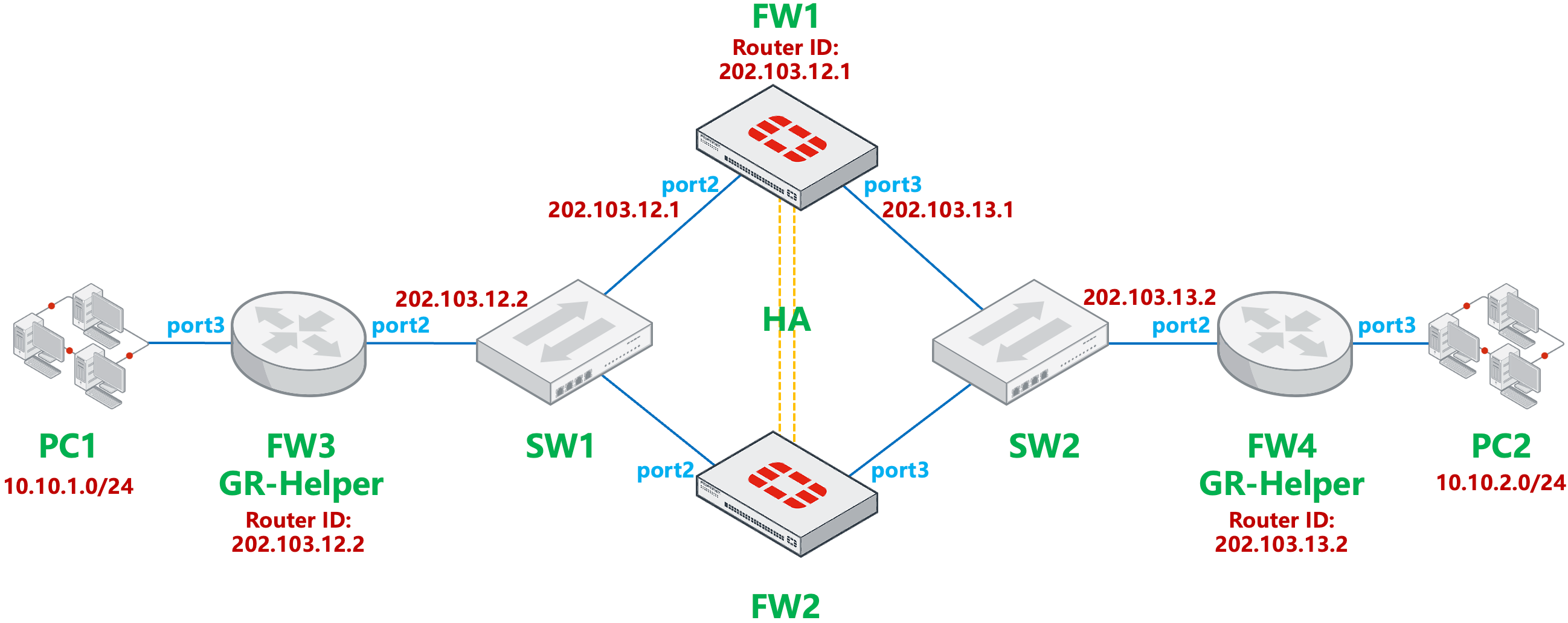
- FW1 与 FW2 建立 A - P 模式的 HA。
- FW1/FW2 与 FW3、FW4 分别建立 OSPF 邻居,并宣告各自的网段。
- FW1/FW2 与 FW3、FW4 开启 OSPF Graceful Restart,FW1/FW2 发生主备切换后,FW3、FW4 可以进入 GR Helper 模式,协助 FW1/FW2 的 GR 过程。
配置步骤
基础网络配置(略)。
FW1 与 FW2 的 HA 配置(略)。
安全策略配置(略)。
配置 FW1/FW2 的 OSPF,宣告网络,开启 GR 功能,restart-period 设置为 600s。
config router ospf
    set router-id 202.103.12.1
    set restart-mode graceful-restart
    set restart-period 600
    config area
        edit 0.0.0.0
        next
    end
    config network
        edit 1
            set prefix 202.103.12.0 255.255.255.0
        next
        edit 2
            set prefix 202.103.13.0 255.255.255.0
        next
    end
end
配置 FW3 的 OSPF,宣告网络,路由器作为 GR-Helper 也需要开启 GR 功能。
config router ospf
    set router-id 202.103.12.2
    set restart-mode graceful-restart
    config area
        edit 0.0.0.0
        next
    end
    config network
        edit 2
            set prefix 202.103.12.0 255.255.255.0
        next
        edit 3
            set prefix 10.10.1.0 255.255.255.0
        next
    end
end
配置 FW4 的 OSPF,路由器作为 GR-Helper 也需要开启 GR 功能。
config router ospf
    set router-id 202.103.13.2
    set restart-mode graceful-restart
    config area
        edit 0.0.0.0
        next
    end
    config network
        edit 1
            set prefix 202.103.13.0 255.255.255.0
        next
        edit 2
            set prefix 10.10.2.0 255.255.255.0
        next
    end
end
配置 FW1/FW2 HA 配置中的 route-ttl 为 600s(默认 10s),在此时间内,新的主机需要在路由 Kernel 表中维持从原主机学习到的 OSPF 路由,直至新的 OSPF 邻居形成。
重要
重要步骤,防止 HA 切换后,新主机建立新的 OSPF 邻居前,路由消失导致业务中断。
config system ha
    set route-ttl 600
end
结果验证
初始状态下,FW1 为主设备,FW2 为备设备。
FW1 # diagnose sys ha status
HA information
Statistics
        traffic.local = s:0 p:42869 b:39035389
        traffic.total = s:0 p:42867 b:39033889
        activity.ha_id_changes = 2
        activity.fdb  = c:0 q:0

Model=80008, Mode=2 Group=7 Debug=0
nvcluster=1, ses_pickup=0, delay=0

[Debug_Zone HA information]
HA group member information: is_manage_primary=1.
FGVM08TM23000175:      Primary, serialno_prio=1, usr_priority=128, hostname=FW1
FGVM08TM23000176:    Secondary, serialno_prio=0, usr_priority=100, hostname=FW2

[Kernel HA information]
vcluster 1, state=work, primary_ip=169.254.0.2, primary_id=0
FGVM08TM23000175:      Primary, ha_prio/o_ha_prio=0/0
FGVM08TM23000176:    Secondary, ha_prio/o_ha_prio=1/1
初始状态下查看 FW3 的 OSPF 邻居状态与路由信息,邻居状态为 Full,OSPF 路由学习正常,未进入 GR Helper 状态。
FW3 # get router info ospf neighbor
OSPF process 0, VRF 0:
Neighbor ID     Pri   State           Dead Time   Address         Interface
202.103.12.1      1   Full/DR         00:00:34    202.103.12.1    port2

FW3 # get router info routing-table ospf
Routing table for VRF=0
O       10.10.2.0/24 [110/3] via 202.103.12.1, port2, 02:47:00, [1/0]
O       202.103.13.0/24 [110/2] via 202.103.12.1, port2, 02:47:00, [1/0]
初始状态下查看 FW4 的 OSPF 邻居状态与路由信息,邻居状态为 Full,OSPF 路由学习正常,未进入 GR Helper 状态。
FW4 # get router info ospf neighbor
OSPF process 0, VRF 0:
Neighbor ID     Pri   State           Dead Time   Address         Interface
202.103.12.1      1   Full/Backup     00:00:33    202.103.13.1    port2

FW4 # get router info routing-table ospf
Routing table for VRF=0
O       10.10.1.0/24 [110/3] via 202.103.13.1, port2, 02:50:08, [1/0]
O       202.103.12.0/24 [110/2] via 202.103.13.1, port2, 02:50:08, [1/0]
初始状态下查看 FW1 的 OSPF 邻居状态与路由信息,邻居状态为 Full,OSPF 路由学习正常。
FW1 # get router info ospf neighbor
OSPF process 0, VRF 0:
Neighbor ID     Pri   State           Dead Time   Address         Interface
202.103.12.2      1   Full/Backup     00:00:38    202.103.12.2    port2
202.103.13.2      1   Full/DR         00:00:40    202.103.13.2    port3

FW1 # get router info routing-table ospf
Routing table for VRF=0
O       10.10.1.0/24 [110/2] via 202.103.12.2, port2, 02:49:28, [1/0]
O       10.10.2.0/24 [110/2] via 202.103.13.2, port3, 02:49:28, [1/0]
使 FW1 和 FW2 发生 HA 主备倒换,此时 FW2 成为 HA 主设备。
FW2 # diagnose sys ha status
HA information
Statistics
        traffic.local = s:0 p:6233 b:4732229
        traffic.total = s:0 p:6286 b:4735596
        activity.ha_id_changes = 4
        activity.fdb  = c:0 q:0

Model=80008, Mode=2 Group=7 Debug=0
nvcluster=1, ses_pickup=0, delay=0

[Debug_Zone HA information]
HA group member information: is_manage_primary=1.
FGVM08TM23000176:      Primary, serialno_prio=0, usr_priority=100, hostname=FW2
FGVM08TM23000175:    Secondary, serialno_prio=1, usr_priority=128, hostname=FW1

[Kernel HA information]
vcluster 1, state=work, primary_ip=169.254.0.1, primary_id=0
FGVM08TM23000176:      Primary, ha_prio/o_ha_prio=0/0
FGVM08TM23000175:    Secondary, ha_prio/o_ha_prio=1/1
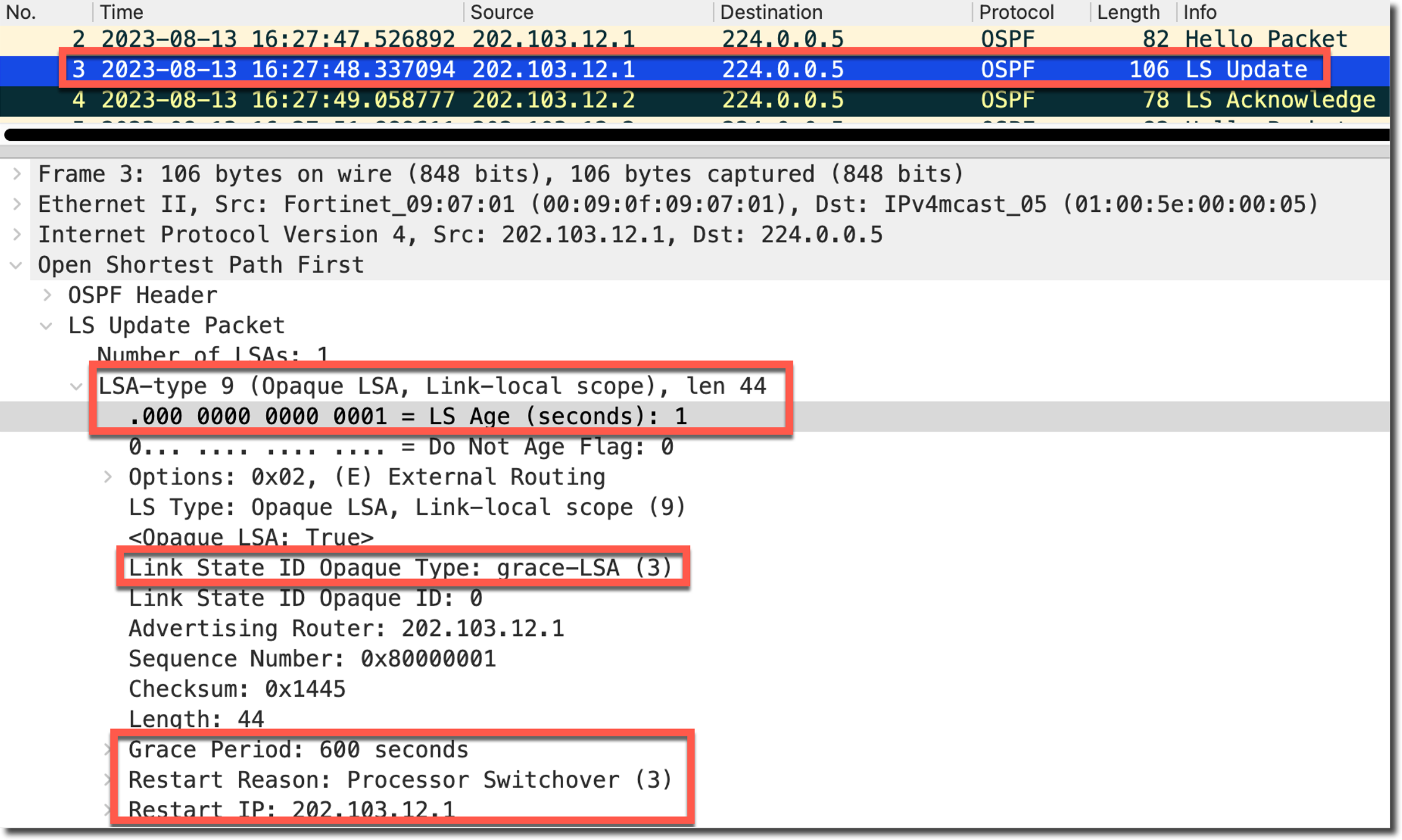
查看 FW2 的 OSPF Debug 信息,FW2 成为 HA 主后,向 OSPF 邻居发送 grace LSA(Type 9),通知邻居自己进入了 GR 过程,包含 GR 的原因和 GR 最大时间,LS Age 为 1s。
FW2 # diagnose ip router ospf level info
FW2 # diagnose ip router ospf all enable
FW2 # diagnose debug console time enable

2023-08-13 16:27:48 OSPF: SEND[LS-Upd]: To 224.0.0.5 via port2:202.103.12.1, length 120
2023-08-13 16:27:48 OSPF:     LS type 9 (Link-Local Opaque-LSA)
2023-08-13 16:27:48 OSPF:     Grace-LSA
2023-08-13 16:27:48 OSPF:     Grace Period: 600
2023-08-13 16:27:48 OSPF:     Graceful Restart Reason: Switch to redundant control processor
2023-08-13 16:27:48 OSPF:     IP interface Address: 202.103.12.1
该报文格式如下图所示,LS age 为 1。
在 FW2 进入 GR 状态后,查看 FW3 的 OSPF 邻居状态与 OSPF 路由状态,FW3 进入 GR Helper 状态(* 标记),Dead Time 变为 FW1/FW2 配置的 GR period 600s。(FW4 也是一样的状态,这里就不再赘述)
FW3 # get router info ospf neighbor
OSPF process 0, VRF 0:
Neighbor ID     Pri   State           Dead Time   Address         Interface
202.103.12.1      1   Full/Backup     00:09:51*   202.103.12.1    port2

FW3 # get router info routing-table ospf
Routing table for VRF=0
O       10.10.2.0/24 [110/3] via 202.103.12.1, port2, 00:33:17, [1/0]
O       202.103.13.0/24 [110/2] via 202.103.12.1, port2, 00:34:16, [1/0]
在 FW3 上查看 OSPF 的 Debug 信息,FW3 收到 GR LSA 后,进入 GR Helper 模式。(FW4 也是一样的状态,这里就不再赘述)
FW3 # diagnose ip router ospf level info
FW3 # diagnose ip router ospf all enable
FW3 # diagnose debug console time enable

2023-08-13 16:27:48 OSPF: RECV[LS-Upd]: From 202.103.12.1 via port2:202.103.12.2 (202.103.12.1 -> 224.0.0.5)
2023-08-13 16:27:48 OSPF:     LS type 9 (Link-Local Opaque-LSA)
2023-08-13 16:27:48 OSPF:   Grace-LSA
2023-08-13 16:27:48 OSPF:     Grace Period: 600
2023-08-13 16:27:48 OSPF:     Graceful Restart Reason: Switch to redundant control processor
2023-08-13 16:27:48 OSPF:     IP interface Address: 202.103.12.1
2023-08-13 16:27:48 OSPF: Router: Enter Helper mode by grace LSA
查看 FW3 上的 OSPF 9 类 LSA 的状态,此时 LS Age 未到达 3600s。(FW4 也是一样的状态,这里就不再赘述)
FW3 # get router info ospf database opaque-area

            OSPF Router with ID (202.103.12.2) (Process ID 0, VRF 0)
                Link-Local Opaque-LSA (Link port2:202.103.12.2)
  LS age: 5
  Options: 0x2 (*|-|-|-|-|-|E|-)
  LS Type: Link-Local Opaque-LSA
  Link State ID: 3.0.0.0 (Link-Local Opaque-Type/ID)
  Opaque Type: 3
  Opaque ID: 0
  Advertising Router: 202.103.12.1
  LS Seq Number: 80000001
  Checksum: 0x1445
  Length: 44
      Grace Period: 600
      Graceful Restart Reason: Switch to redundant control processor
      IP Interface Address: 202.103.12.1
等待 FW2 与 FW3 的 OSPF 邻居变为 Full 状态后,FW2 的 GR 完成,FW3 退出 GR Helper 状态,期间 OSPF 路由没有丢失,Dead Time 从 40s 开始倒计时。(FW4 也是一样的状态,这里就不再赘述)
FW3 # get router info ospf neighbor
OSPF process 0, VRF 0:
Neighbor ID     Pri   State           Dead Time   Address         Interface
202.103.12.1      1   Full/Backup     00:00:36    202.103.12.1    port2

FW3 # get router info routing-table ospf
Routing table for VRF=0
O       10.10.2.0/24 [110/3] via 202.103.12.1, port2, 00:00:03, [1/0]
O       202.103.13.0/24 [110/2] via 202.103.12.1, port2, 00:34:31, [1/0]
在 FW2 上查看 OSPF 的 Debug 信息,FW2 正常退出了 GR,并发送 Age 为 3600 的 grace-LSA。
FW2 # diagnose ip router ospf level info
FW2 # diagnose ip router ospf all enable
FW2 # diagnose debug console time enable

2023-08-13 16:27:57 OSPF: ROUTER[Process:0, RouterID:202.103.12.1]: Exit Restarting normally
2023-08-13 16:27:57 OSPF: SEND[LS-Upd]: To 224.0.0.5 via port3:202.103.13.1, length 72
2023-08-13 19:05:59 OSPF:     LS age 3600
2023-08-13 19:05:59 OSPF:     LS type 9 (Link-Local Opaque-LSA)
2023-08-13 19:05:59 OSPF:   Grace-LSA
在 FW3 上查看 OSPF 的 Debug 信息,FW3 收到 FW2 发送的 maxage 的 LSA 后,等待几秒后退出 GR Helper 状态。
2023-08-13 16:28:08 OSPF: ROUTER: Exit Restart Helper mode for neighbor(port2:202.103.12.2-202.103.12.1) by receiving maxage grace-LSA再次查看 FW3 上的 OSPF 9 类 LSA 的状态,此时 LS Age 直接到达 3600s。
FW3 # get router info ospf database opaque-link

            OSPF Router with ID (202.103.12.2) (Process ID 0, VRF 0)
                Link-Local Opaque-LSA (Link port2:202.103.12.2)
  LS age: 3600
  Options: 0x2 (*|-|-|-|-|-|E|-)
  LS Type: Link-Local Opaque-LSA
  Link State ID: 3.0.0.0 (Link-Local Opaque-Type/ID)
  Opaque Type: 3
  Opaque ID: 0
  Advertising Router: 202.103.12.1
  LS Seq Number: 80000001
  Checksum: 0x1445
  Length: 44
      Grace Period: 600
      Graceful Restart Reason: Switch to redundant control processor
      IP Interface Address: 202.103.12.1
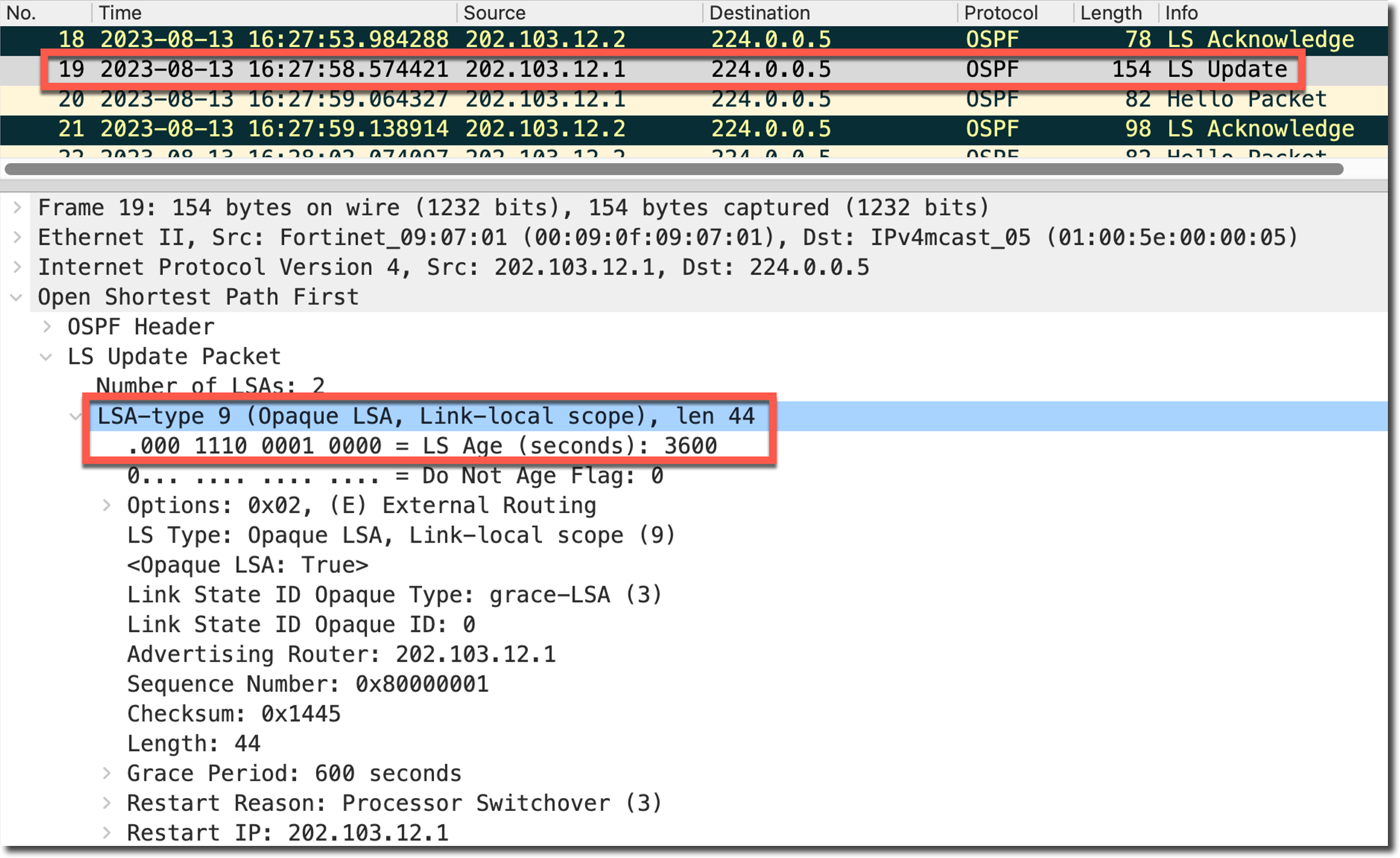
抓包查看 FW3 收到的这个 maxage grace-LSA,可以看到 LSA 的 age 为 3600s,达到了 OSPF 定义的 maxage(https://www.rfc-editor.org/rfc/rfc2328#appendix-B),可以理解为 FW2 的 OSPF 邻居状态为 Full 后,会通过再次发送此类型的 LSA 告知 GR Helper,可以退出 GR Helper 模式了。
GR 期间,FW2/FW4 从 FW1 重启前同步的路由一直存在(route-ttl 600,prio = 2164260865)。
FW2 # get router info kernel | grep 10.10.
tab=254 vf=0 scope=0 type=1 proto=30 prio=2164260865 0.0.0.0/0.0.0.0/0->10.10.1.0/24 pref=0.0.0.0 gwy=202.103.12.2 dev=4(port2)
tab=254 vf=0 scope=0 type=1 proto=30 prio=2164260865 0.0.0.0/0.0.0.0/0->10.10.2.0/24 pref=0.0.0.0 gwy=202.103.13.2 dev=5(port3)
GR 结束后,学到了新的 OSPF 路由(prio = 1)。
FW2 # get router info kernel | grep 10.10.
tab=254 vf=0 scope=0 type=1 proto=11 prio=1 0.0.0.0/0.0.0.0/0->10.10.1.0/24 pref=0.0.0.0 gwy=202.103.12.2 dev=4(port2)
tab=254 vf=0 scope=0 type=1 proto=30 prio=2164260865 0.0.0.0/0.0.0.0/0->10.10.1.0/24 pref=0.0.0.0 gwy=202.103.12.2 dev=4(port2)
tab=254 vf=0 scope=0 type=1 proto=11 prio=1 0.0.0.0/0.0.0.0/0->10.10.2.0/24 pref=0.0.0.0 gwy=202.103.13.2 dev=5(port3)
tab=254 vf=0 scope=0 type=1 proto=30 prio=2164260865 0.0.0.0/0.0.0.0/0->10.10.2.0/24 pref=0.0.0.0 gwy=202.103.13.2 dev=5(port3)
整个 HA 切换引起的 GR 期间,所有设备路由转发表未发生实际变化,流量不会中断。
注意事项
在以上测试步骤过程中,如果 FW1/FW2 在 GR 的过程中发现了 OSPF 拓扑变化,则会直接终端并退出 GR 的过程,同时通知 FW3/FW4 退出 GR Helper 状态,导致 OSPF 路由提前从 GR Helper 设备上消失,导致业务临时中断。
FW2 # diagnose ip router ospf level info
FW2 # diagnose ip router ospf all enable
FW2 # diagnose debug console time enable

2023-08-13 17:45:46 OSPF: ROUTER[Process:0, RouterID:202.103.12.1]: Exit Restarting by NbrChanged (port3:202.103.13.1-202.103.13.2)
2023-08-13 17:45:46 OSPF: LSA[-:Type9:3.0.0.0:(self)]: Flooding via interface[port2:202.103.12.1]
2023-08-13 17:45:46 OSPF: LSA[-:Type9:3.0.0.0:(self)]: Flooding to neighbor[202.103.12.2]
......
2023-08-13 17:45:46 OSPF: SEND[LS-Upd]: To 224.0.0.5 via port2:202.103.12.1, length 72
2023-08-13 17:45:46 OSPF:     LS age 3600
2023-08-13 17:45:46 OSPF:     LS type 9 (Link-Local Opaque-LSA)
为了避免 OSPF 拓扑变化导致的 GR 提前退出,可以在 FW1/FW2 上开启 OSPF 的 restart-on-topology-change,开启后,OSPF 进程在 GR 的过程中将忽略拓扑变化,继续完成 GR 的整个过程。
重要
仅支持 7.2.0 及以后版本。
config router ospf
    set restart-on-topology-change enable
end
如下 Debug 信息所示,FW1/FW2 在 GR 期间探测到拓扑变化,但没有立即退出 GR,而是继续正常完成了 GR。
2023-08-13 19:05:56 OSPF: ROUTER[Process:0, RouterID:202.103.12.1]: Exit Restarting by NbrChanged (port3:202.103.13.1-202.103.13.2)
2023-08-13 19:05:56 OSPF: ROUTER[Process:0, RouterID:202.103.12.1]: skip exiting restart due to topology change
......
2023-08-13 19:05:59 OSPF: ROUTER[Process:0, RouterID:202.103.12.1]: Exit Restarting normally
......
2023-08-13 19:05:59 OSPF: SEND[LS-Upd]: To 224.0.0.6 via port2:202.103.12.1, length 72
2023-08-13 19:05:59 OSPF:     LS age 3600
2023-08-13 19:05:59 OSPF:     Options 0x2
2023-08-13 19:05:59 OSPF:     LS type 9 (Link-Local Opaque-LSA)
2023-08-13 19:05:59 OSPF:     Advertising Router 202.103.12.1
2023-08-13 19:05:59 OSPF:   Grace-LSA
......
GR 与 BFD 的使用关系
重要
BGP GR 或 OSPF GR 不建议与 BFD 同时使用。
GR 用于 FortiGate 通知邻居自己的路由进程将重启,并且邻居从 FortiGate 学到的路由应在重启期间保留。但 BFD 检测到故障时会将动态路由邻居重置。这种操作上的差异使得在 GR 的同时使用 BFD 会导致功能上的冲突,可能导致 GR 期间流量中断。
业界通用的做法是在使用 GR 时关闭 BFD。例如在 FortiGate 和 GCP(Google 云平台)之间配置动态路由 + GR + BFD 时:
- GCP 将关闭 BFD 并发送 AdminDown(BFD 事件)到 FortiGate(参考 https://cloud.google.com/network-connectivity/docs/router/concepts/bfd#graceful-restart-and-bfd )。