

OSPF 基础配置
OSPF 基础配置
应用场景
- 若网络中路由设备超过 16 个,建议使用 OSPF,它的路由学习更新速度更快,更适合 16 个路由设备以上的网络。
- 当网络路由设备较多,且不超过 16 个,为避免写大量静态路由,且路由可自动学习,可在 FortiGate 上配置 RIP 路由协议功能,让 FortiGate 也能动态学习到其他网络的路由, 且能自动老化更新。
- 当网络中路由设备较少,建议使用静态路由即可,维护简单,且对路由器要求不高,因为路由器都支持静态路由,而普通小路由一般不支持 RIP 协议。
网络需求
- 内网三层交换机和出口 FortiGate 间通过动态路由 OSPF 互相通告路由,实现内网用户正常上网。
- FortiGate 手动配置默认路由,并将其重发布引入 OSPF,三层交换机与 FortiGate 之间通过 OSPF 互相学习路由,实现内网用户正常上网。
网络拓扑
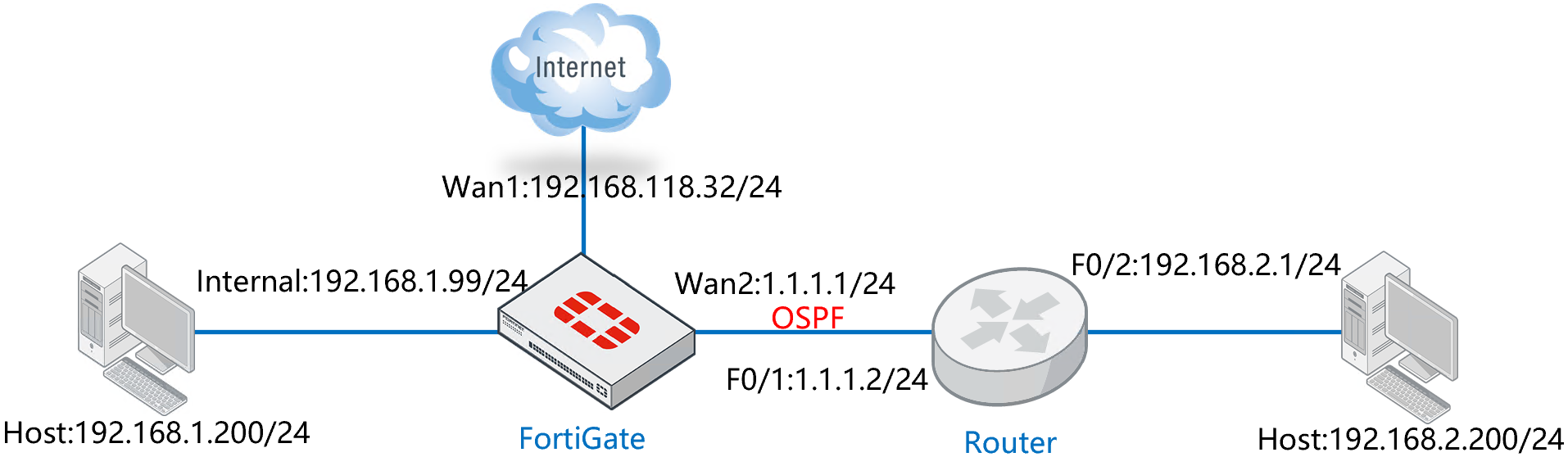
配置要点
- 配置接口地址
- 配置默认路由
- 配置 OSPF
- 配置路由器 ID
- 发布缺省路由
- 重发布
- 建立 OSPF 区
- 添加 OSPF 网络
- 添加接口
- 配置对端路由器
配置步骤
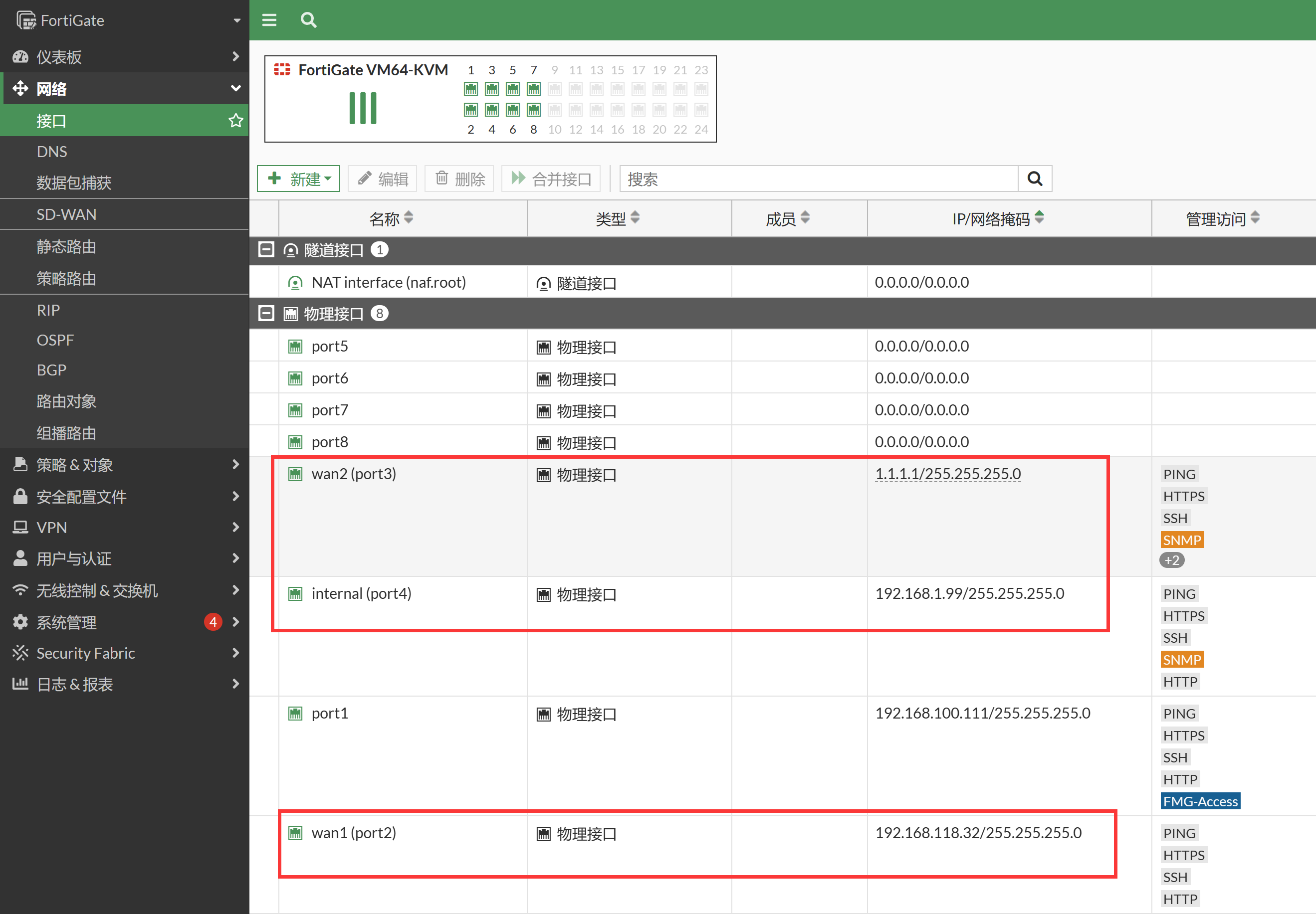
配置接口地址。
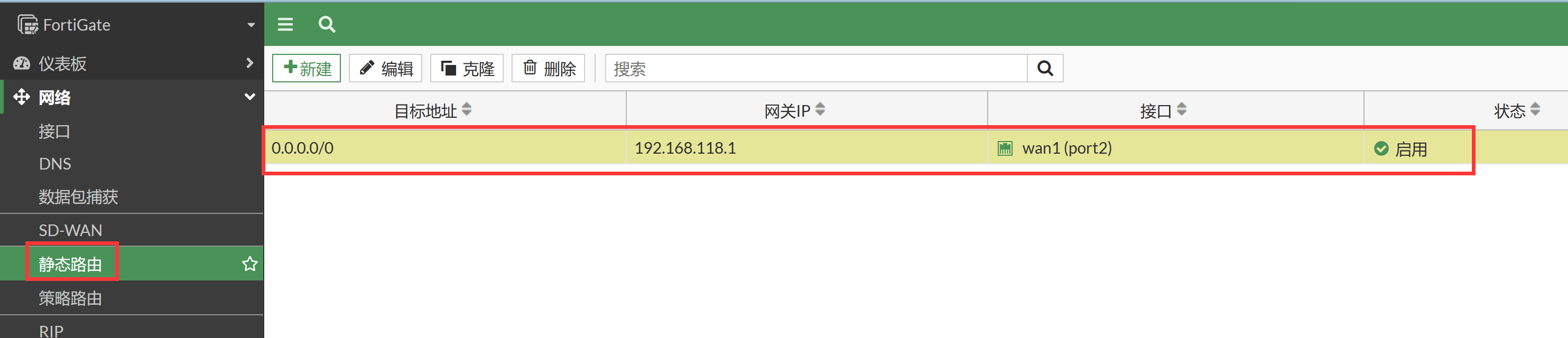
配置默认路由。
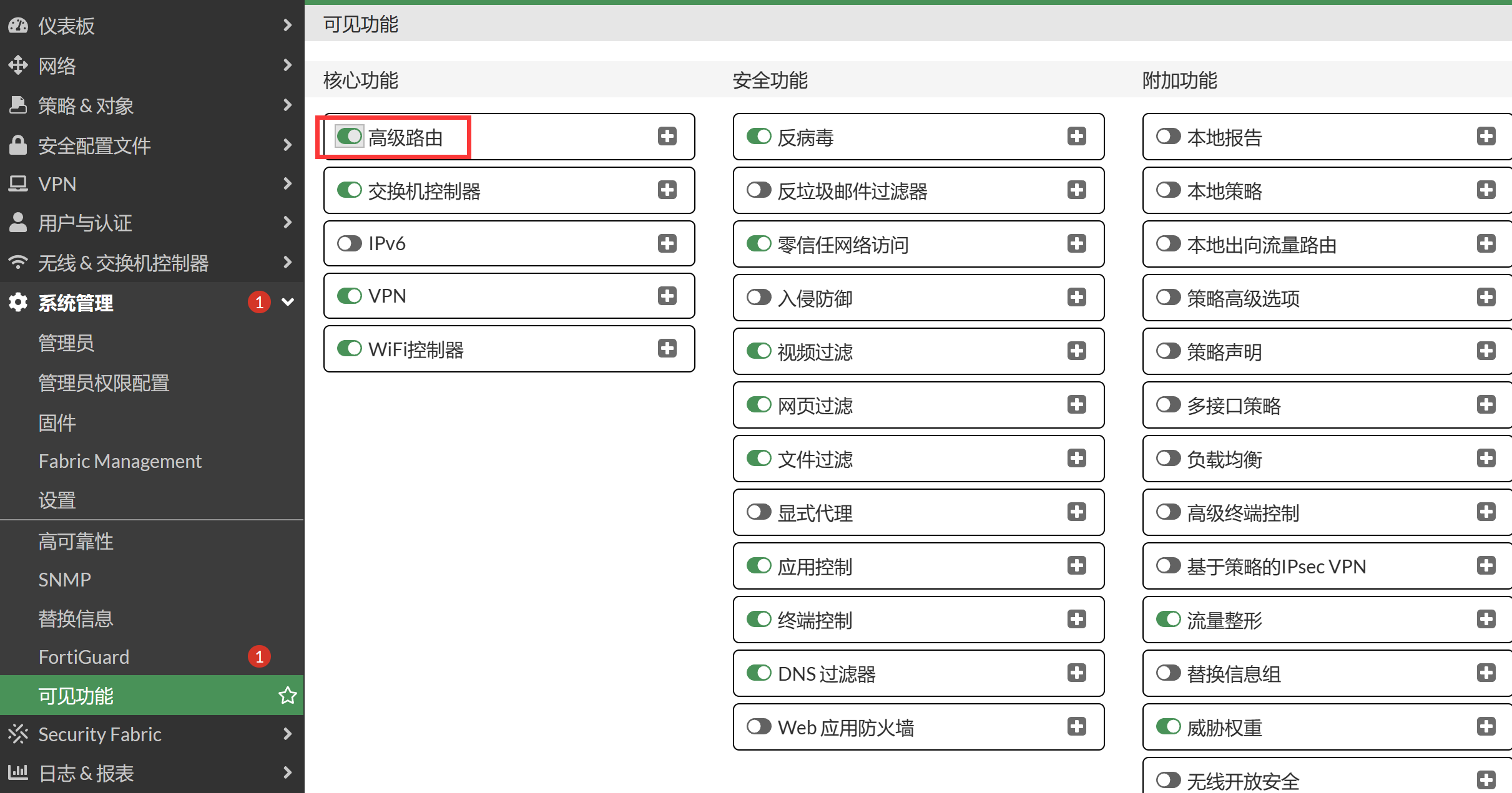
配置 OSPF,首先需要在系统配置 → 可见功能中,开启高级路由功能。
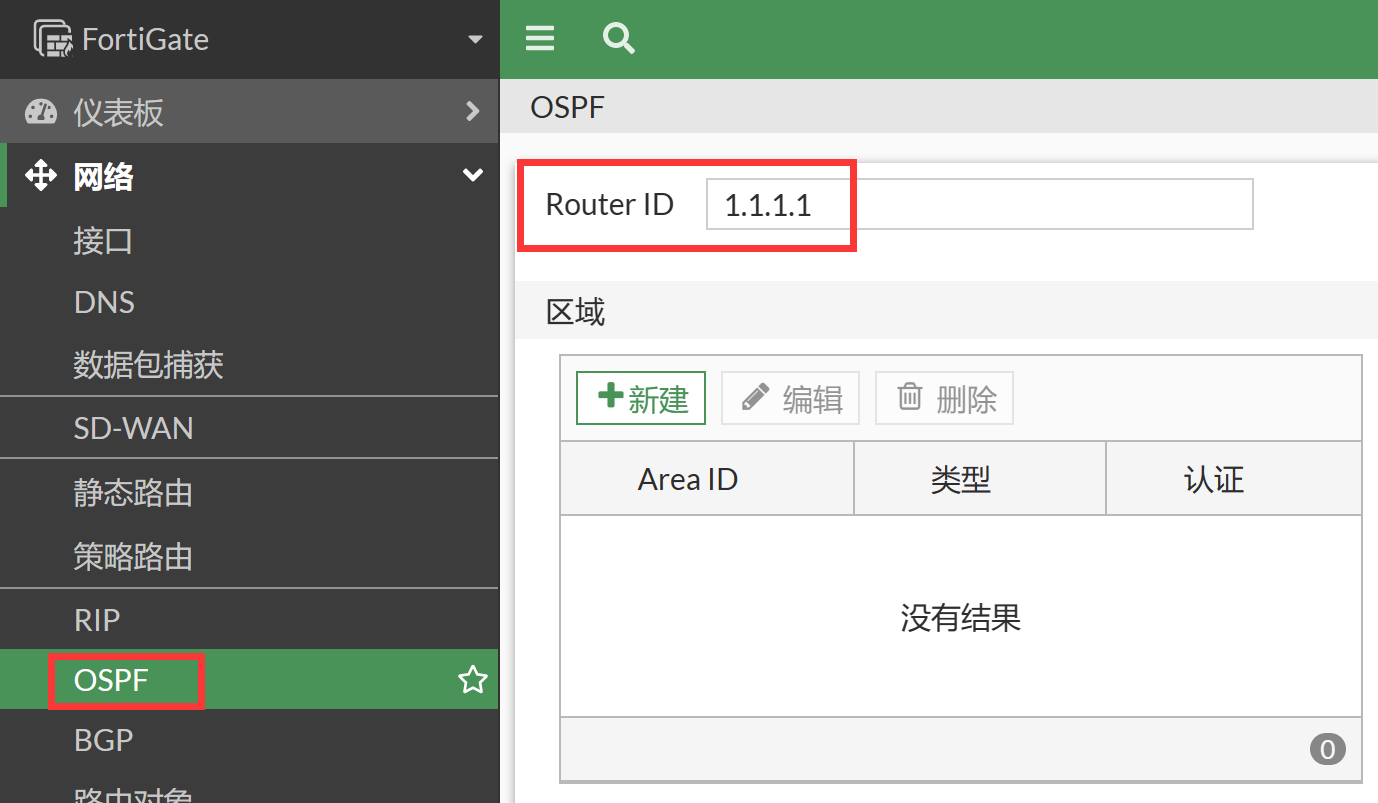
进入网络 → OSPF 页面,配置 Router ID。
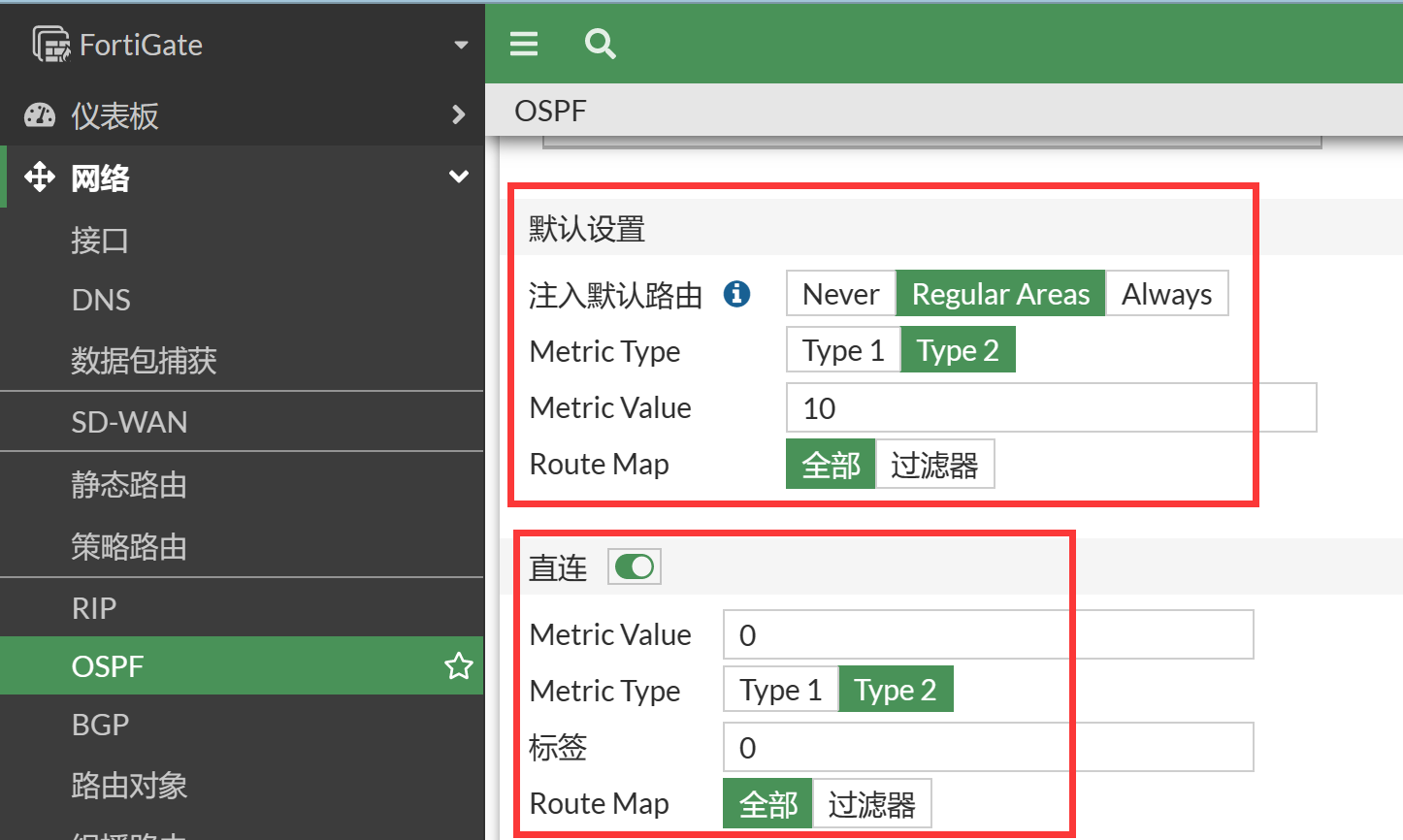
开启默认路由注入,并开启重发布直连路由。
- 配置 Router ID,填写 ID 为 1.1.1.1
- 注入缺省路由: 选择 "Regular Areas",其三个选项意义如下:
- Never: 从不发送缺省路由表
- Regular Areas: 如果有则发布,没有则不发布
- Always: 无论是否有缺省路由表,都发布一条缺省路由出去
- 重发布:勾选 "直连",将直连的 192.168.1.0/24 路由信息发送给 OSPF 邻居
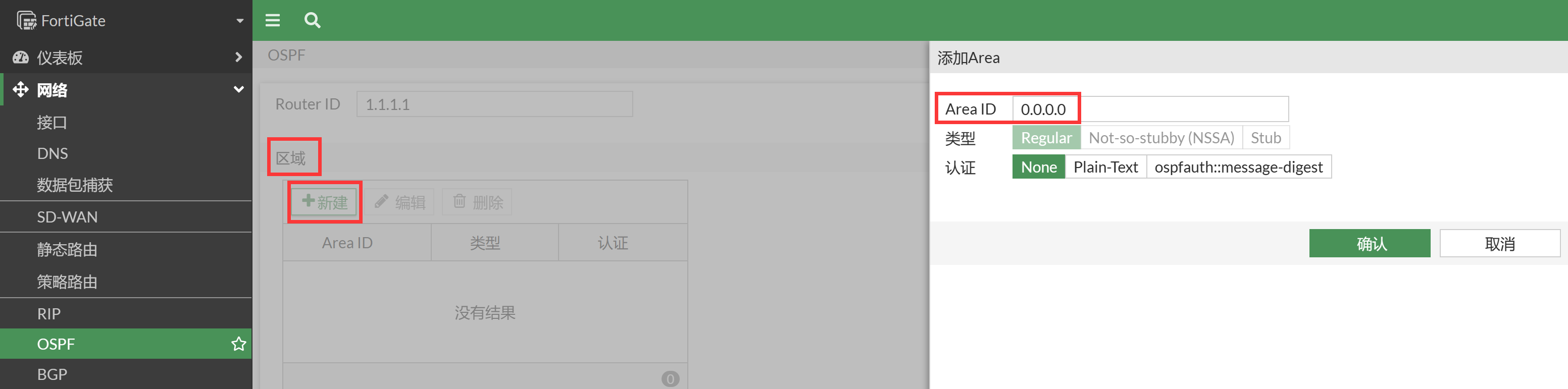
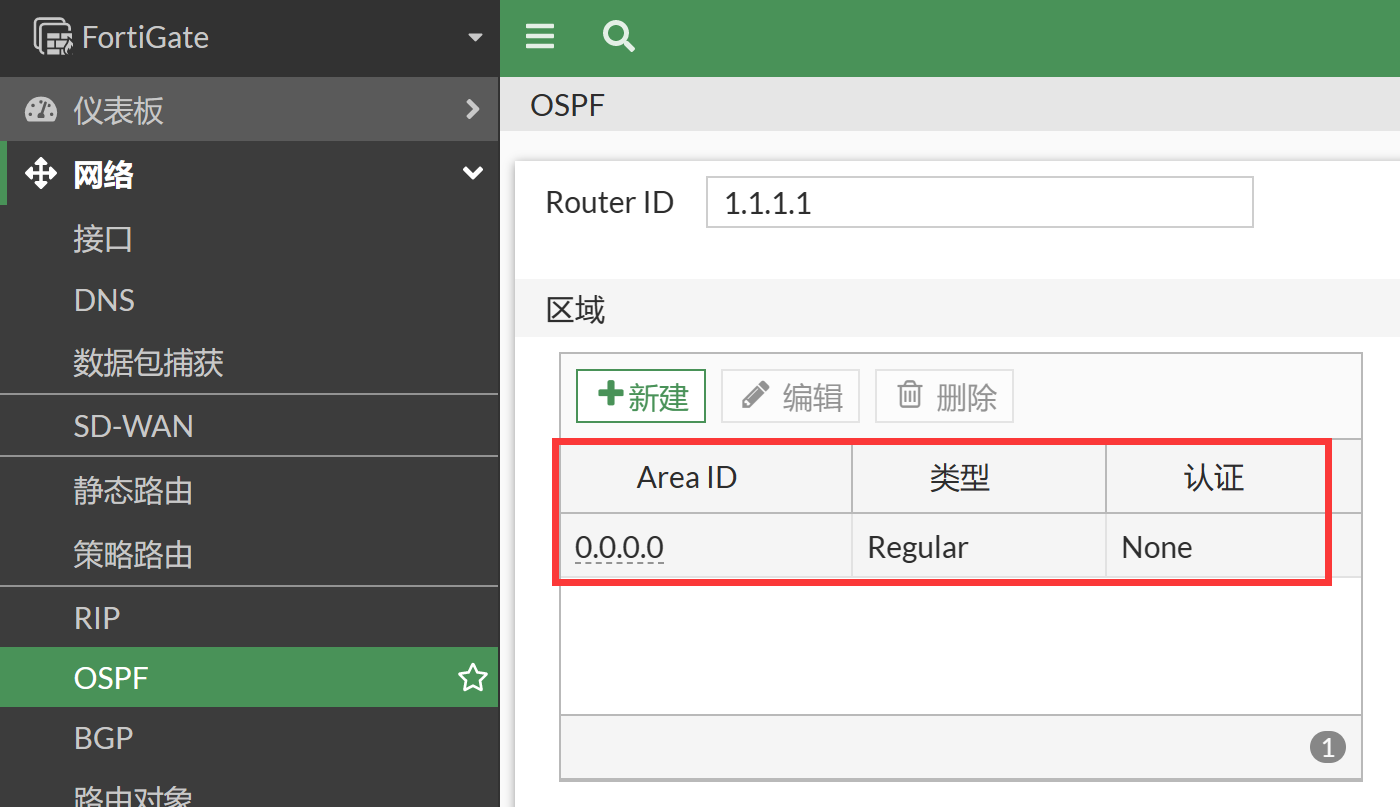
建立 OSPF 区域,在区域部分点击新建按钮,创建根区域 0.0.0.0(area 0)。
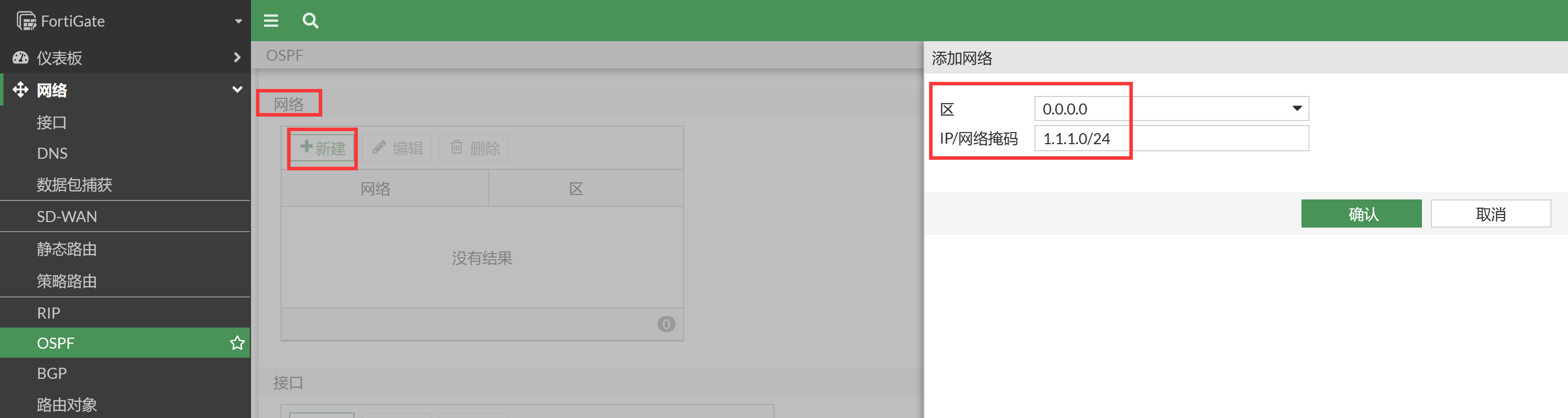
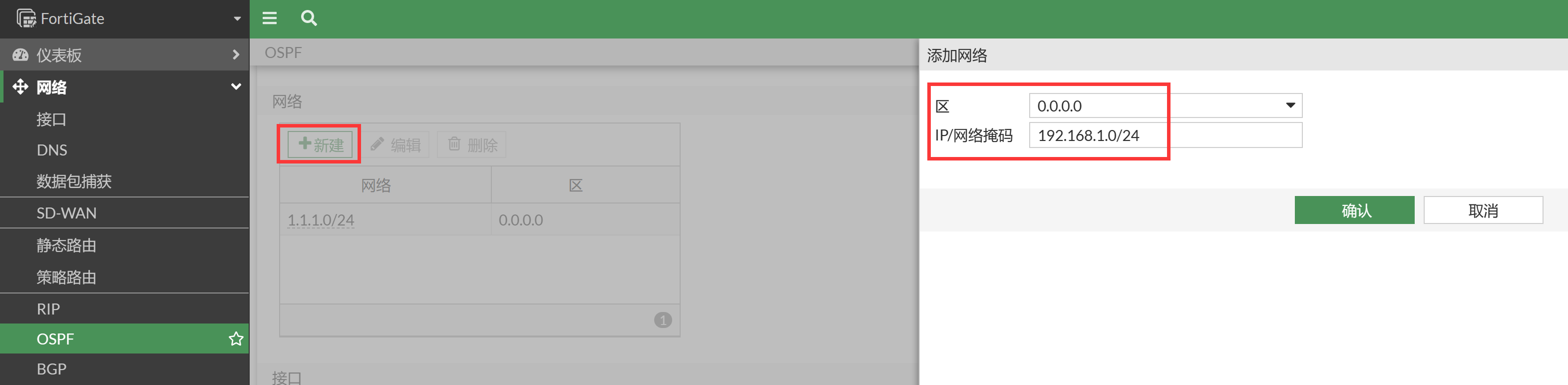
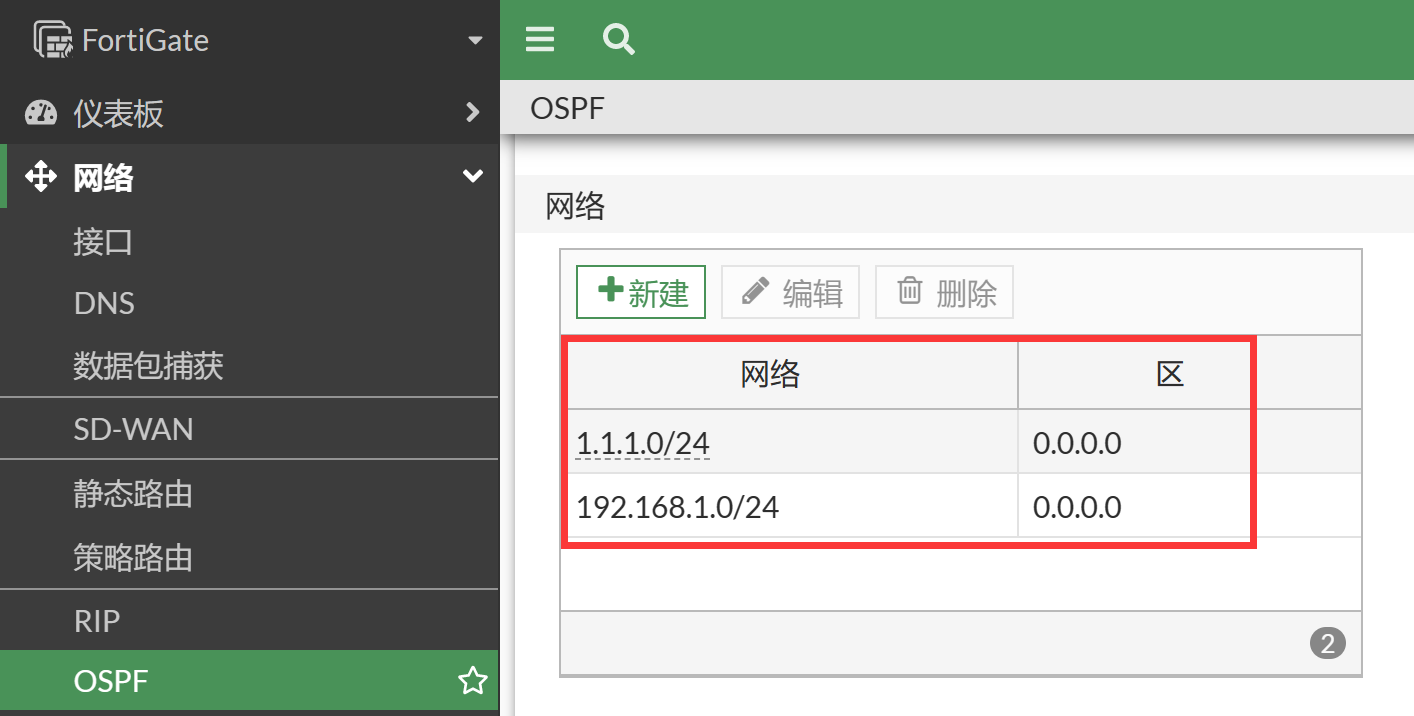
添加 OSPF 网络,在网络部分点击新建按钮,将 1.1.1.0/24 和 192.168.1.0/24 网络加入 OSPF 区域 0.0.0.0,之后点击页面下方的应用按钮应用配置。
添加 OSPF 接口(可选,可以自定义 OSPF 的协商参数),在接口部分点击新建按钮,配置相关的协商参数。
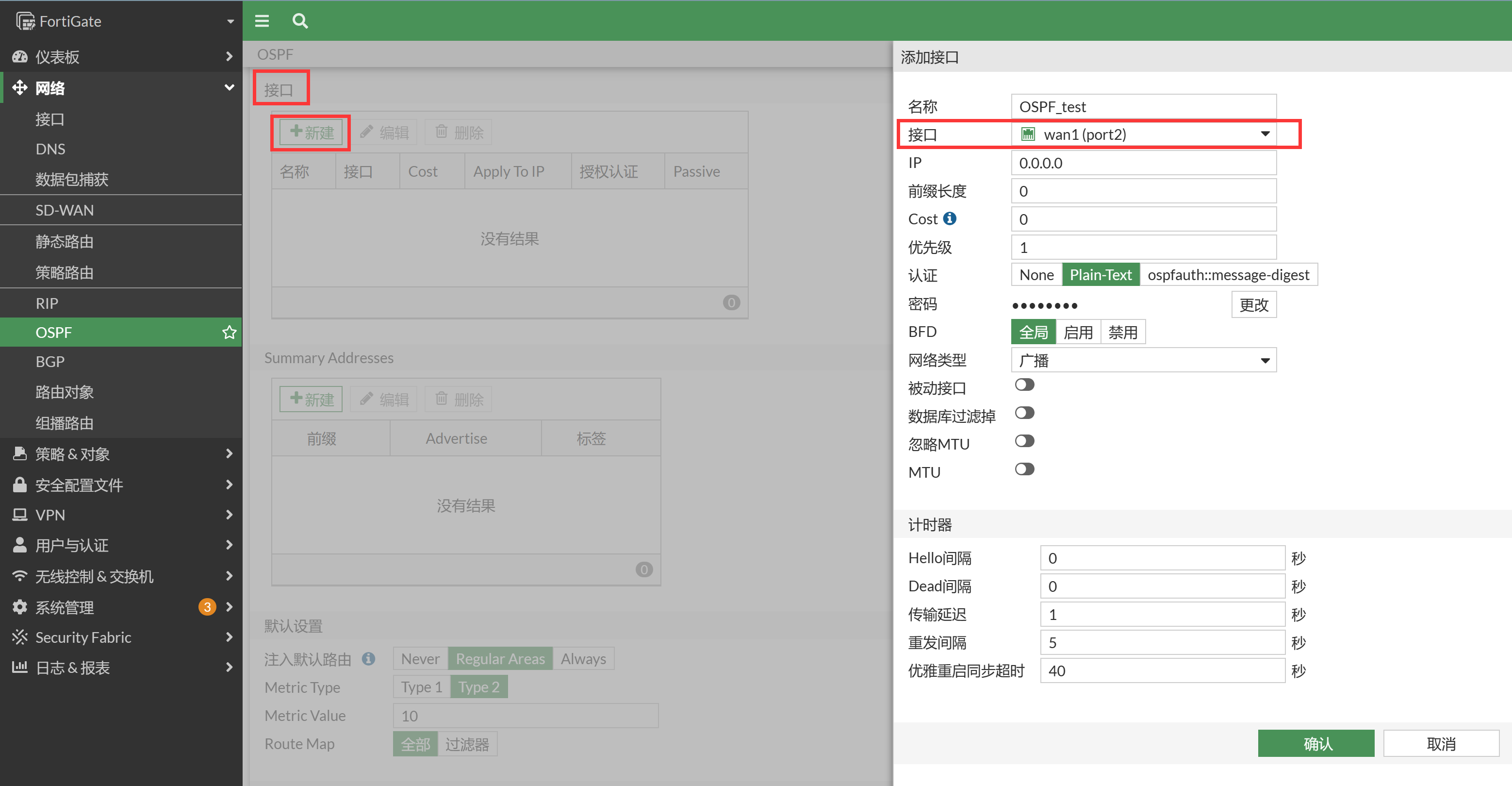
- 名称: 标识作用
- 接口:需要编辑的接口
- 认证: 是否需要对该接口进行 OSPF 的认证,支持 Plain-Text(明文),none(无),几种方式
- Cost:接口 OSPF cost 值,用于 SPF 的计算,值越小代表越可用于优先转发
- 密码: 输入 key 的秘钥
- 计时:
- Hello 间隔: hello 包的发送间隔默认为 10 秒,根据需要进行修改,对 OSPf 邻居协商时,该参数需要相同
- Dead 间隔: 默认为 40 秒,根据需要进行修改,对 OSPf 邻居协商时,该参数需要相同
对应的 CLI。
config router ospf
    set default-information-originate enable
    set router-id 1.1.1.1
    config area
        edit 0.0.0.0
        next
    end
    config network
        edit 1
            set prefix 1.1.1.0 255.255.255.0
        next
        edit 2
            set prefix 192.168.1.0 255.255.255.0
        next
    end
    config redistribute "connected"
        set status enable
    end
    config redistribute "static"
    end
    config redistribute "rip"
    end
    config redistribute "bgp"
    end
    config redistribute "isis"
    end
end
配置路由器。
配置接口IP:
interface e 0/1
ip address 1.1.1.2 255.255.255.0
interface e 0/2
ip address 192.168.2.1 255.255.255.0

配置OSPF:
router ospf 10
network 1.1.1.0 0.0.0.255 area 0
network 192.168.2.0 0.0.0.255 area 0    //该条目也可以采用直连分发的方式发布
结果验证
查看 FortiGate 的路由表,可以看到 FortiGate 学到了路由器发布的路由 192.168.2.0/24。
FortiGate # get router info routing-table all
Codes: K - kernel, C - connected, S - static, R - RIP, B - BGP
       O - OSPF, IA - OSPF inter area
       N1 - OSPF NSSA external type 1, N2 - OSPF NSSA external type 2
       E1 - OSPF external type 1, E2 - OSPF external type 2
       i - IS-IS, L1 - IS-IS level-1, L2 - IS-IS level-2, ia - IS-IS inter area
       * - candidate default

Routing table for VRF=0
S*      0.0.0.0/0 [10/0] via 192.168.118.1, port2, [1/0]
C       1.1.1.0/24 is directly connected, port3
C       192.168.1.0/24 is directly connected, port4
O       192.168.2.0/24 [110/11] via 1.1.1.2, port3, 00:00:33
C       192.168.100.0/24 is directly connected, port1
C       192.168.118.0/24 is directly connected, port2
查看路由器的路由表,可以看到路由器学到了 FortiGate 重发布的两个直连网段 192.168.1.0/24、192.168.118.0/24,以及 FortiGate 注入的默认路由。
Router#show ip route
Codes: L - local, C - connected, S - static, R - RIP, M - mobile, B - BGP
       D - EIGRP, EX - EIGRP external, O - OSPF, IA - OSPF inter area
       N1 - OSPF NSSA external type 1, N2 - OSPF NSSA external type 2
       E1 - OSPF external type 1, E2 - OSPF external type 2
       i - IS-IS, su - IS-IS summary, L1 - IS-IS level-1, L2 - IS-IS level-2
       ia - IS-IS inter area, * - candidate default, U - per-user static route
       o - ODR, P - periodic downloaded static route, H - NHRP, l - LISP
       a - application route
       + - replicated route, % - next hop override, p - overrides from PfR

Gateway of last resort is 1.1.1.1 to network 0.0.0.0

O*E2  0.0.0.0/0 [110/10] via 1.1.1.1, 00:00:49, Ethernet0/1
      1.0.0.0/8 is variably subnetted, 2 subnets, 2 masks
C        1.1.1.0/24 is directly connected, Ethernet0/1
L        1.1.1.2/32 is directly connected, Ethernet0/1
O     192.168.1.0/24 [110/11] via 1.1.1.1, 00:00:49, Ethernet0/1
      192.168.2.0/24 is variably subnetted, 2 subnets, 2 masks
C        192.168.2.0/24 is directly connected, Ethernet0/2
L        192.168.2.1/32 is directly connected, Ethernet0/2
O E2  192.168.118.0/24 [110/10] via 1.1.1.1, 00:00:49, Ethernet0/1
注意事项
route-ttl
在 HA 主备模式部署环境下,主机会将自己的路由转发表项(FIB)同步给备机。
默认配置下,当一个备机被选举成主机后,其会保留从原主机同步来的 FIB 表项 10s,同时动态路由进程会发起邻居建立过程,重新学习相关的动态路由。HA 切换 10s 后,从原主机同步来的 FIB 表项会被删除,如果在这 10s 内动态路由邻居没有建立,无法学习到动态路由表项,会造成 HA 切换后业务中断的情况。
建议 HA 主备模式 + 动态路由的部署模式下,在 HA 配置中配置 route-ttl 的时间可以覆盖新主机建立动态路由邻居与学习路由的时间,如下所示。
config system ha
    set route-ttl 120
end
graceful-restart
在 HA 主备模式 + 动态路由的部署环境下,默认配置下,当 HA 切换后(或动态路由进程重启),上下游的动态路由邻居设备会删除动态路由邻居,并删除从 FortiGate 学习到的动态路由,这也会造成 HA 切换后业务的中断。
解决方法是开启动态路由的 graceful-restart 功能(并配置 restart-period),FortiGate 与上下游动态路由邻居设备都需要开启 GR 功能。
config router ospf
    set restart-mode graceful-restart
    set restart-period 120
end
开启 GR 后,FortiGate 发生 HA 主备切换后,上下游的动态路由邻居设备会自动开启 GR Helper 模式,在此模式下,上下游的动态路由邻居不会删除 FortiGate HA 切换前与原主机的 OSPF 邻居关系与其学习到的动态路由,直到 FortiGate 的新主机与上下游邻居重新建立动态路由邻居或 FortiGate 配置的 restart-period(默认为 120s)到期。