

内网主机通过公网 IP 访问 VIP
内网主机通过公网 IP 访问 VIP
需求场景一
- PC 与 Server 对于 FortiGate 属于不同的接口、相同的网段。
- PC 与 Server 属于不同网段。
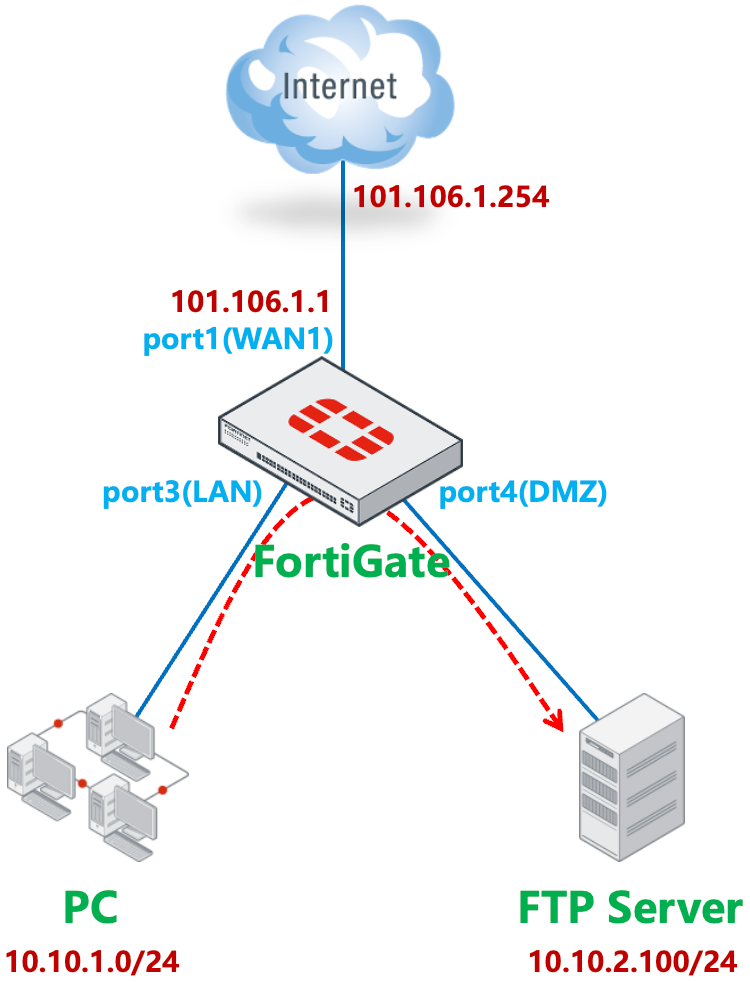
FortiGate 的 port1(WAN1)连接 ISP。默认路由 1 指向 port1(WAN1)。
重要
如果通过策略路由来控制内网 PC 访问 Internet,请参考本文注意事项章节中的说明。
FortiGate # get router info routing-table all

Routing table for VRF=0
S*      0.0.0.0/0 [10/0] via 101.106.1.254, port1, [1/0]
C       10.10.1.0/24 is directly connected, port3
C       10.10.2.0/24 is directly connected, port4
C       101.106.1.0/24 is directly connected, port1
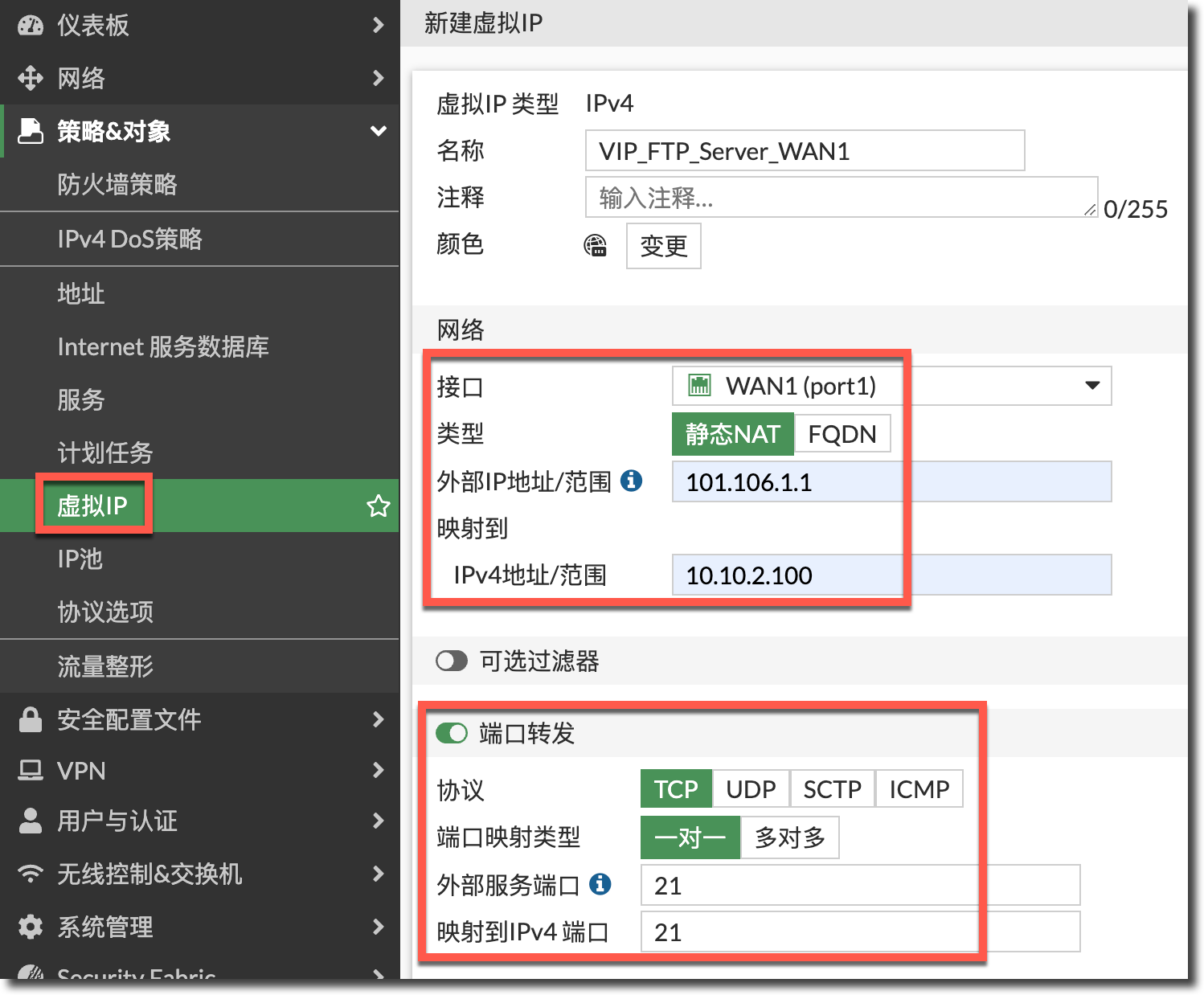
FortiGate 通过配置 VIP,在 port1(WAN1)的公网 IP 101.106.1.1 上映射了 FTP Server 的 21 端口。
内网 PC 通过 port1(WAN1)做 SNAT 访问互联网。
内网 PC 和 FTP Server 位于不同的 FortiGate 内网口下,属于不同网段。
内网 PC 需要通过 FortiGate 在 port1(WAN1)上映射的公网 IP 101.106.1.1(或通过域名解析得到此公网 IP)的 21 端口访问 FTP Server。
配置步骤
正常配置属于外网接口 port1(WAN1)的 VIP 条目,。
config firewall vip
    edit "VIP_FTP_Server_WAN1"
        set extip 101.106.1.1
        set mappedip "10.10.2.100"
        set extintf "port1"
        set portforward enable
        set extport 21
        set mappedport 21
    next
end
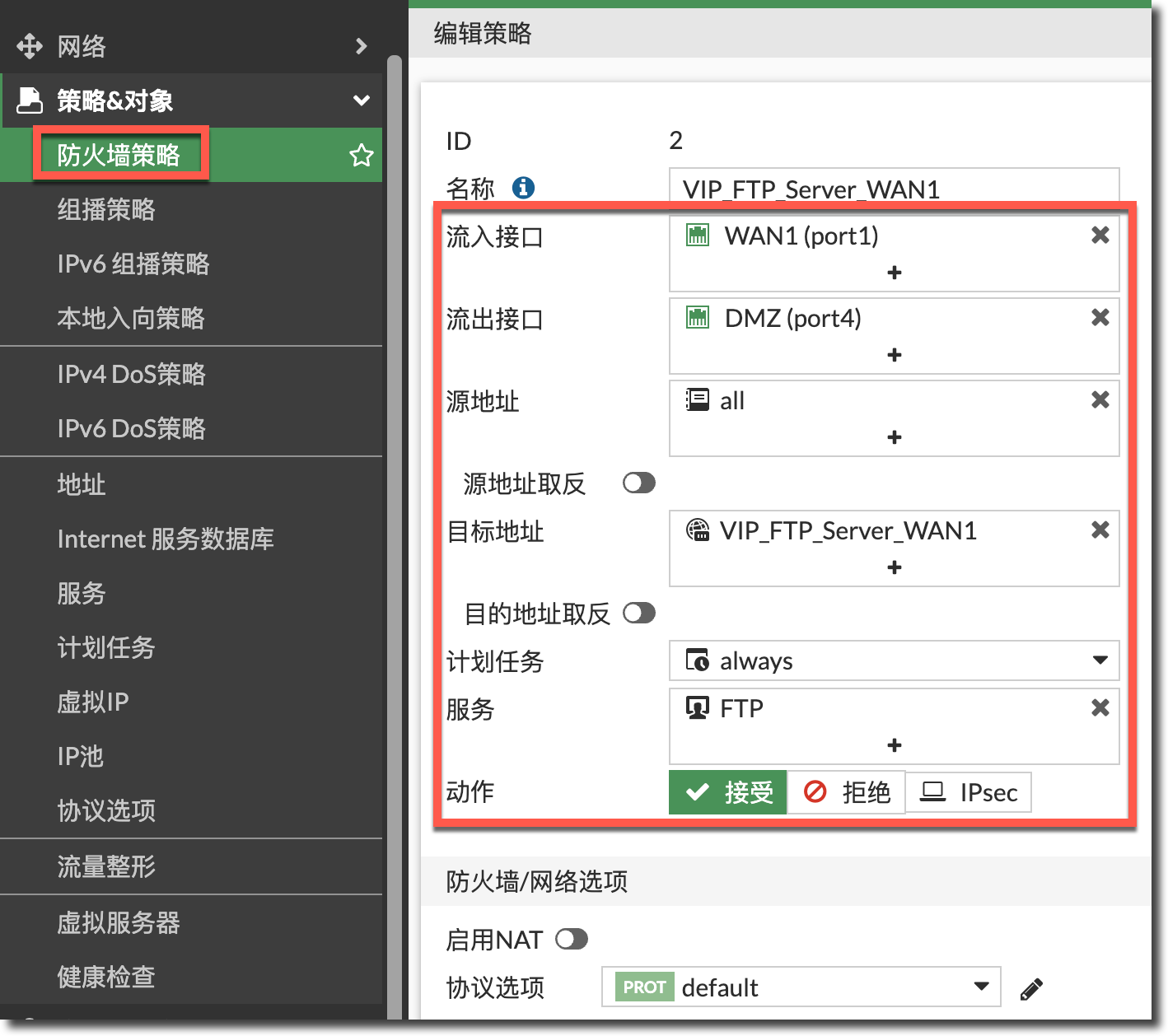
配置安全策略放通外网 port1(WAN1)到内网 port4(DMZ)且目的 IP 为 VIP 条目的策略,注意这里不用开启 SNAT。
重要
VIP 策略的“源地址”一定要包含 PC 所在网段,这里以“all”为例,既能包含外网访问 VIP 的流量,也包含 PC 所在网段。
config firewall policy
    edit 2
        set name "VIP_FTP_Server_WAN1"
        set srcintf "port1"
        set dstintf "port4"
        set action accept
        set srcaddr "all"
        set dstaddr "VIP_FTP_Server_WAN1"
        set schedule "always"
        set service "FTP"
    next
end
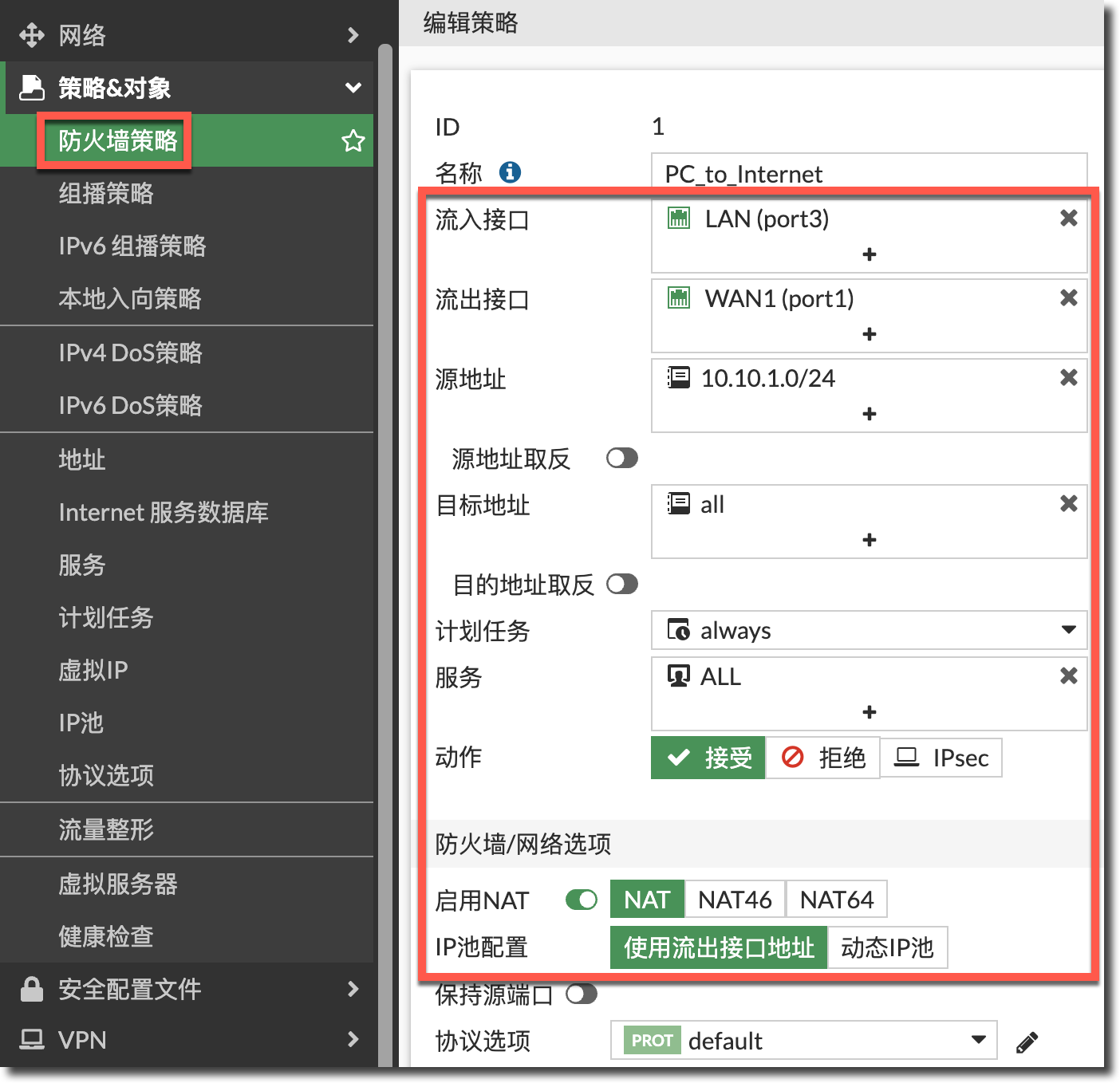
正常配置放通内网 port3(LAN)到外网 port1(WAN1)的上网策略。
config firewall policy
    edit 1
        set name "PC_to_Internet"
        set srcintf "port3"
        set dstintf "port1"
        set action accept
        set srcaddr "10.10.1.0/24"
        set dstaddr "all"
        set schedule "always"
        set service "ALL"
        set nat enable
    next
end
结果验证
内网 PC 就可以通过 FTP 服务器的 VIP 公网 IP 访问到 DMZ 区域的 FTP 服务器。
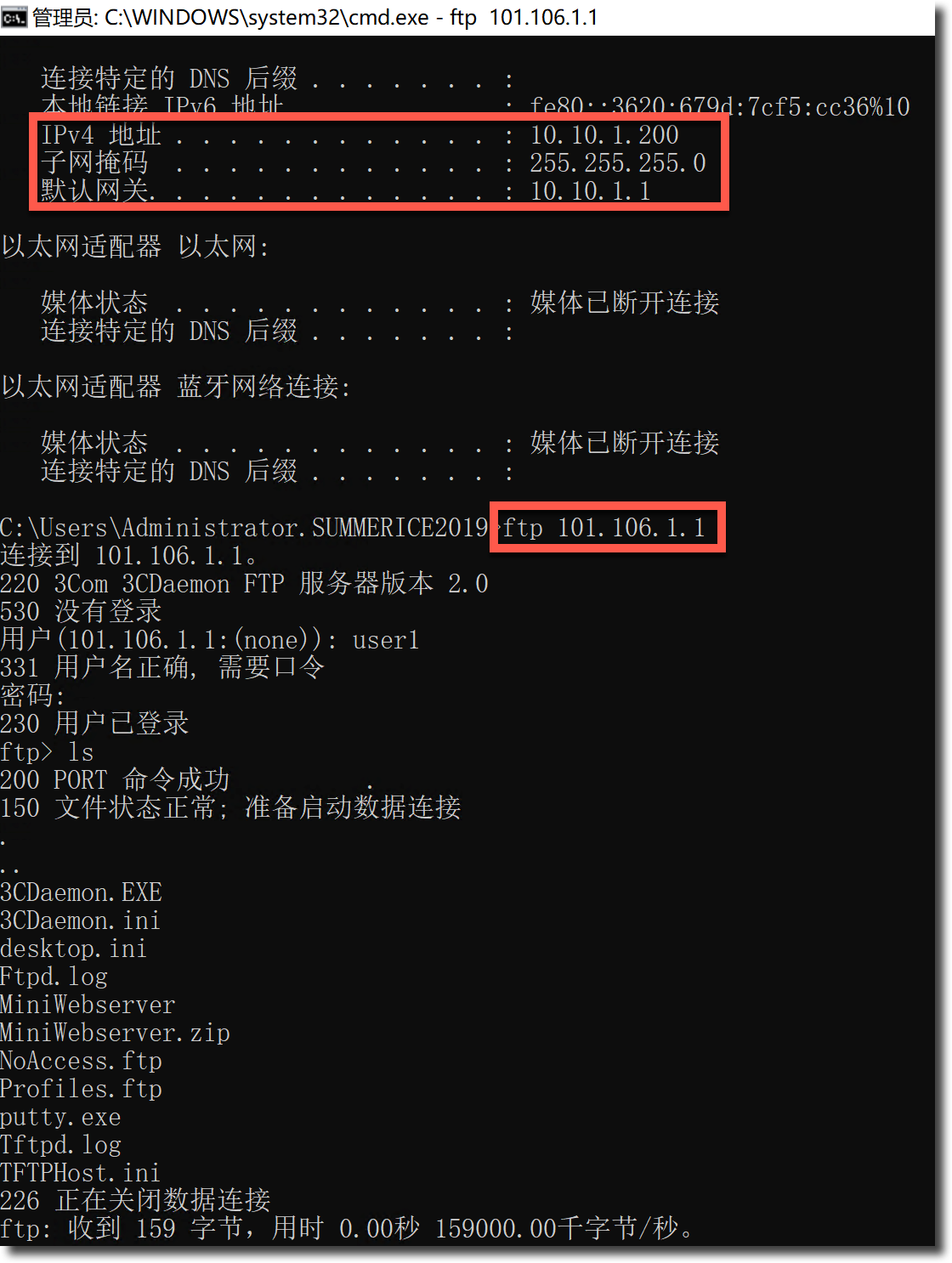
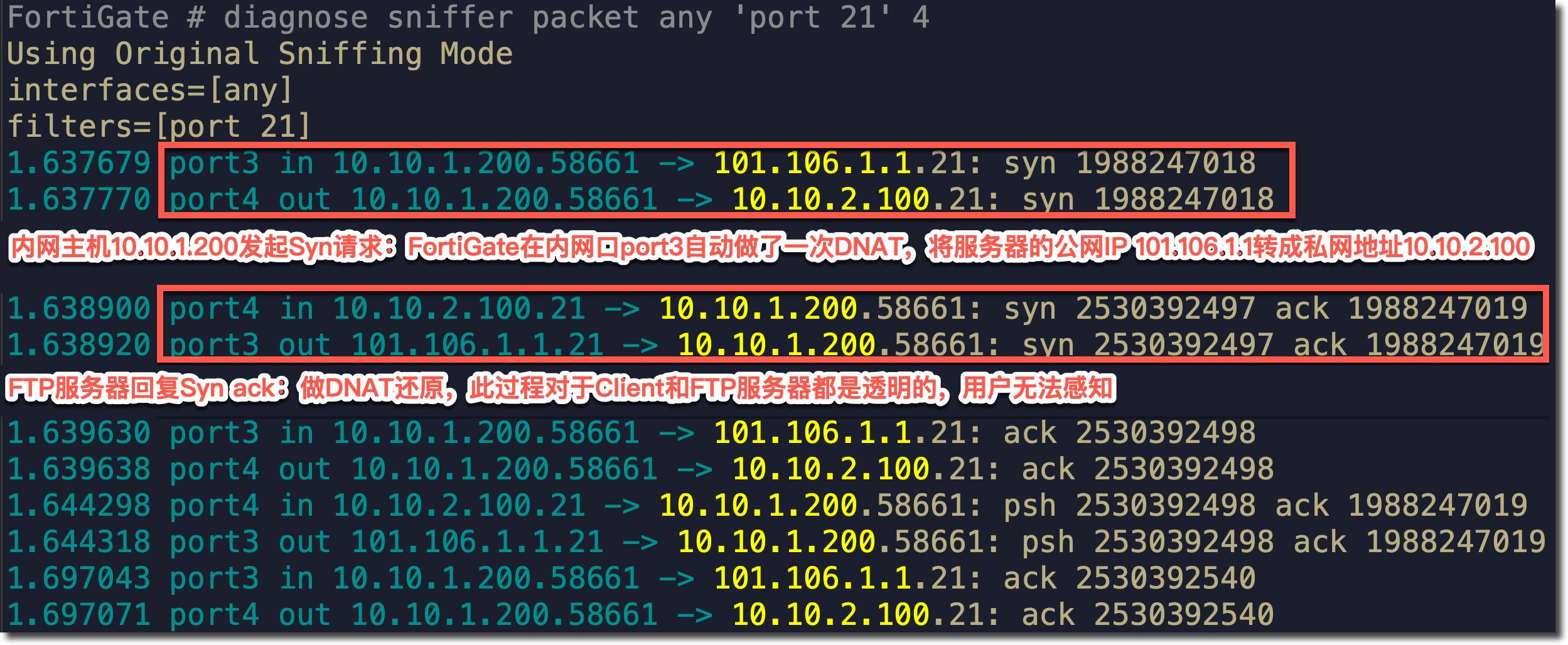
抓包分析
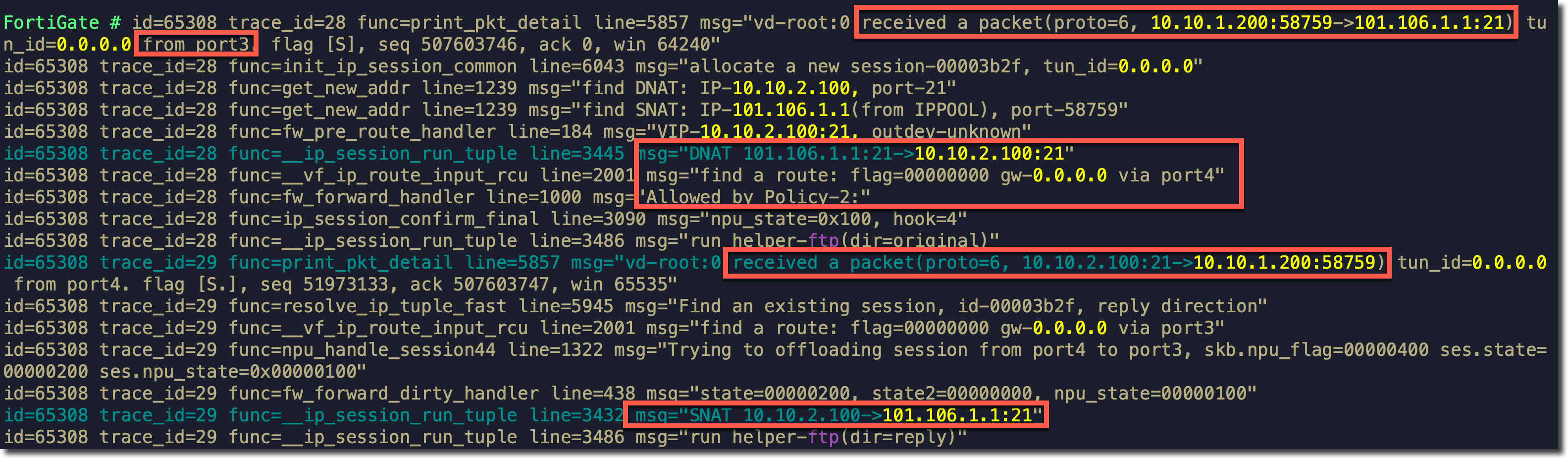
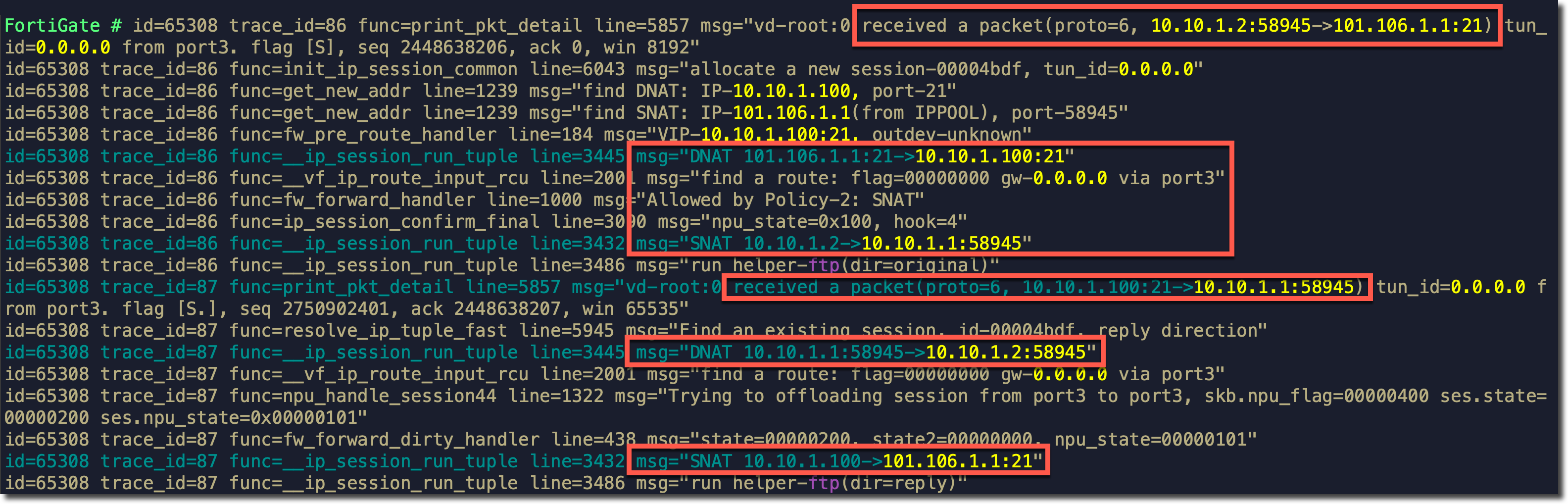
Debug Flow 分析
需求场景二
- PC 与 Server 对于 FortiGate 属于相同的接口、相同的网段。
- PC 与 Server 属于相同网段。
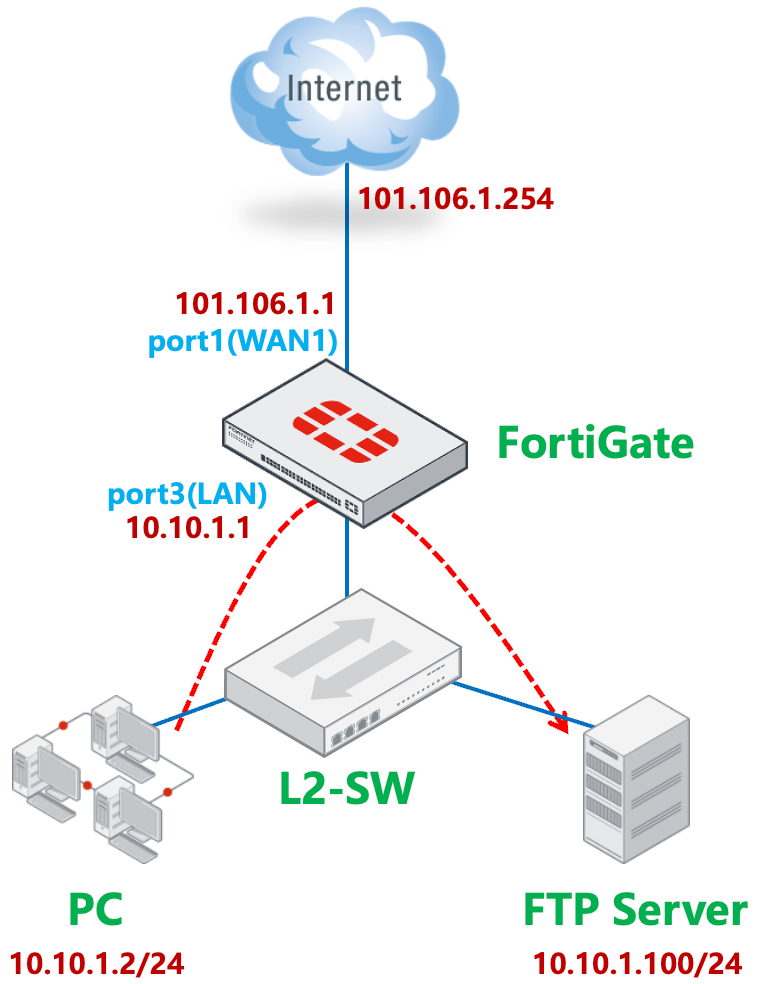
FortiGate 的 port1(WAN1)连接 ISP。默认路由 1 指向 port1(WAN1)。
重要
如果通过策略路由来控制内网 PC 访问 Internet,请参考本文注意事项章节中的说明。
FortiGate # get router info routing-table all

Routing table for VRF=0
S*      0.0.0.0/0 [10/0] via 101.106.1.254, port1, [1/0]
C       10.10.1.0/24 is directly connected, port3
C       101.106.1.0/24 is directly connected, port1
FortiGate 通过配置 VIP,在 port1(WAN1)的公网 IP 101.106.1.1 上映射了 FTP Server 的 21 端口。
内网 PC 通过 port1(WAN1)做 SNAT 访问互联网。
内网 PC 和 FTP Server 位于相同的二层交换机下,与 FortiGate 的 port3(LAN)接口都属于同一网段。
内网 PC 需要通过 FortiGate 在 port1(WAN1)上映射的公网 IP 101.106.1.1(或通过域名解析得到此公网 IP)的 21 端口访问 FTP Server。
配置步骤
正常配置属于外网接口 port1(WAN1)的 VIP 条目,。
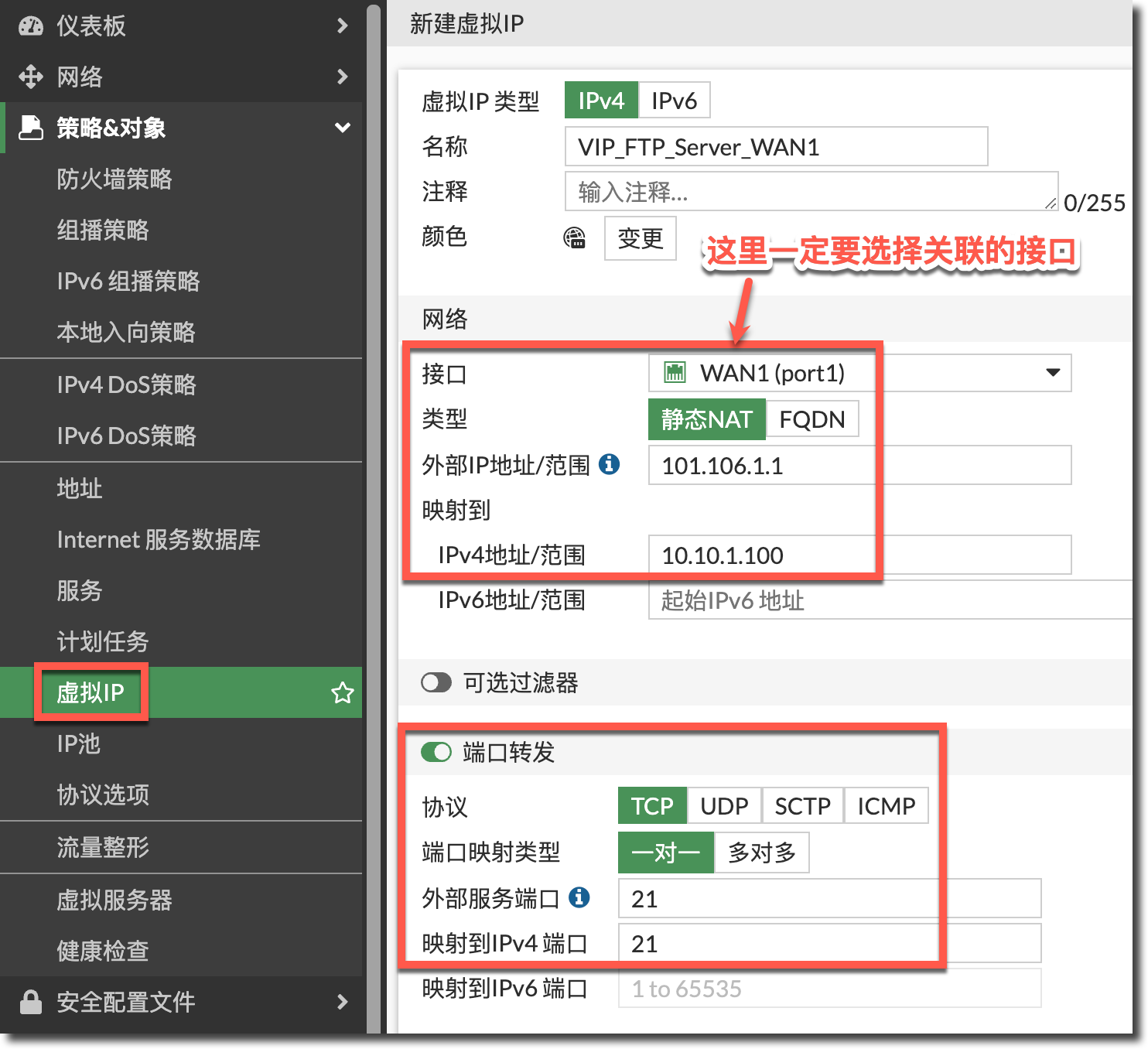
config firewall vip
    edit "VIP_FTP_Server_WAN1"
        set extip 101.106.1.1
        set mappedip "10.10.1.100"
        set extintf "port1"
        set portforward enable
        set extport 21
        set mappedport 21
    next
end
配置安全策略放通外网 port1(WAN1)到内网 port3(LAN)且目的 IP 为 VIP 条目的策略,注意这里不用开启 SNAT。
重要
VIP 策略的“源地址”一定要包含 PC 所在网段,这里以“all”为例,既能包含外网访问 VIP 的流量,也包含 PC 所在网段。
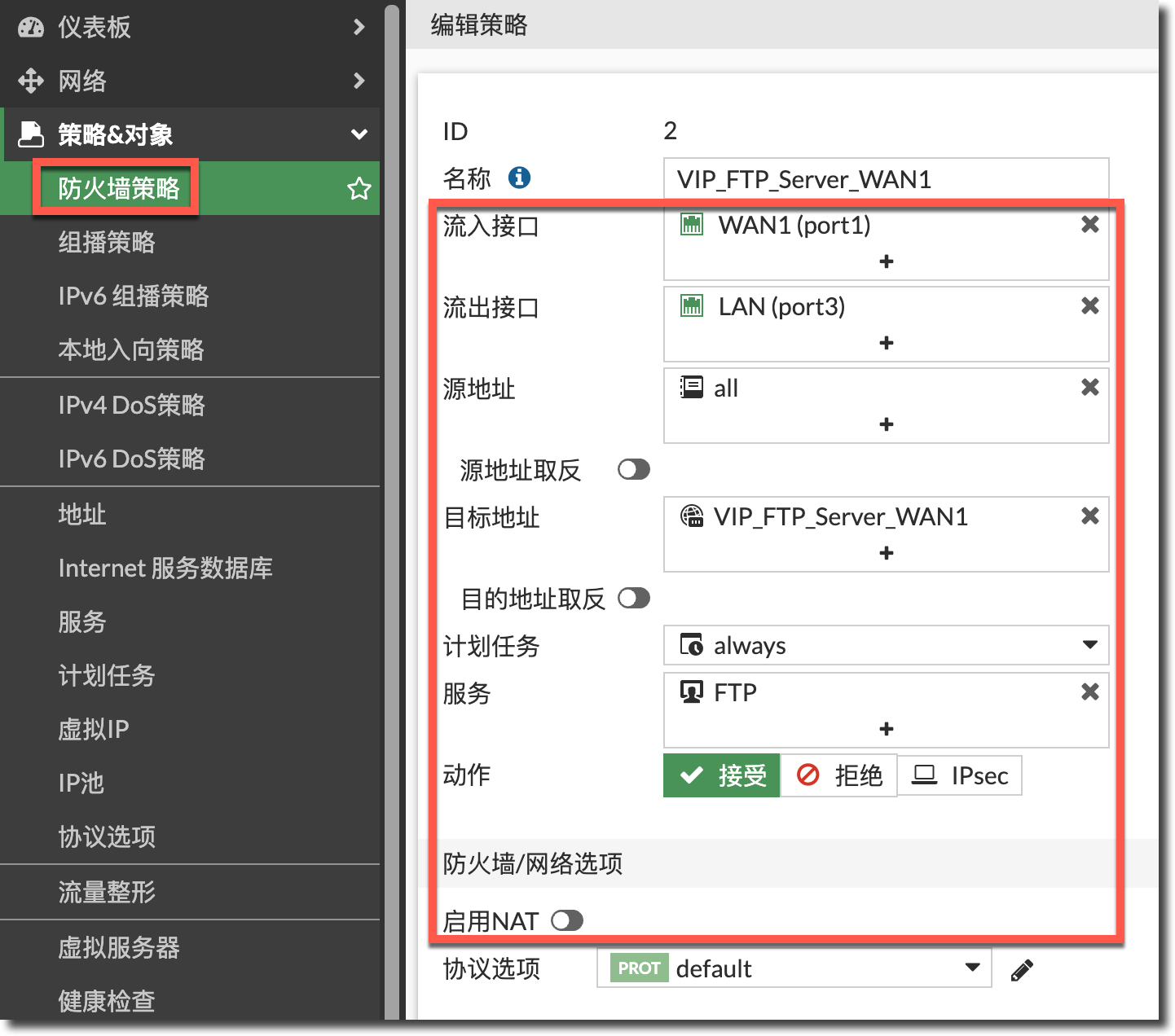
config firewall policy
    edit 2
        set name "VIP_FTP_Server_WAN1"
        set srcintf "port1"
        set dstintf "port3"
        set action accept
        set srcaddr "all"
        set dstaddr "VIP_FTP_Server_WAN1"
        set schedule "always"
        set service "FTP"
    next
end
正常配置放通内网 port3(LAN)到外网 port1(WAN1)的上网策略。
config firewall policy
    edit 1
        set name "PC_to_Internet"
        set srcintf "port3"
        set dstintf "port1"
        set action accept
        set srcaddr "10.10.1.0/24"
        set dstaddr "all"
        set schedule "always"
        set service "ALL"
        set nat enable
    next
end
结果验证
内网 PC 就可以通过 FTP 服务器的 VIP 公网 IP 访问到 LAN 区域的 FTP 服务器。
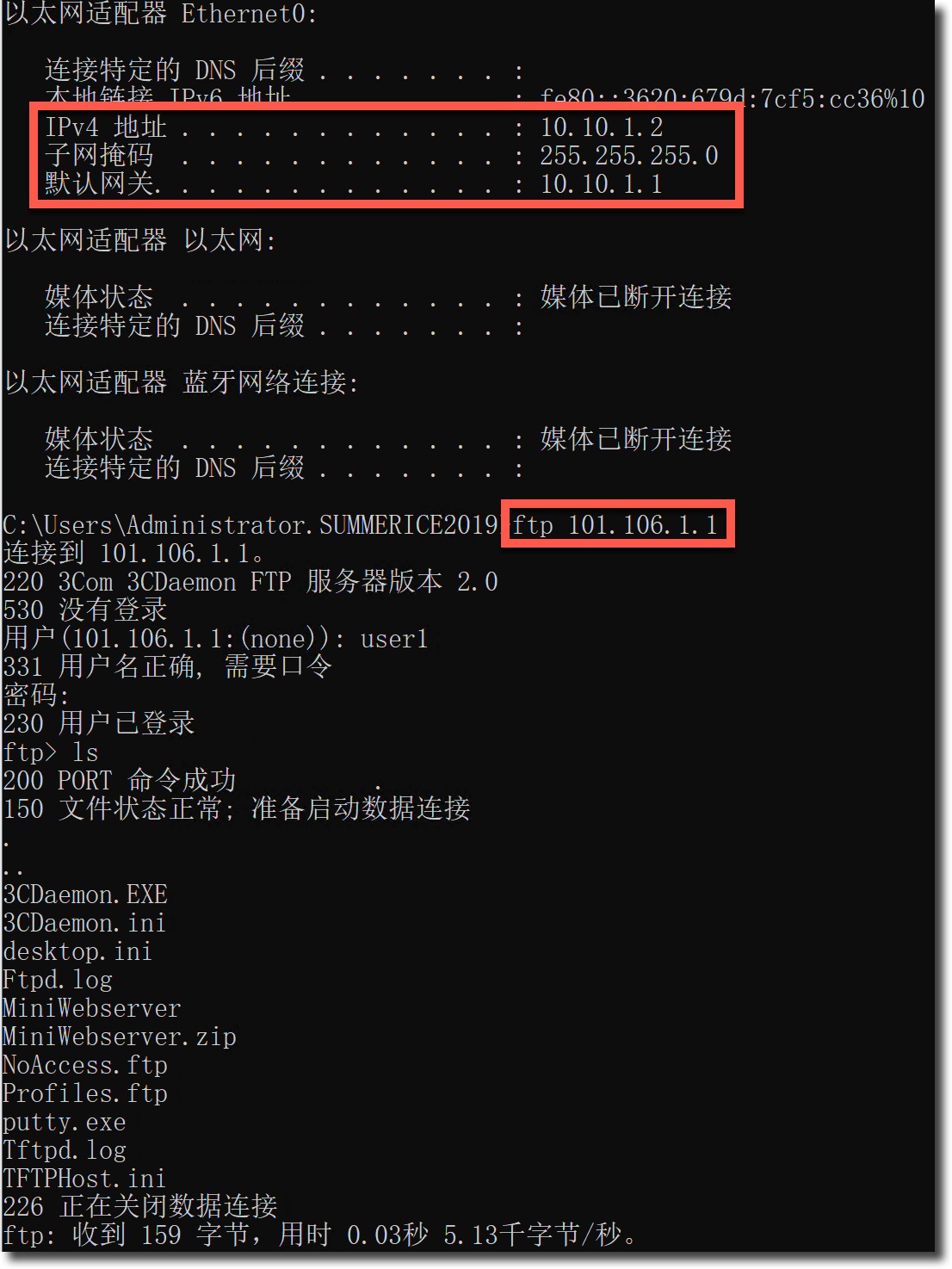
抓包分析
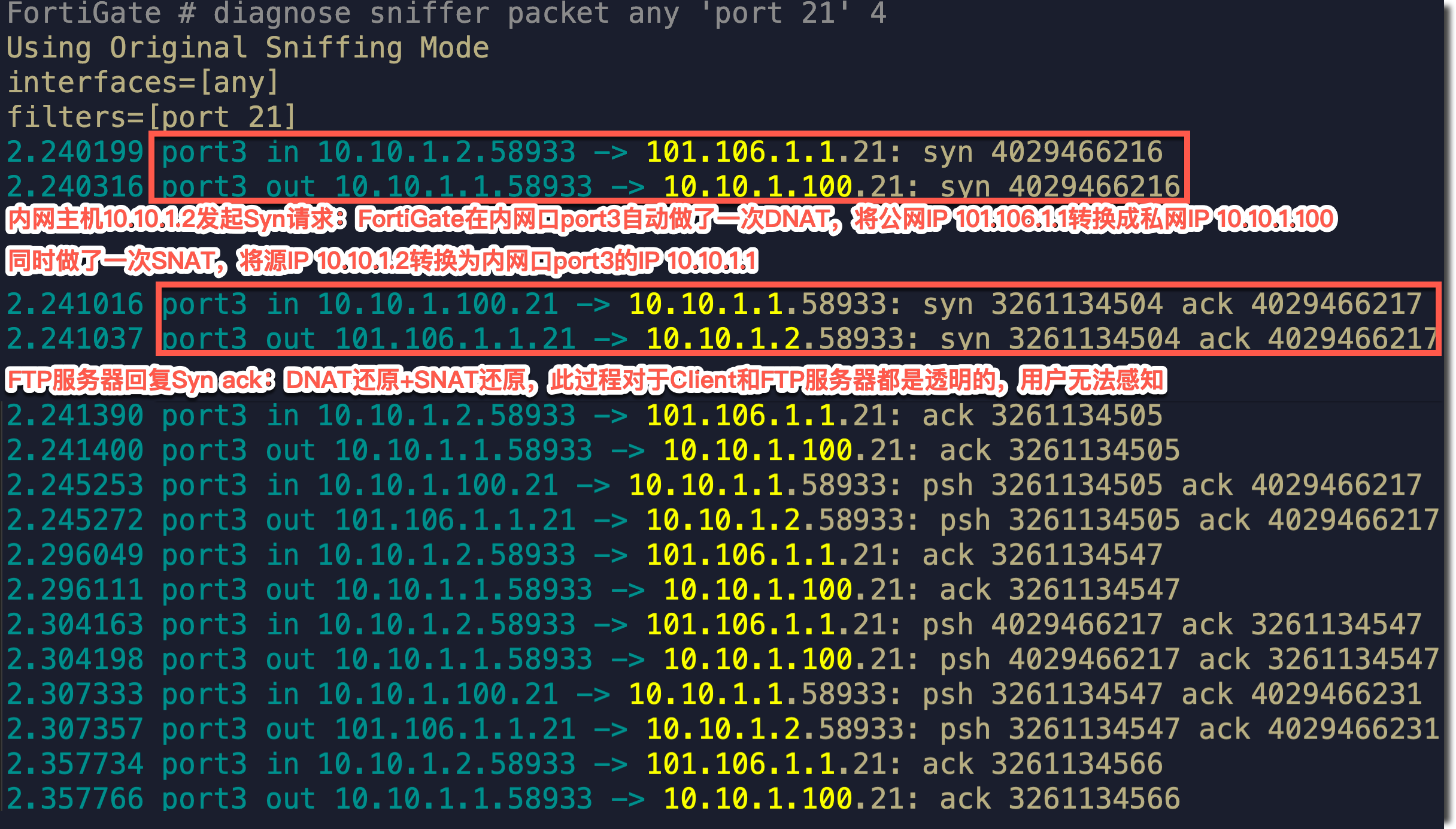
Debug Flow 分析
需求场景三
- PC 与 Server 对于 FortiGate 属于相同的接口、不同的网段。
- PC 与 Server 属于不同网段。
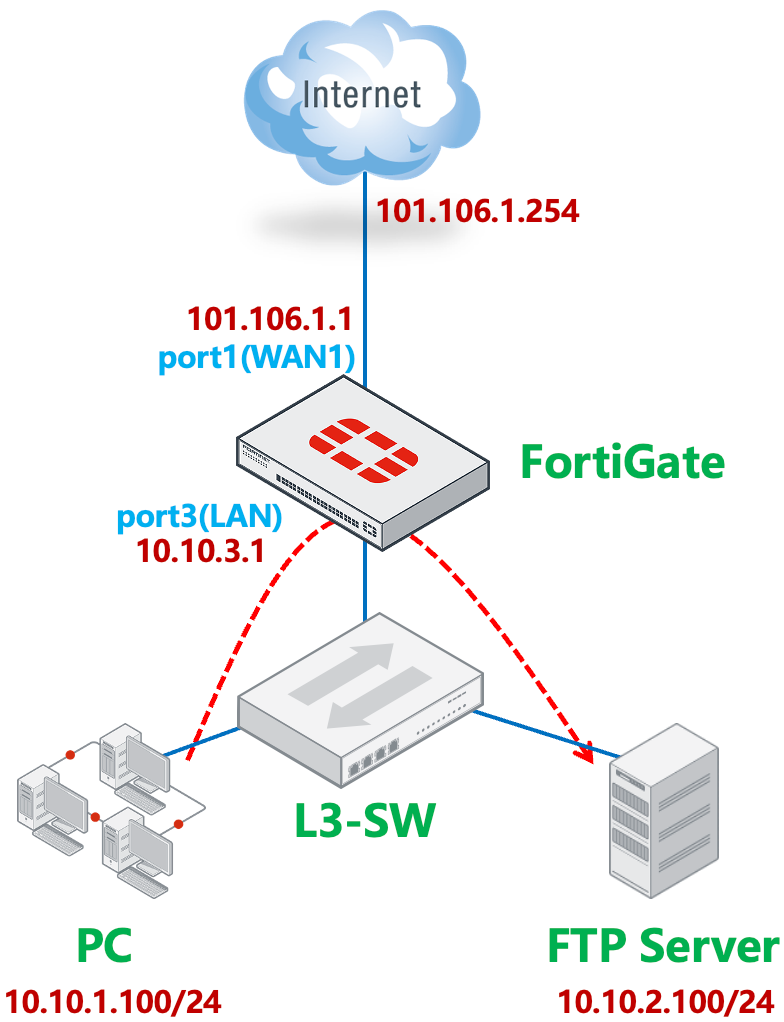
FortiGate 的 port1(WAN1)连接 ISP。默认路由 1 指向 port1(WAN1)。
重要
如果通过策略路由来控制内网 PC 访问 Internet,请参考本文注意事项章节中的说明。
FortiGate # get router info routing-table all

Routing table for VRF=0
S*      0.0.0.0/0 [10/0] via 101.106.1.254, port1, [1/0]
C       10.10.3.0/24 is directly connected, port3
C       101.106.1.0/24 is directly connected, port1
FortiGate 通过配置 VIP,在 port1(WAN1)的公网 IP 101.106.1.1 上映射了 FTP Server 的 21 端口。
内网 PC 通过 port1(WAN1)做 SNAT 访问互联网。
内网 PC 和 FTP Server 属于不同网段,网关位于同一个三层交换机下。
内网 PC、FTP Server 与 FortiGate 的 port3(LAN)接口属于不同网段。
内网 PC 需要通过 FortiGate 在 port1(WAN1)上映射的公网 IP 101.106.1.1(或通过域名解析得到此公网 IP)的 21 端口访问 FTP Server。
配置步骤
参考需求场景二的配置即可。
需求场景四
- PC 与 Server 对于 FortiGate 属于不同的接口、不同的网段。
- PC 与 Server 属于不同网段。
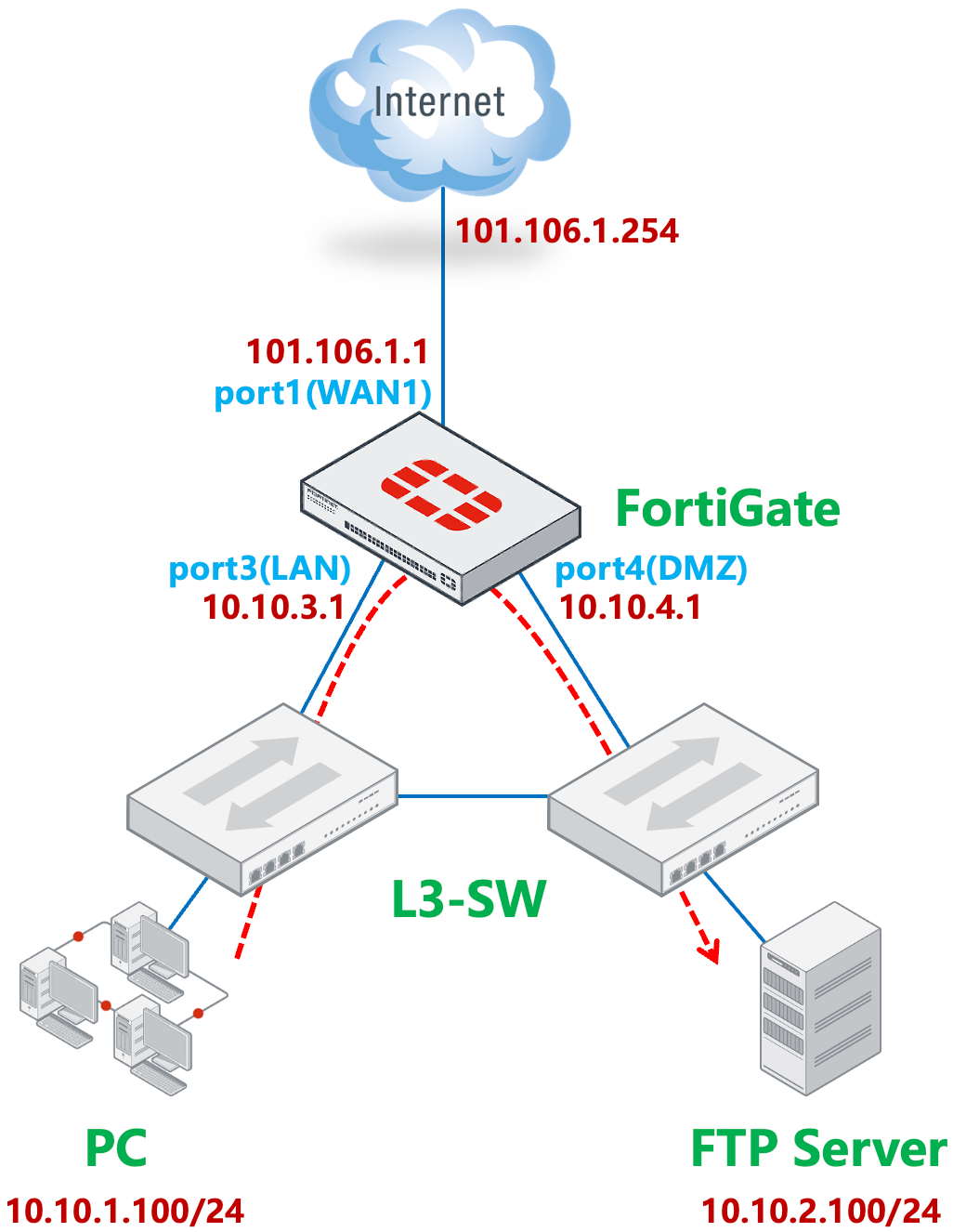
FortiGate 的 port1(WAN1)连接 ISP。默认路由 1 指向 port1(WAN1)。
重要
如果通过策略路由来控制内网 PC 访问 Internet,请参考本文注意事项章节中的说明。
FortiGate # get router info routing-table all

Routing table for VRF=0
S*      0.0.0.0/0 [10/0] via 101.106.1.254, port1, [1/0]
S       10.10.1.0/24 [10/0] via 10.10.3.2, port3, [1/0]
S       10.10.2.0/24 [10/0] via 10.10.4.2, port4, [1/0]
C       10.10.3.0/24 is directly connected, port3
C       10.10.4.0/24 is directly connected, port4
C       101.106.1.0/24 is directly connected, port1
FortiGate 通过配置 VIP,在 port1(WAN1)的公网 IP 101.106.1.1 上映射了 FTP Server 的 21 端口。
内网 PC 通过 port1(WAN1)做 SNAT 访问互联网。
内网 PC 和 FTP Server 位于不同的 3 层交换机下,属于不同网段,网关为各自相连的 L3-SW,且 PC 可以和 FTP Server 通过两台 L3-SW 直接通信。两台 L3-SW 与 FortiGate 的 2 个接口分别三层互联,两台 L3-SW 的网关都指向 FortiGate。
内网 PC 需要通过 FortiGate 在 port1(WAN1)上映射的公网 IP 101.106.1.1(或通过域名解析得到此公网 IP)的 21 端口访问 FTP Server。
配置步骤
正常配置属于外网接口 port1(WAN1)的 VIP 条目,。
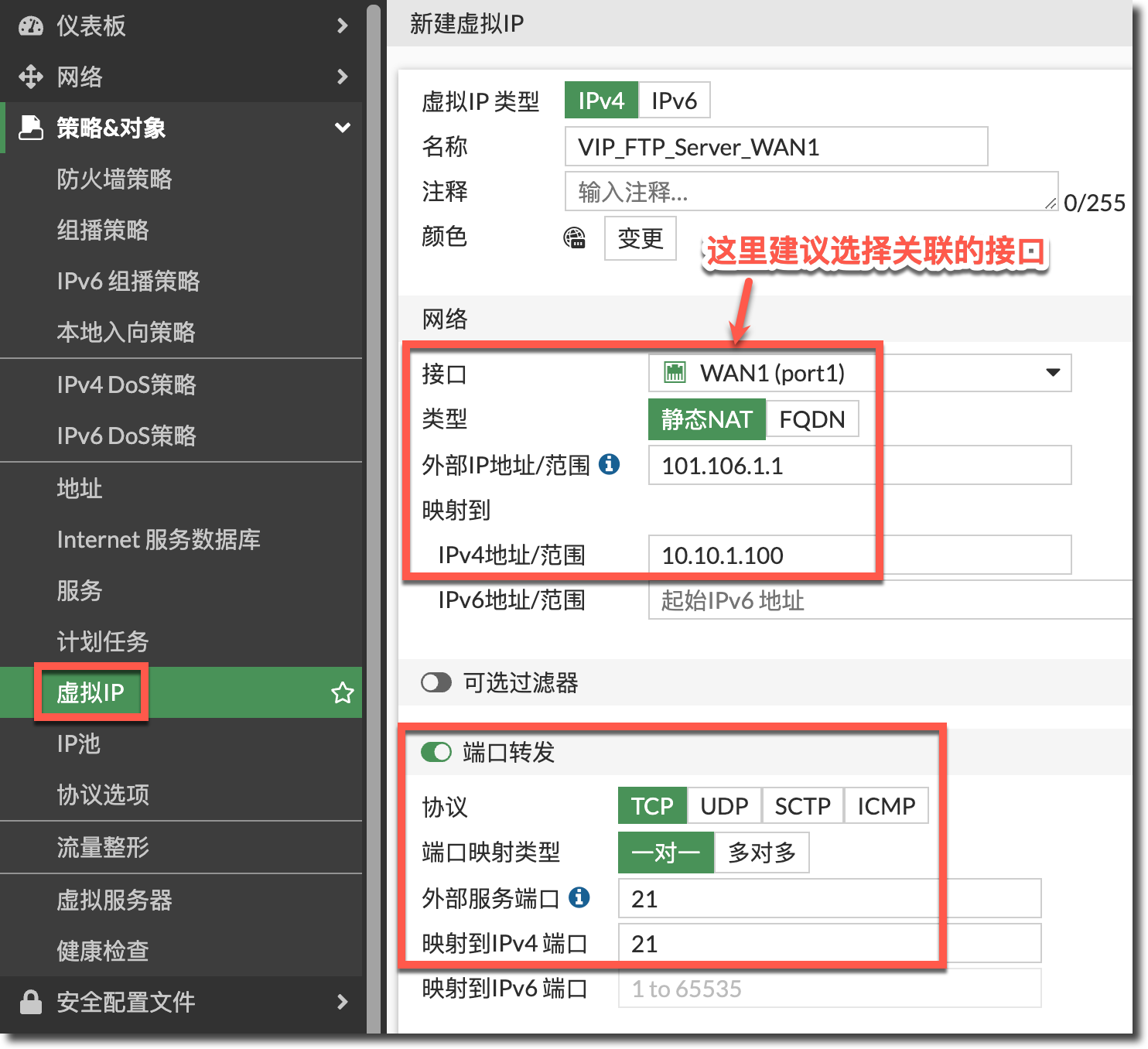
config firewall vip
    edit "VIP_FTP_Server_WAN1"
        set extip 101.106.1.1
        set mappedip "10.10.2.100"
        set extintf "port1"
        set portforward enable
        set extport 21
        set mappedport 21
    next
end
配置安全策略:公网 port1(WAN1)到 port4(DMZ),源地址为内网 PC 网段 10.10.1.0/24,且目的 IP 为 VIP 条目的策略,注意这条策略开启 SNAT,用于内网 PC 对 VIP 的访问。
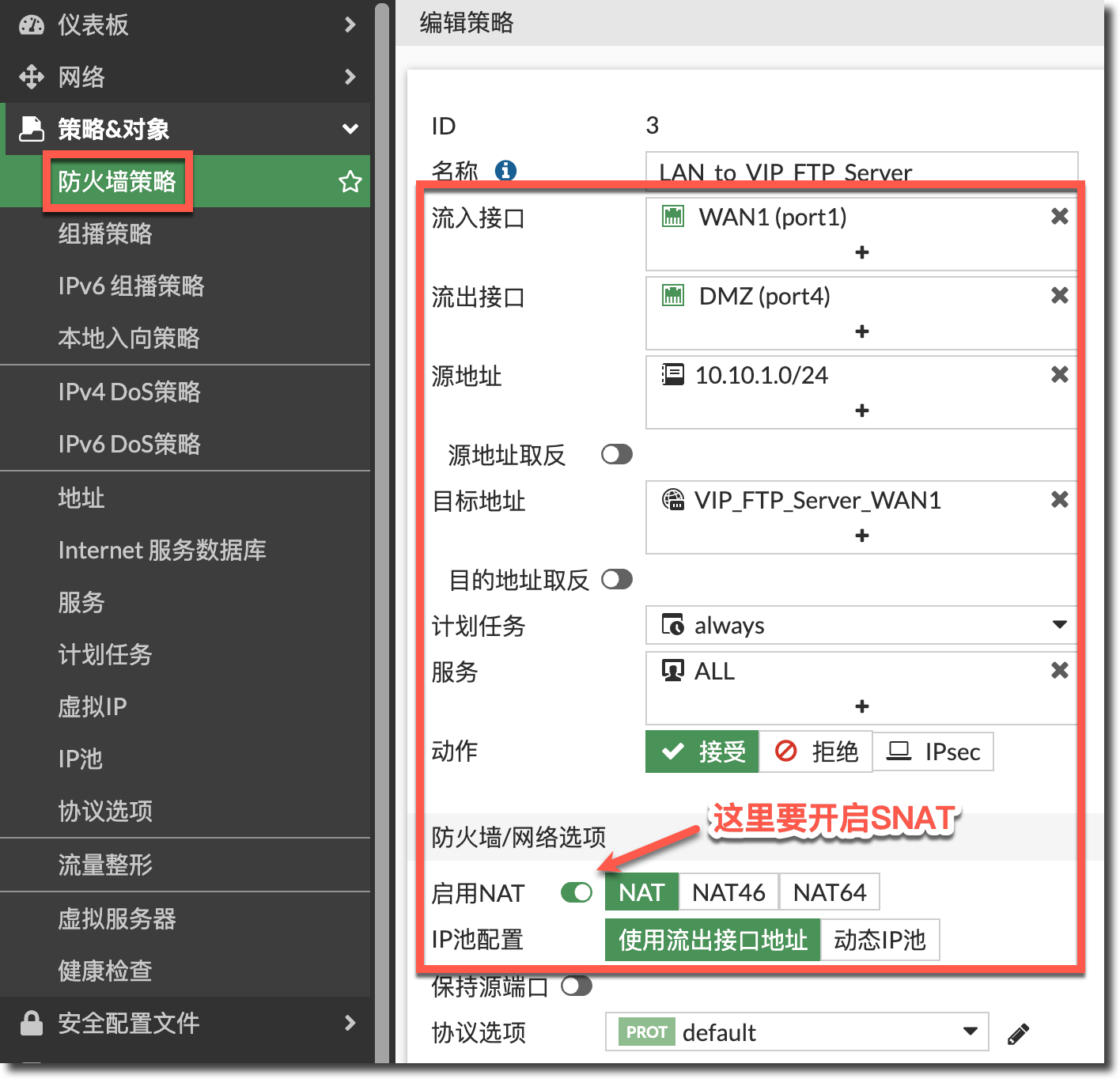
config firewall policy
    edit 3
        set name "LAN_to_VIP_FTP_Server"
        set srcintf "port1"
        set dstintf "port4"
        set action accept
        set srcaddr "10.10.1.0/24"
        set dstaddr "VIP_FTP_Server_WAN1"
        set schedule "always"
        set service "ALL"
        set nat enable
    next
end
配置安全策略放通外网 port1(WAN1)到内网 port4(DMZ)且目的 IP 为 VIP 条目的策略,注意这里不用开启 SNAT,用于外网客户端对 VIP 的访问。
重要
VIP 策略的“源地址”一定要包含 PC 所在网段,这里以“all”为例,既能包含外网访问 VIP 的流量,也包含 PC 所在网段。
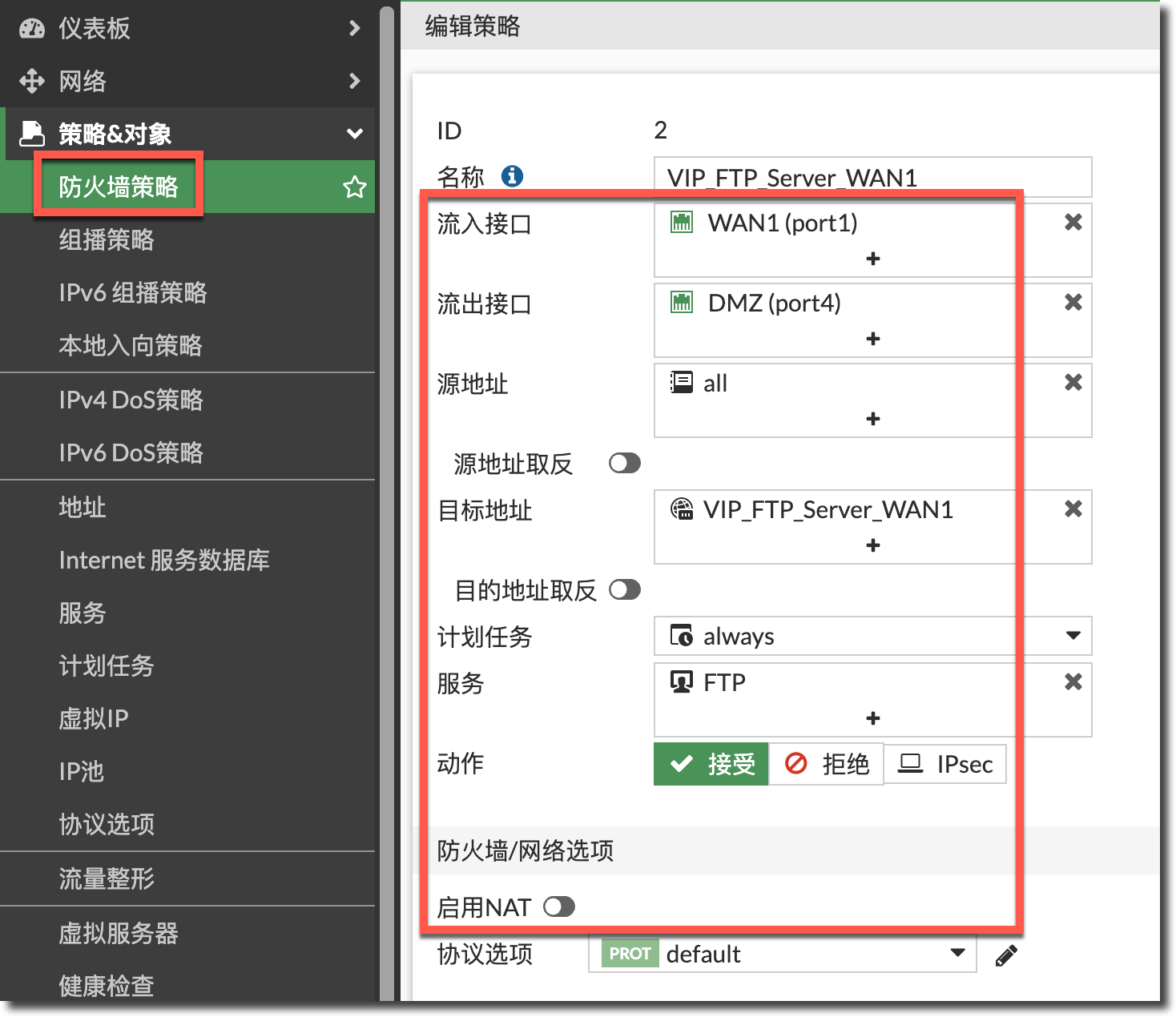
config firewall policy
    edit 2
        set name "VIP_FTP_Server_WAN1"
        set srcintf "port1"
        set dstintf "port4"
        set action accept
        set srcaddr "all"
        set dstaddr "VIP_FTP_Server_WAN1"
        set schedule "always"
        set service "FTP"
    next
end
正常配置放通内网 port3(LAN)到外网 port1(WAN1)的上网策略。
config firewall policy
    edit 1
        set name "PC_to_Internet"
        set srcintf "port3"
        set dstintf "port1"
        set action accept
        set srcaddr "10.10.1.0/24"
        set dstaddr "all"
        set schedule "always"
        set service "ALL"
        set nat enable
    next
end
注意策略顺序如下。

结果验证
内网 PC 就可以通过 FTP 服务器的 VIP 公网 IP 访问到 DMZ 区域的 FTP 服务器。
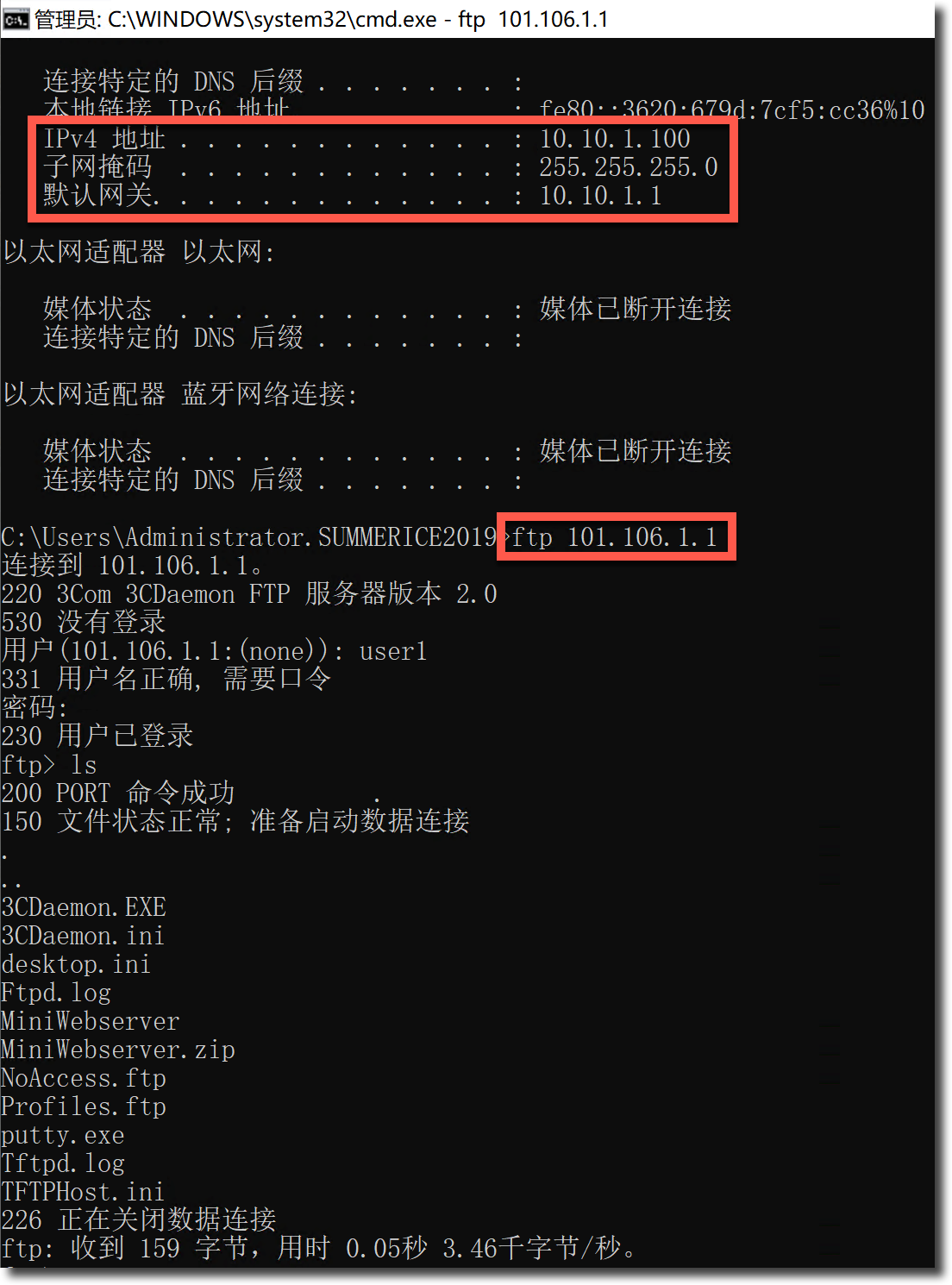
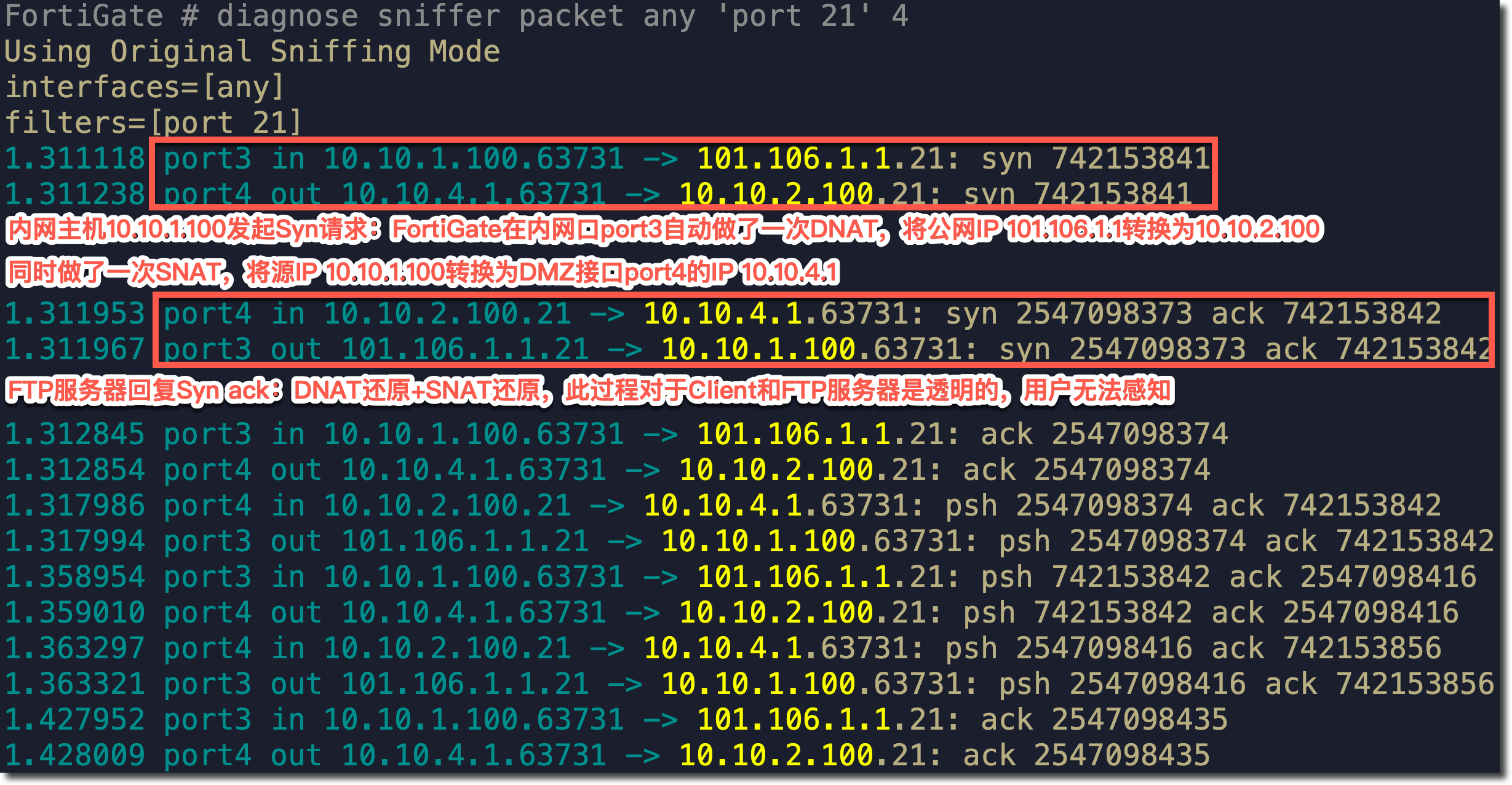
抓包分析
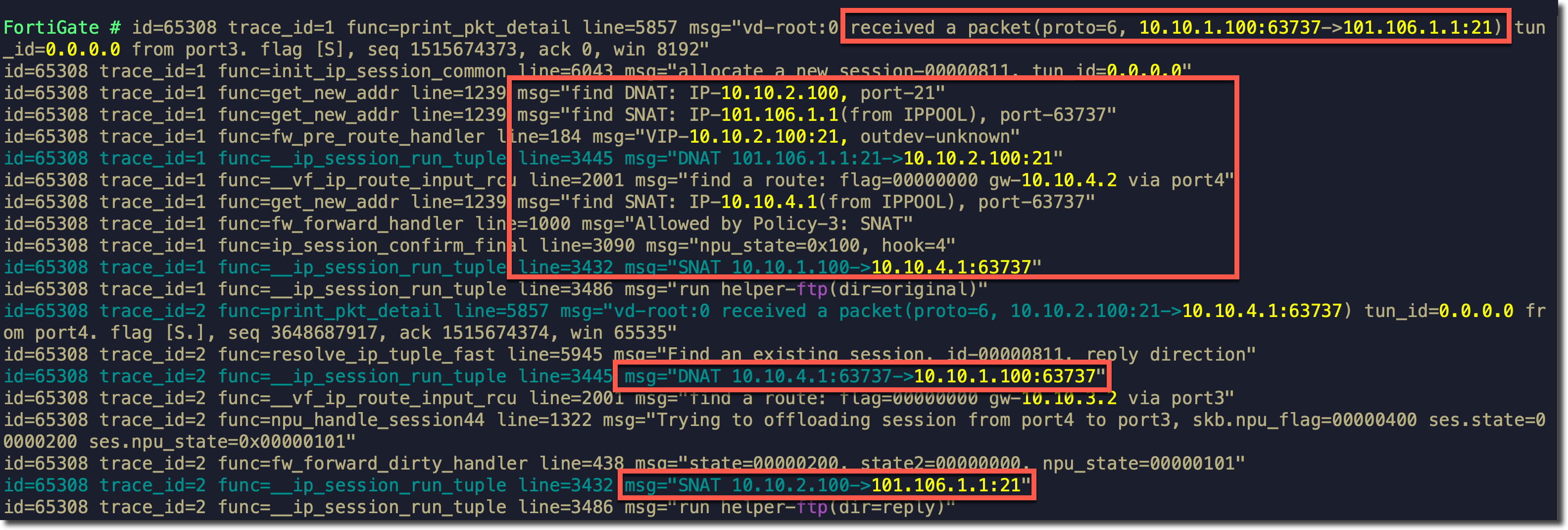
Debug Flow 分析
需求场景五
- PC 与 Server 对于 FortiGate 属于不同的接口、相同的网段。
- PC 与 Server 属于不同网段。
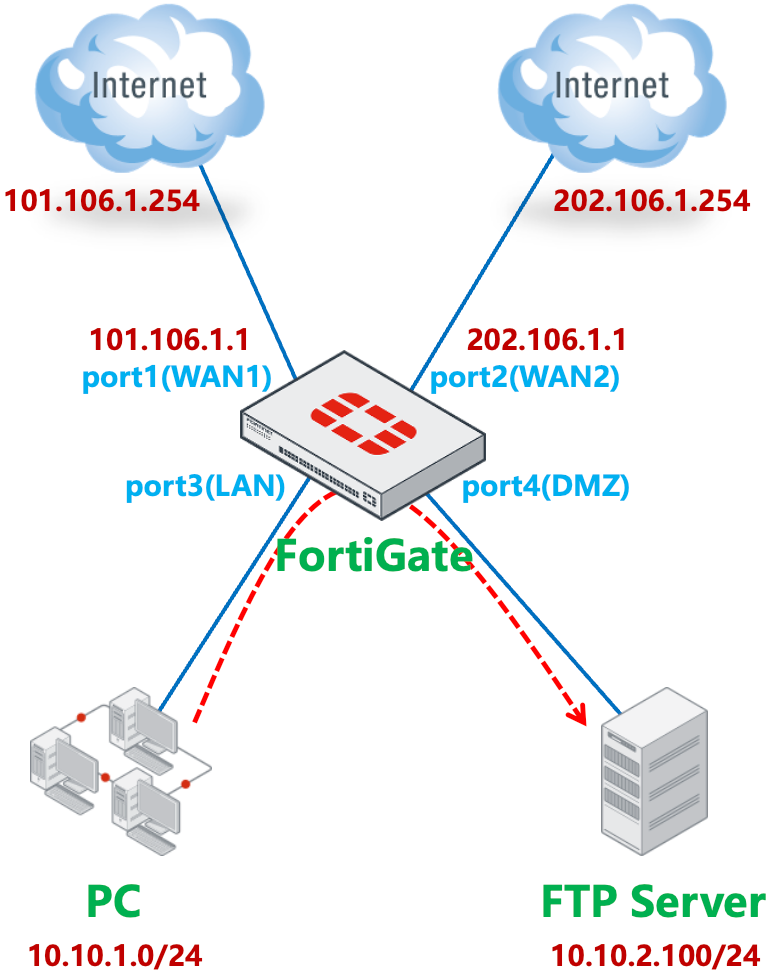
FortiGate 的 port1(WAN1)和 port2(WAN2)分别连接两个 ISP。默认路由 1 指向 port1(WAN1),路由优先级为 10,默认路由 2 指向 port2(WAN2),路由优先级为 20。
重要
如果通过策略路由来控制内网 PC 访问 Internet,请参考本文注意事项章节中的说明。
FortiGate # get router info routing-table all

Routing table for VRF=0
S*      0.0.0.0/0 [10/0] via 101.106.1.254, port1, [10/0]
                  [10/0] via 202.106.1.254, port2, [20/0]
C       10.10.1.0/24 is directly connected, port3
C       10.10.2.0/24 is directly connected, port4
C       101.106.1.0/24 is directly connected, port1
C       202.106.1.0/24 is directly connected, port2
FortiGate 通过配置 VIP,在 port2(WAN2)的公网 IP 202.106.1.1 上映射了 FTP Server 的 21 端口。
内网 PC 通过 port1(WAN1)做 SNAT 访问互联网(备用通过 port2 上网)。
内网 PC 需要通过 FortiGate 在 port2(WAN2)上映射的公网 IP 202.106.1.1(或通过域名解析得到此公网 IP)的 21 端口访问 FTP Server。
配置步骤
正常配置属于外网接口 port2(WAN2)的 VIP 条目,。
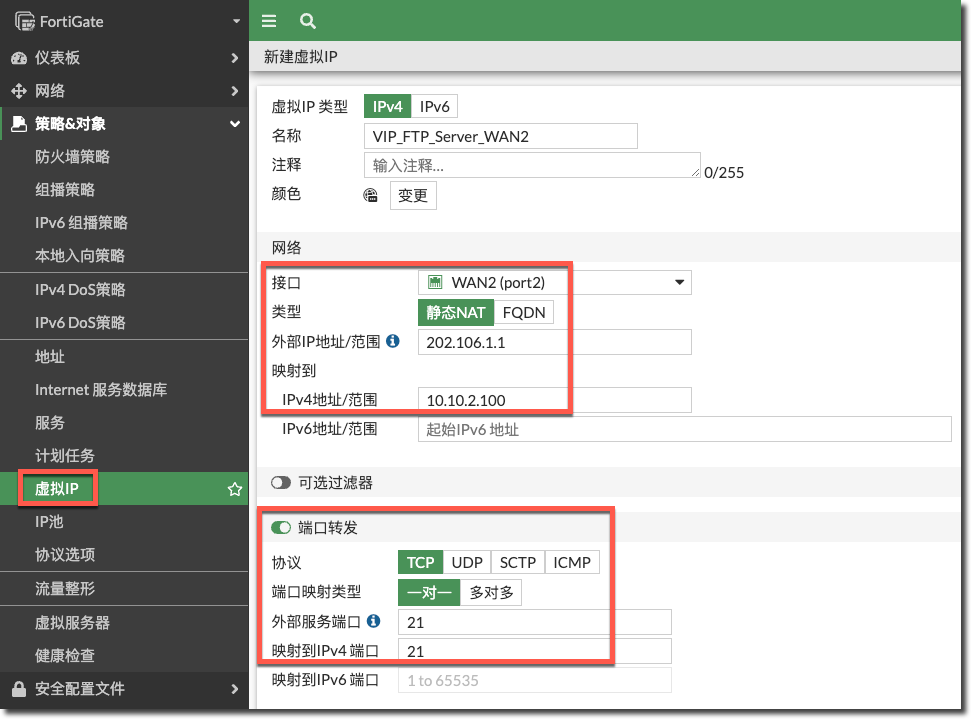
config firewall vip
    edit "VIP_FTP_Server_WAN2"
        set extip 202.106.1.1
        set mappedip "10.10.2.100"
        set extintf "port2"
        set portforward enable
        set extport 21
        set mappedport 21
    next
end
配置安全策略放通外网 port2(WAN2)到内网 port4(DMZ)且目的 IP 为 VIP 条目的策略,注意这里不用开启 SNAT。
重要
VIP 策略的“源地址”一定要包含 PC 所在网段,这里以“all”为例,既能包含外网访问 VIP 的流量,也包含 PC 所在网段。
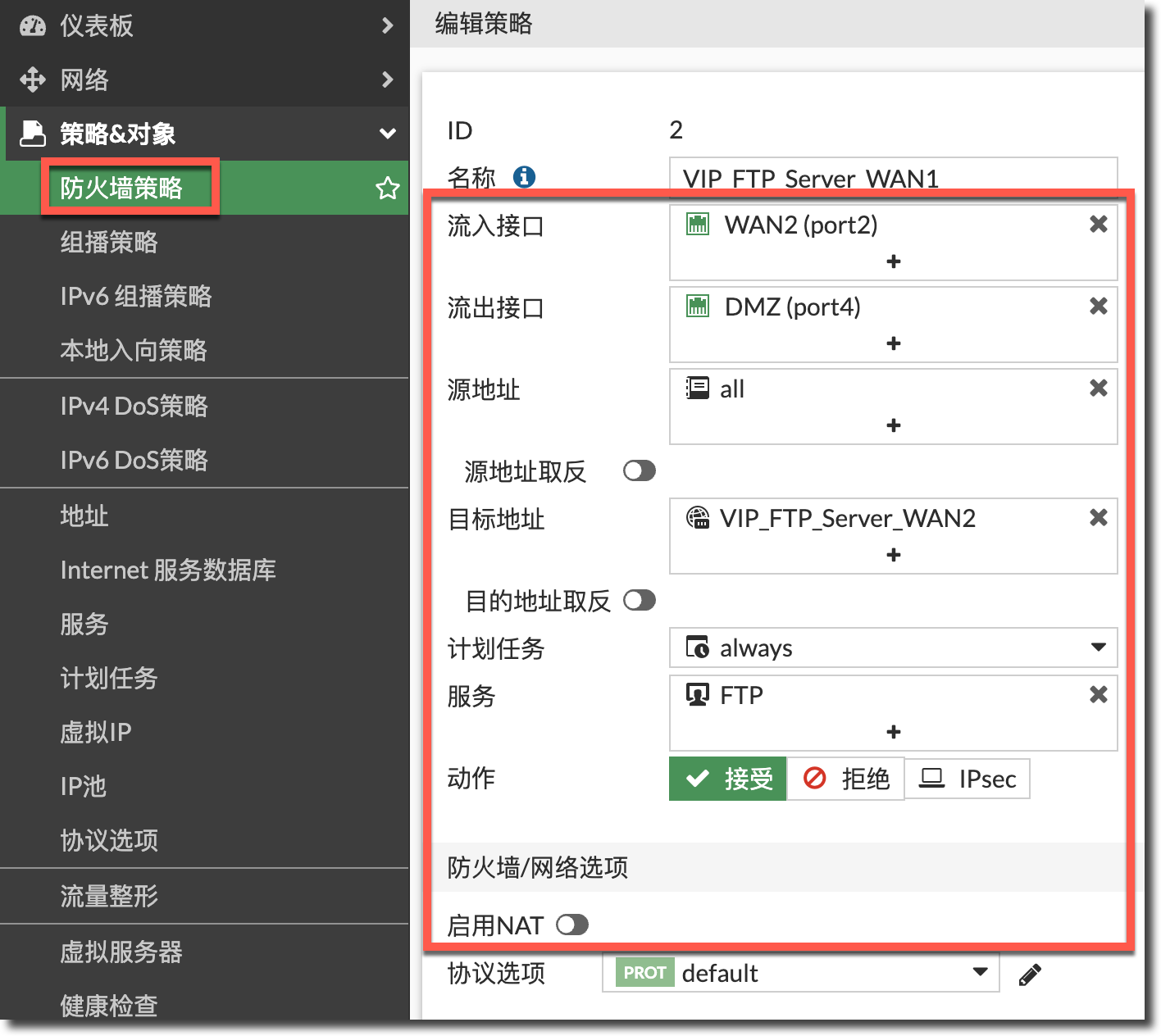
config firewall policy
    edit 2
        set name "VIP_FTP_Server_WAN1"
        set srcintf "port2"
        set dstintf "port4"
        set action accept
        set srcaddr "all"
        set dstaddr "VIP_FTP_Server_WAN2"
        set schedule "always"
        set service "FTP"
    next
end
正常配置放通内网 port3(LAN)到外网 port1(WAN1)、port2(WAN2)的上网策略。
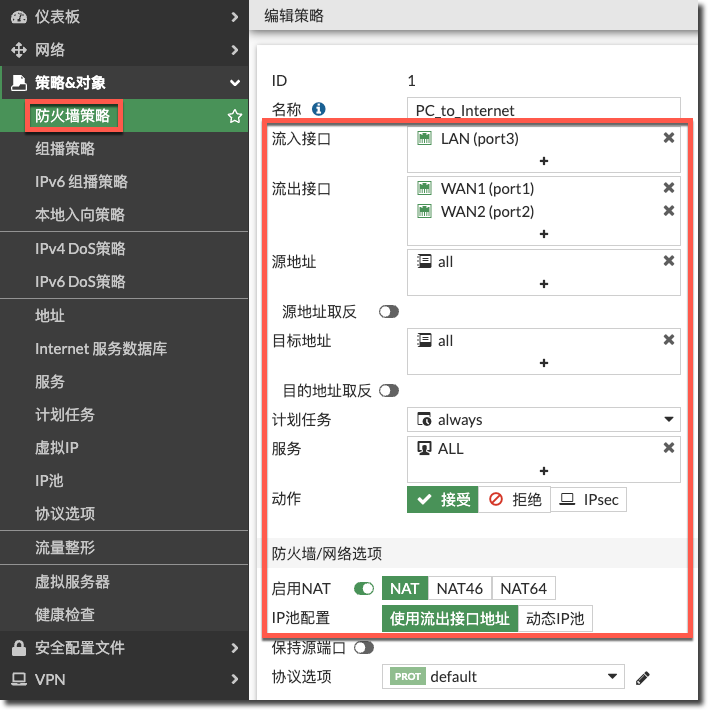
config firewall policy
    edit 1
        set name "PC_to_Internet"
        set srcintf "port3"
        set dstintf "port1" "port2"
        set action accept
        set srcaddr "all"
        set dstaddr "all"
        set schedule "always"
        set service "ALL"
        set nat enable
    next
end
结果验证
内网 PC 就可以通过 FTP 服务器的 VIP 公网 IP 访问到 DMZ 区域的 FTP 服务器。

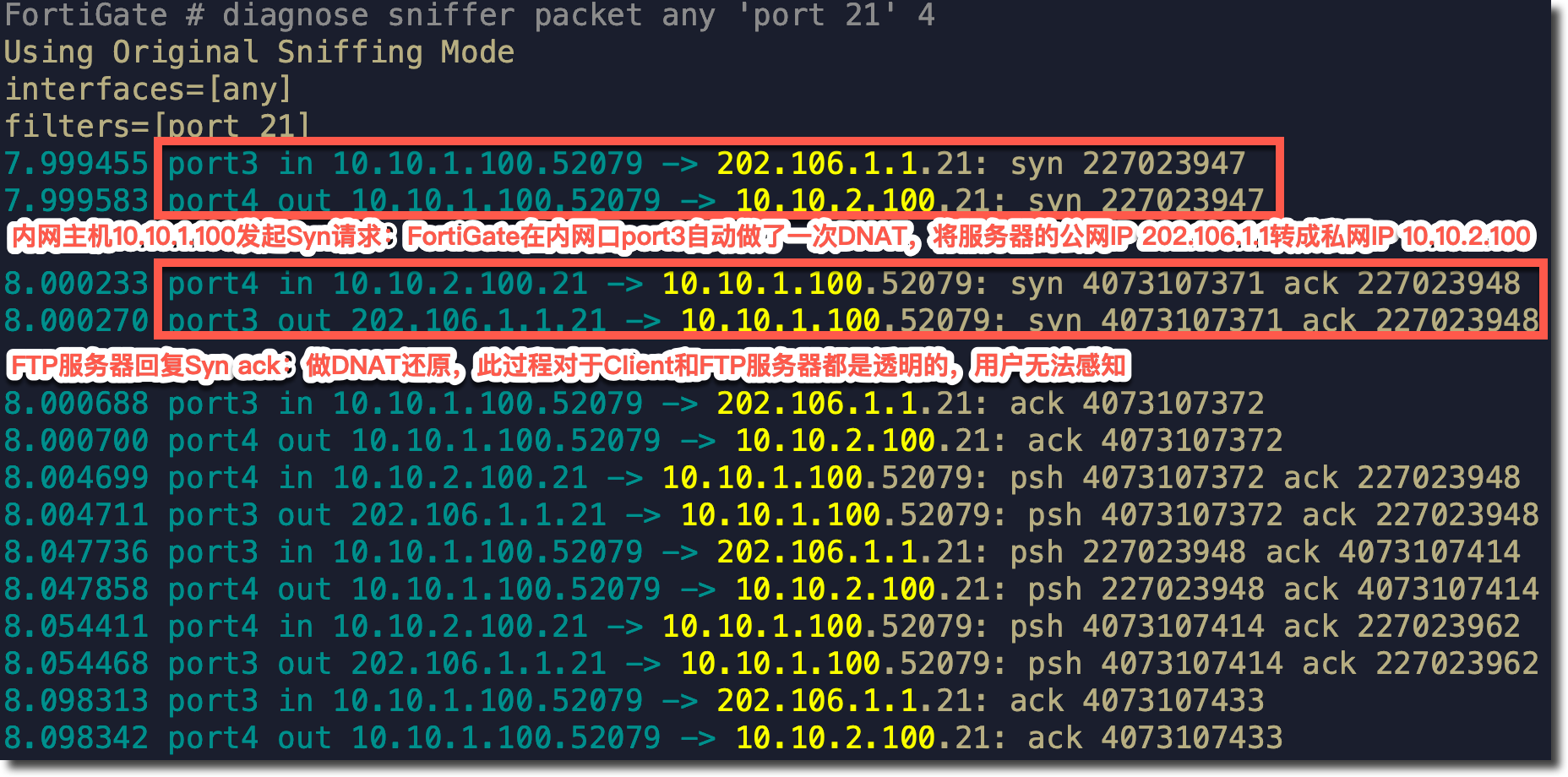
抓包分析
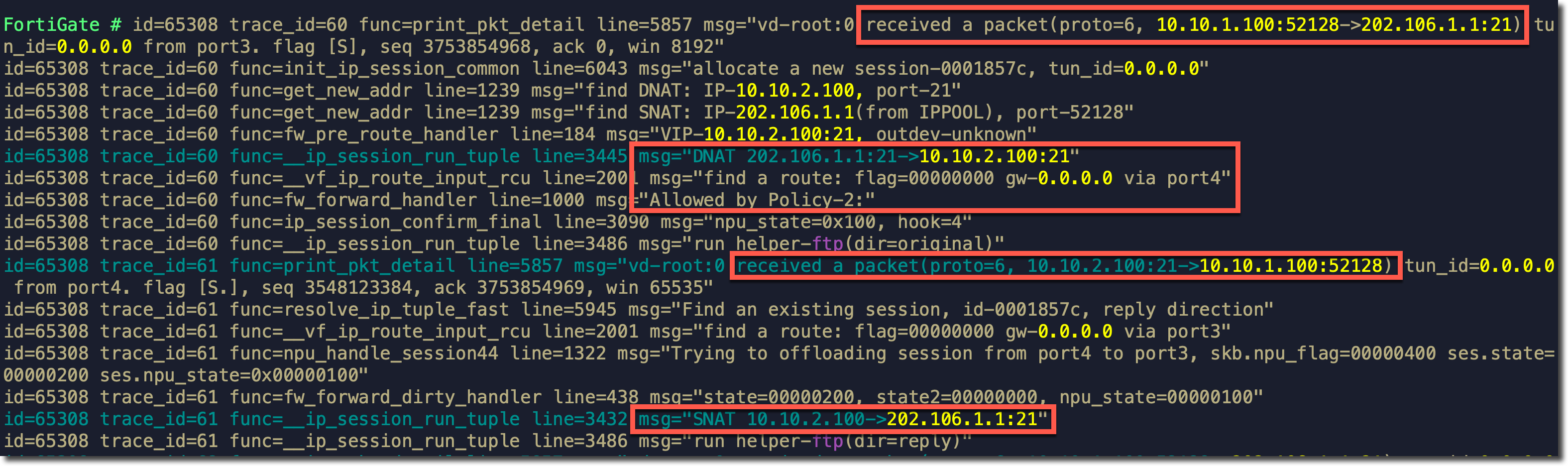
Debug Flow 分析
总结
内网 PC 通过 VIP 的公网地址访问内部服务器时,对于 FortiGate 来说:
- 如果发起访问的内网 PC 和 VIP 映射的真实服务器在 FortiGate 的同一个内网口下(与网段无关),FortiGate 会自动做 DNAT + SNAT。
- 如果发起访问的内网 PC 和 VIP 映射的真实服务器不在 FortiGate 的同一个内网口下(与网段无关),FortiGate 会自动做 DNAT,但不会做 SNAT。如果内网服务器和 PC 的内网 IP 可以不通过 FortiGate 直接访问,则需要像场景三的步骤 2 那样额外配置一条源为内网 PC 网段,目标为 VIP 的开启 SNAT 的策略,否则服务器返回的 Syn ack 会从下游交换机直接返回,而不会经过 FortiGate。
注意事项
如果通过策略路由来控制内网 PC 访问 Internet,则需要额外的策略路由配置。
问题现象
在需求场景 2 的配置基础上,FortiGate 通过配置策略路由来控制 PC 网段访问 Internet。
config router policy
    edit 1
        set input-device "port3"
        set src "10.10.1.0/255.255.255.0"
        set gateway 101.106.1.254
        set output-device "port1"
    next
end

FortiGate # diagnose firewall proute list
list route policy info(vf=root):
id=1(0x01) dscp_tag=0xfc 0xfc flags=0x0 tos=0x00 tos_mask=0x00 protocol=0 sport=0-0 iif=5(port3) dport=0-65535 path(1) oif=3(port1) gwy=101.106.1.254
source wildcard(1): 10.10.1.0/255.255.255.0
destination wildcard(1): 0.0.0.0/0.0.0.0
hit_count=2649 last_used=2024-05-07 09:35:17
此时使用内网 PC 就无法通过 FTP 服务器的 VIP 公网 IP 访问到 LAN 区域的 FTP 服务器。抓包查看内网 PC 访问 FTP 服务器的 VIP 公网 IP 的流量只有 in,没有 out。
FortiGate # diagnose sniffer packet any 'port 21' 4 0 l

2024-05-06 14:57:40.855316 port3 in 10.10.1.100.51646 -> 101.106.1.1.21: syn 1097509905
2024-05-06 14:57:41.872411 port3 in 10.10.1.100.51646 -> 101.106.1.1.21: syn 1097509905
2024-05-06 14:57:43.872568 port3 in 10.10.1.100.51646 -> 101.106.1.1.21: syn 1097509905
相关 Debug Flow 显示 TCP SYN 报文经过 DNAT 转换后,匹配上网的策略路由,出接口为 port1(WAN1),下一跳为运营商网关。但没有可以匹配的防火墙策略,被隐式策略(0)丢弃。

解决方法 1
在上网的策略路由 之前添加一条新的策略路由(如下配置中的 ID 2)。流入接口为 port3(LAN),源地址为内网 PC 网段(10.10.1.0/24),目的地址为 FTP Server 的内网 IP,动作为停止策略路由(deny)。
config router policy
    edit 2
        set input-device "port3"
        set src "10.10.1.0/255.255.255.0"
        set dst "10.10.1.100/255.255.255.255"
        set action deny
    next
end
    edit 1
        set input-device "port3"
        set src "10.10.1.0/255.255.255.0"
        set gateway 101.106.1.254
        set output-device "port1"
    next
end
此时使用内网 PC 可以正常通过 FTP 服务器的 VIP 公网 IP 访问到 LAN 区域的 FTP 服务器,Debug Flow 信息显示不会匹配策略路由,流程与场景二中的 Debug Flow 一致:
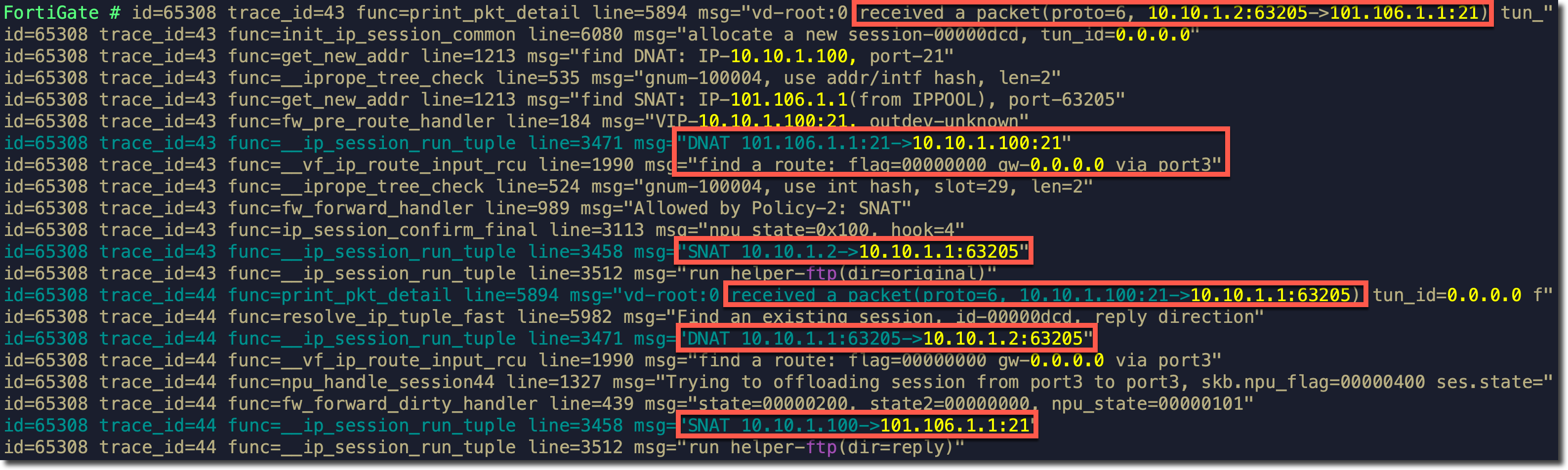
其他场景下使用策略路由上网时,均可以参考此配置。
解决方法 2
在上网的策略路由 之前添加一条新的策略路由(如下配置中的 ID 2)。流入接口为 port3(LAN),源地址为内网 PC 网段(10.10.1.0/24),目的地址为 FTP Server 的内网 IP。流出接口为内网接口 port3(LAN),网关地址为去往 FTP Server 的下一跳 IP(此例需求场景 2 中的下一跳 IP 就是 FTP Server 的内网 IP)。
重要
在此例(需求场景 2)中,策略路由 ID 2 的目的地址一定要填写具体的 Server 内网 IP,防止 Server 返回的流量匹配到策略路由。
config router policy
    edit 2
        set input-device "port3"
        set src "10.10.1.0/255.255.255.0"
        set dst "10.10.1.100/255.255.255.255"
        set gateway 10.10.1.100
        set output-device "port3"
    next
    edit 1
        set input-device "port3"
        set src "10.10.1.0/255.255.255.0"
        set gateway 101.106.1.254
        set output-device "port1"
    next
end
此时使用内网 PC 可以正常通过 FTP 服务器的 VIP 公网 IP 访问到 LAN 区域的 FTP 服务器,Debug Flow 信息显示如下:
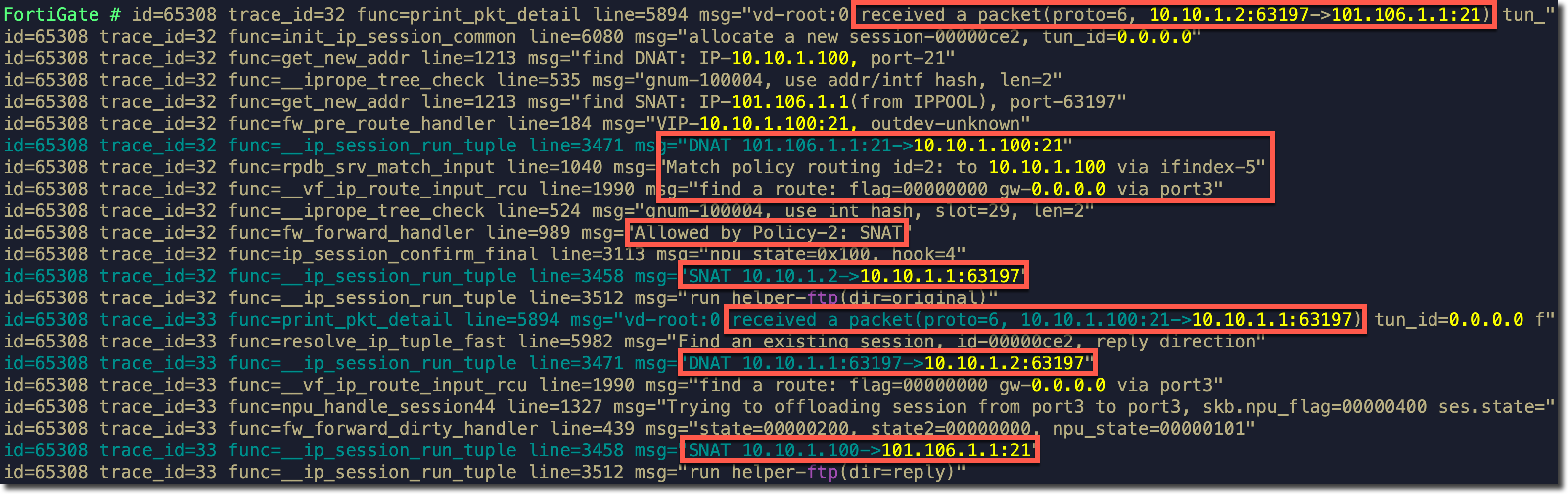
- TCP SYN 到达 FortiGate 后先做 DNAT 转换(目的地址转换为 FTP Server IP),然后匹配策略路由 ID 2(步骤 4 新增的策略路由),出接口为 port3(LAN)下一跳为 FTP Server,随后执行 SNAT,将源地址转换为 port3(LAN)接口 IP。
- FTP Server 返回 TCP SYN ACK 时,做 DNAT 和 SNAT 还原,返回客户端 PC。
其他场景下使用策略路由上网时,均可以参考此配置。
特殊情况
如果 FortiGate 开启了异步路由(asymroute),且针对内网 PC 和服务器配置了用于上网的策略路由。客户端访问服务器后,服务器返回的流量也会查找策略路由,有可能匹配上上网的策略路由从公网口发出,从而导致返回的流量无法到达客户端。
所以这种情况下一定要针对服务器 → 客户端反向的流量配置策略路由,出接口配置为内网口,并放置在上网策略路由的前边。