

NetFlow 的配置
NetFlow 的配置
NetFlow 介绍
NetFlow 允许基于设备接口收集网络流量的统计信息,它提供了在数据进入或离开接口时收集 IP 网络流量的能力。通过分析 NetFlow 提供的数据,网络管理员可以确定流量的源和目的地、服务类别以及拥塞的原因。
NetFlow 通常使用 UDP 协议进行导出,并使用 NetFlow Collector 进行收集。NetFlow Collector 的 IP 地址和目标 UDP 端口必须在发送设备(FortiGate)上进行配置。标准的 NetFlow UDP 端口为 2055。
在 FortiGate 中,根据 netflow-sampler 监控的接口,发送所有此接口相关的会话信息,无法设置 NetFlow 的接口采样率。
重要
在任何接口上配置 NetFlow 都不会影响 NP 芯片的加速功能。
但如果使用的是 sFlow,是无法被任何 NP 芯片加速的。
NetFlow 配置
NetFlow 发送配置
未开启 VDOM 的配置
7.0.X、7.2.0~7.2.7、7.4.0~7.4.3版本(只能配置1个Collector):
config system netflow
    set collector-ip <ip>
    set collector-port <port>
    set source-ip <ip>
    set active-flow-timeout <integer>
    set inactive-flow-timeout <integer>
    set template-tx-timeout <integer>
    set template-tx-counter <integer>
end

其他7.X.X版本(可以配置最多6个Collector):
config system netflow
    set active-flow-timeout {integer}
    config collectors
        edit <id>
            set collector-ip {string}
            set collector-port {integer}
            set source-ip {string}
            set interface-select-method [auto|sdwan|...]
            set interface {string}
        next
    end
    set inactive-flow-timeout {integer}
    set template-tx-counter {integer}
    set template-tx-timeout {integer}
end| 参数名称 | 参数说明 |
|---|---|
| collector-ip [ip] | NetFlow collector 的 IPv4 或 IPv6 地址(IPv6 在 7.2.0 GA 后支持) |
| collector-port [port] | NetFlow collector 用于接收 NetFlow 流量的端口,默认为 2055 |
| source-ip [ip] | 指定 FortiGate 发送 NetFlow 流量的源 IP,默认根据路由出接口指定源 IP |
| active-flow-timeout [integer] | 报告活动中的会话 NetFlow 信息的间隔,默认为 30 分钟,范围 1~60 |
| inactive-flow-timeout [integer] | 报告已结束的会话 NetFlow 信息的间隔,默认为 15 秒,范围 10~600 |
| template-tx-timeout [integer] | 模板数据流的发送间隔,默认 30 分钟,范围 1~1440 |
| template-tx-counter [integer] | 数据流记录的产生计数,达到这个计数后也会发送模板数据流到 collector,默认为 20,范围 10~6000 |
开启多 VDOM 的配置
重要
在多 VDOM 环境中,无法在 root VDOM 或管理 VDOM 上配置 Netflow,root VDOM 或管理 VDOM 的 NetFlow 配置将从 config system global 下的 NetFlow 配置继承。
在多 VDOM + HA 环境中,当 HA 禁用“ha-direct”功能时,Netflow 还是会在独立管理口上发送流量。如果需要通过业务 VDOM 中的路由接口发送 NetFlow 流量,必须在 config system global 下禁用 NetFlow IP 或配置 NetFlow IP 为 0.0.0.0。
7.0.X、7.2.0~7.2.7、7.4.0~7.4.3版本:
config vdom
    edit <vdom>
        config system vdom-netflow
            set vdom-netflow enable
            set collector-ip <ip>
            set collector-port <port>
            set source-ip <ip>
        end
    next
end

其他7.X.X版本:
config vdom
    edit <vdom>
        config system vdom-netflow
            set active-flow-timeout {integer}
            config collectors
                edit <id>
                    set collector-ip {string}
                    set collector-port {integer}
                    set source-ip {string}
                    set interface-select-method [auto|sdwan|...]
                    set interface {string}
                next
            end
            set inactive-flow-timeout {integer}
            set template-tx-counter {integer}
            set template-tx-timeout {integer}
        end
    next
end
NetFlow 采样器配置
config system interface
    edit <interface>
        set netflow-sampler {disable | tx | rx | both}
    next
end| 参数名称 | 参数说明 |
|---|---|
| disable | 接口下关闭 NetFlow 采样,默认配置 |
| tx | 采样此接口发送的流量 |
| rx | 采样此接口接收的流量 |
| both | 同时采样此接口发送和接收的流量 |
配置验证
如果在 NetFlow 上无法查询到 FortiGate 的 NetFlow 数据,可以在 FortiGate 上抓包查看 NetFlow 数据是否已发送,如下图所示。
diagnose sniffer packet 'host <collector-ip> and port <collector-port>' 6 0 l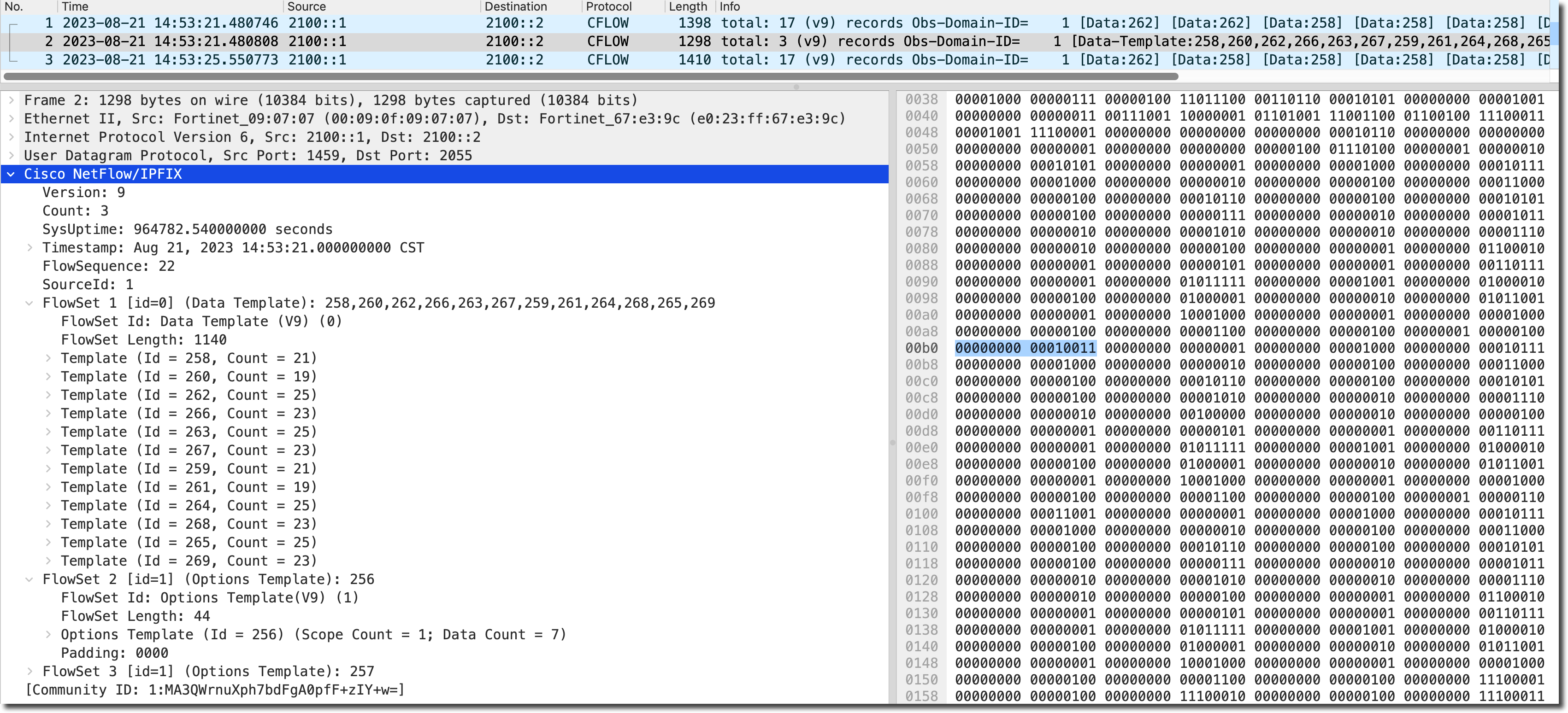
NetFlow 功能通过 FortiGate 的 sflow 进程工作,通过以下命令,可以看到 Netflow 的工作状态。
FortiGate # diagnose test application sflowd 3

===== Netflow Vdom Configuration =====
Global collector:172.22.5.41:[2055] source ip:  active-timeout(seconds):1800 inactive-timeout(seconds):15
____ vdom: root, index=0, is master, collector: disabled (use global config) (mgmt vdom)
   |_ coll_ip:172.22.5.41:2055,src_ip:172.22.5.19
   |_ seq_num:301 pkts/time to next template: 7/1259
   |_ exported: Bytes:114028124, Packets:322978, Sessions:13457 Flows:13494
   |_ active_intf: 1
   |____ interface:wan2 sample_direction:both device_index:6 snmp_index:2
查看流量会话是否匹配 NetFlow,如下所示,会话被打上了 NetFlow-reply 方向的标记。
# diagnose sys session list
session info: proto=1 proto_state=00 duration=1732 expire=59 timeout=0 flags=00000000 socktype=0 sockport=0 av_idx=0 use=3
origin-shaper=
reply-shaper=
per_ip_shaper=
class_id=0 ha_id=0 policy_dir=0 tunnel=/ vlan_cos=0/255
state=may_dirty netflow-origin netflow-reply
statistic(bytes/packets/allow_err): org=145572/1733/1 reply=145572/1733/1 tuples=2
tx speed(Bps/kbps): 83/0 rx speed(Bps/kbps): 83/0
orgin->sink: org pre->post, reply pre->post dev=5->26/26->5 gwy=10.39.252.244/172.16.200.55
hook=post dir=org act=snat 172.16.200.55:61290->8.8.8.8:8(10.39.252.243:61290)
hook=pre dir=reply act=dnat 8.8.8.8:61290->10.39.252.243:0(172.16.200.55:61290)
misc=0 policy_id=1 auth_info=0 chk_client_info=0 vd=0
serial=00001298 tos=ff/ff app_list=0 app=0 url_cat=0
sdwan_mbr_seq=0 sdwan_service_id=0
rpdb_link_id=00000000 rpdb_svc_id=0 ngfwid=n/a
npu_state=0x040000
no_ofld_reason:  non-npu-intf
total session 1