基于 TCP 的 FortiClient 拨号
基于 TCP 的 FortiClient 拨号
重要
- 该功能在 FortiOS 7.4.2、7.6.0 及以上版本支持。
- 该功能要求 FortiClient 版本≥7.4.1。
- 该功能仅支持 IKEv2。
- 使用基于 TCP 的 FortiClient IPSec 拨号模式,FortiGate 暂不支持 ESP 流量的 NP 加速(但可以被 CP 芯片加速)。
- 在 FortiClient 7.4.4 及以后版本中,FortiClient VPN only 版本(免费)将不再支持此功能,FortiClient ZTNA 版本(需要 EMS License)仍然支持此功能。
功能介绍
传统拨号 IPsec VPN 流量使用 UDP 或 ESP 协议,在 FortiOS 7.4.3、7.6.0 及以上版本可以通过 TCP 运行。出于以下考量,我们推荐将 FortiClient 拨号模式的 SSL VPN/IPSec over UDP 逐渐迁移至 IPSec over TCP。
- 从 FortiOS 7.6.3 开始,FortiGate 在所有型号上移除了 SSL VPN Tunnel 模式,需要使用 IPSec VPN 拨号模式替代 SSL VPN 的 Tunnel 模式(详情参考:VPN 技术 → SSL_VPN → 开启 SSL VPN 中的“SSL VPN 移除情况”部分)。
- 在高延迟或拥塞的网络中,基于 UDP 的 IPSec VPN 连接可能会出现数据包丢失或性能下降。TCP 具有错误检测和重传机制,可提高 IPSec VPN 连接在此类环境中的可靠性和稳定性。
- 部分运营商可能对 UDP 500/4500、ESP 流量实施策略性限速(如降低 QoS 优先级或设置带宽阈值)或阻断,尤其在高峰时段或跨境链路上。通过将 IPSec VPN 切换至 TCP 传输,可规避此类 UDP 限速策略,利用 TCP 的标准化流量特征获得更稳定的带宽分配,从而保障 VPN 隧道的吞吐量。
网络拓扑
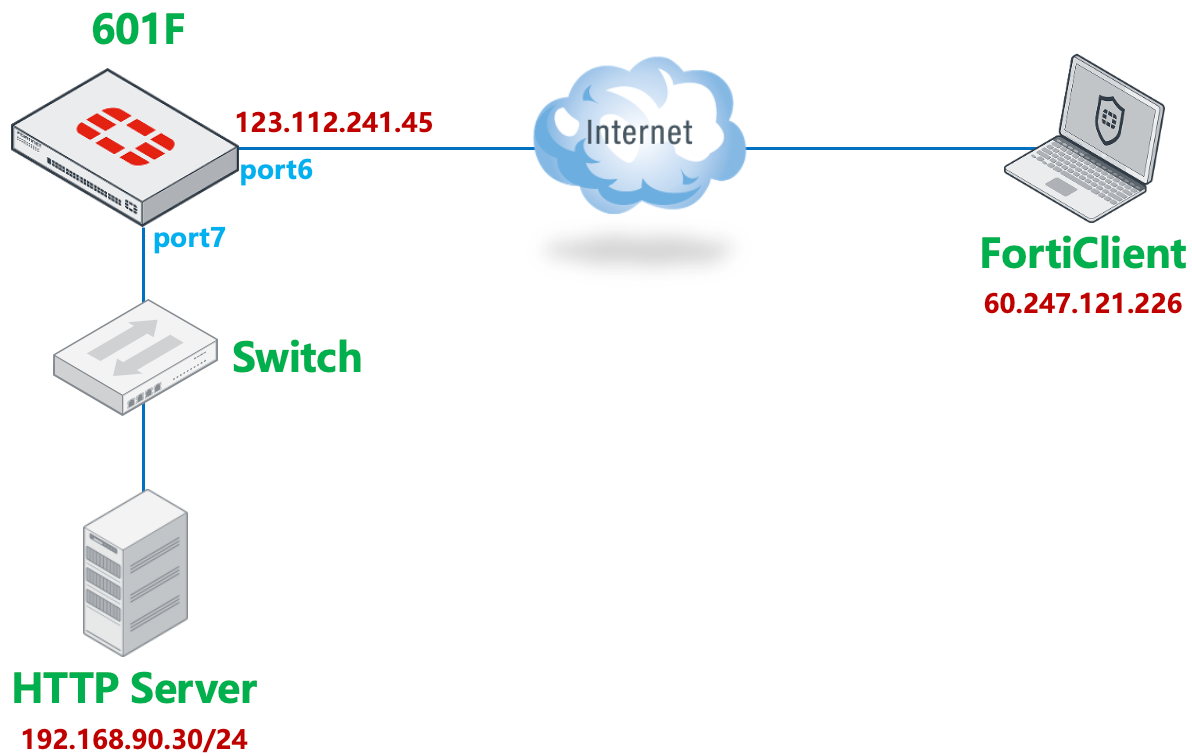
- FortiGate-601F(NP7)配置基于 TCP 的 IKEv2 拨号 IPsec 服务器,自定义 TCP 端口为 4443。
- IKEv2 使用 EAP 进行用户身份验证。
- 客户端使用 FortiClient 7.4.3 版本,配置 TCP 目标端口 4443 连接 FortiGate 的 IPsec。
基础配置
用户配置
创建用于 IPSec 拨号认证的用户和用户组。
config user local
    edit "user1"
        set type password
        set passwd 1q2w3e4r
    next
    edit "user2"
        set type password
        set passwd 1q2w3e4r
    next
end

config user group
    edit "VPN"
        set member "user1" "user2"
    next
end
配置用于隧道分割的地址对象,可以配置多个。
config firewall address
    edit "192.168.90.0/24"
        set subnet 192.168.90.0 255.255.255.0
    next
end
指定基于 TCP 的 IPSec 端口
指定基于 TCP 的 IPSec VPN 使用的端口(
ike-tcp-port),这里配置为 TCP 4443。重要
- 默认
ike-tcp-port配置:- FortiOS 7.4:4500。
- FortiOS 7.6:443。
- 修改
ike-tcp-port选项是基于当前 VDOM 生效的,该 VDOM 内所有基于 TCP 的 IPSec 连接都将使用指定端口封装 IKE 协商包和 IPSec ESP 报文。若需同时支持其他使用不同 TCP 端口的 IPSec 连接(如与其他 FortiGate 之间),建议通过新建 VDOM 实现。 - 修改
ike-tcp-port选项不会影响基于 UDP 的 IPSec 连接端口(ike-port,默认 500)。
config system settings set ike-tcp-port 4443 end- 默认
如果使用 TCP 443 端口,可能会与 FortiGate 的 HTTPS 管理端口或 SSL VPN 端口冲突,需要修改 HTTPS 管理端口/SSL VPN 为其他端口,IPSec 的 TCP 443 端口才能生效。
HTTPS管理端口:
config system global
    set admin-sport <port>
end

SSL VPN端口:
config vpn ssl settings
    set port <port>
end
FortiGate IPSec 配置
重要
通过 GUI 的配置步骤基于 FortiOS 7.6.3,如果是 7.4.X 版本,请参考通过 CLI 命令配置的部分。
通过 GUI 配置(FortiOS 7.6)
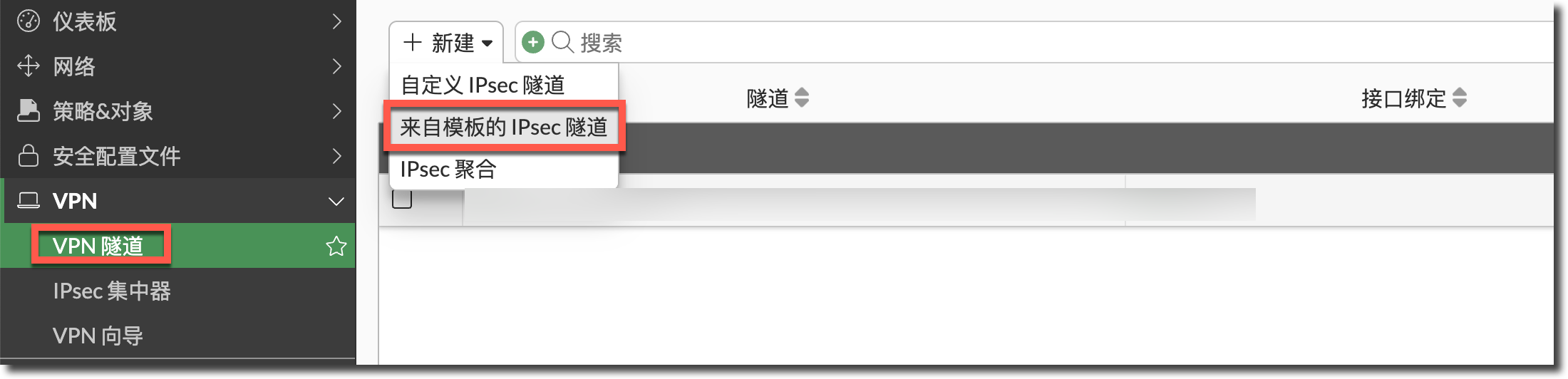
在 FortiGate 进入“VPN → VPN 隧道”页面,点击“新建”按钮,选择“来自模板的 IPSec 隧道”。
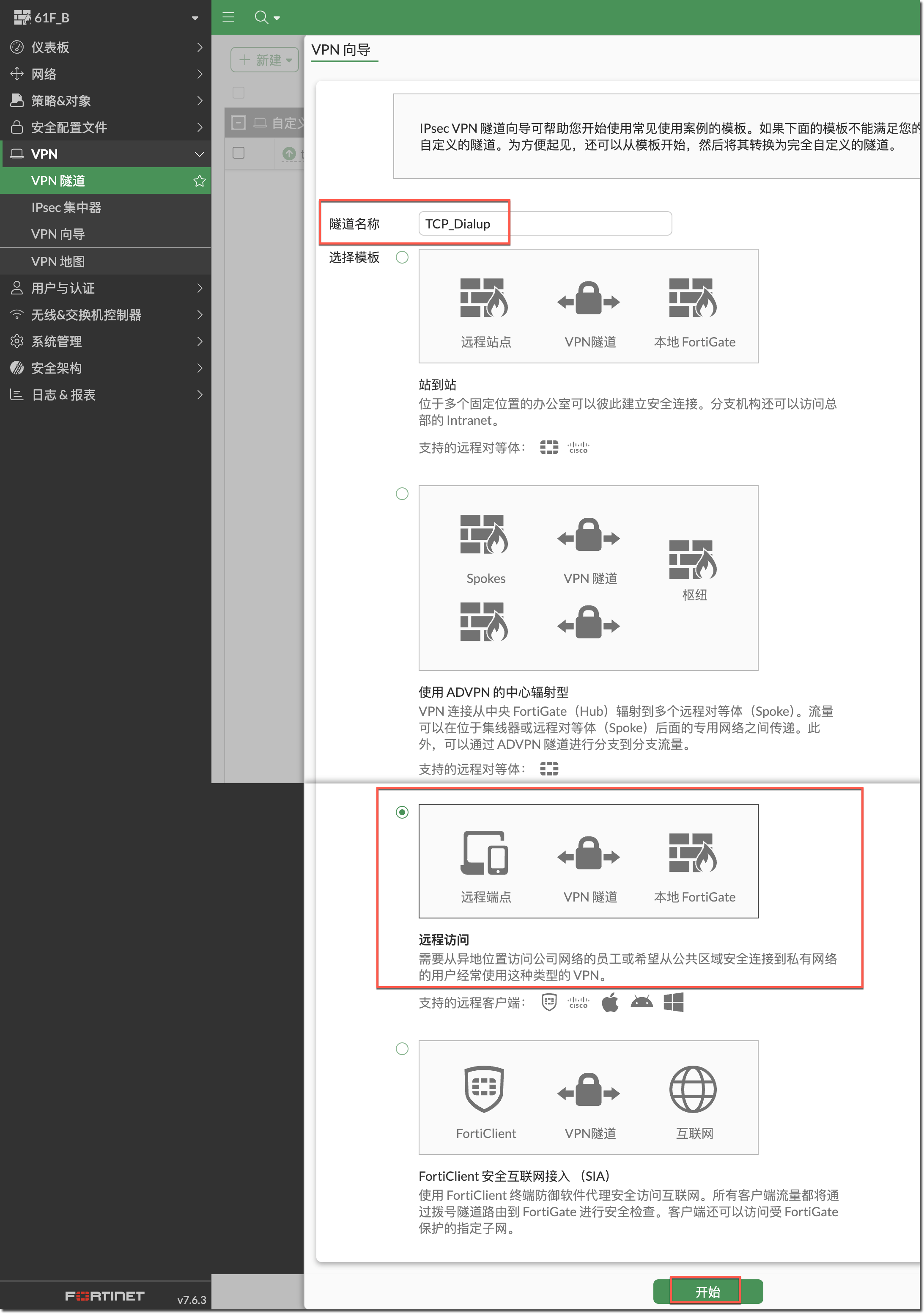
在弹出的“VPN 向导”中,填写隧道名称,模板选择“远程访问”类型,然后点击“开始”按钮。
在“VPN 隧道”页面填写“预共享密钥”,传输模式选择“TCP 封装”,用户身份验证方法选择“阶段 1 接口”,选择已创建的 VPN 用户组,其他保持默认,点击“下一个”按钮。
重要
可选配置:
- 传输:
- TCP 封装:强制使用 TCP 封装 IKE 协商报文与 IPSec ESP 报文,TCP 端口会使用已配置的
ike-tcp-port。 - 自动:优先使用 UDP 封装 IKE 协商报文,如果 UDP 连接超时(默认超时时间为 15s)。
- TCP 封装:强制使用 TCP 封装 IKE 协商报文与 IPSec ESP 报文,TCP 端口会使用已配置的
- 使用 Fortinet 封装:
- 开启:使用 Fake TCP 头部封装 ESP(RFC8229),仅适用于 FortiGate 之间建立的 IPSec。
- 关闭:使用标准 TCP 头部封装 ESP(RFC9293),使用 FortiClient 连接时,一定要关闭此选项。
- 用户身份验证方法:
- 阶段 1 接口:在 IPSec 阶段 1 配置中手动选择需要认证的用户组,只能选择一个用户组。
- 从策略继承:在 IPSec 相关的防火墙策略中指定需要认证的用户组,适用于有多个用户组的情况。
- DNS 服务器:
- 使用系统 DNS:分配系统配置的 DNS 服务器给 FortiClient。
- 指定:手工指定给 FortiClient 分配的 DNS 服务器。

- 传输:
在“远程端点”页面填写给 FortiClient 分配的地址池,关闭“EMS SN 验证”,点击“下一个”按钮。

在“本地 FortiGate”页面选择用于接入 IPSec 连接的接口 port6,IPSec 拨号访问的目的接口 port7,“本地地址”选择需要隧道分离的地址对象“192.168.90.0/24”(可选多个),点击“下一个”按钮。

Comment 页面提示会自动下发的地址对象(分配的地址池)、地址组(包含隧道分割的地址对象)、策略(远程到本地放通)的名称,可以点右侧的笔修改名称。
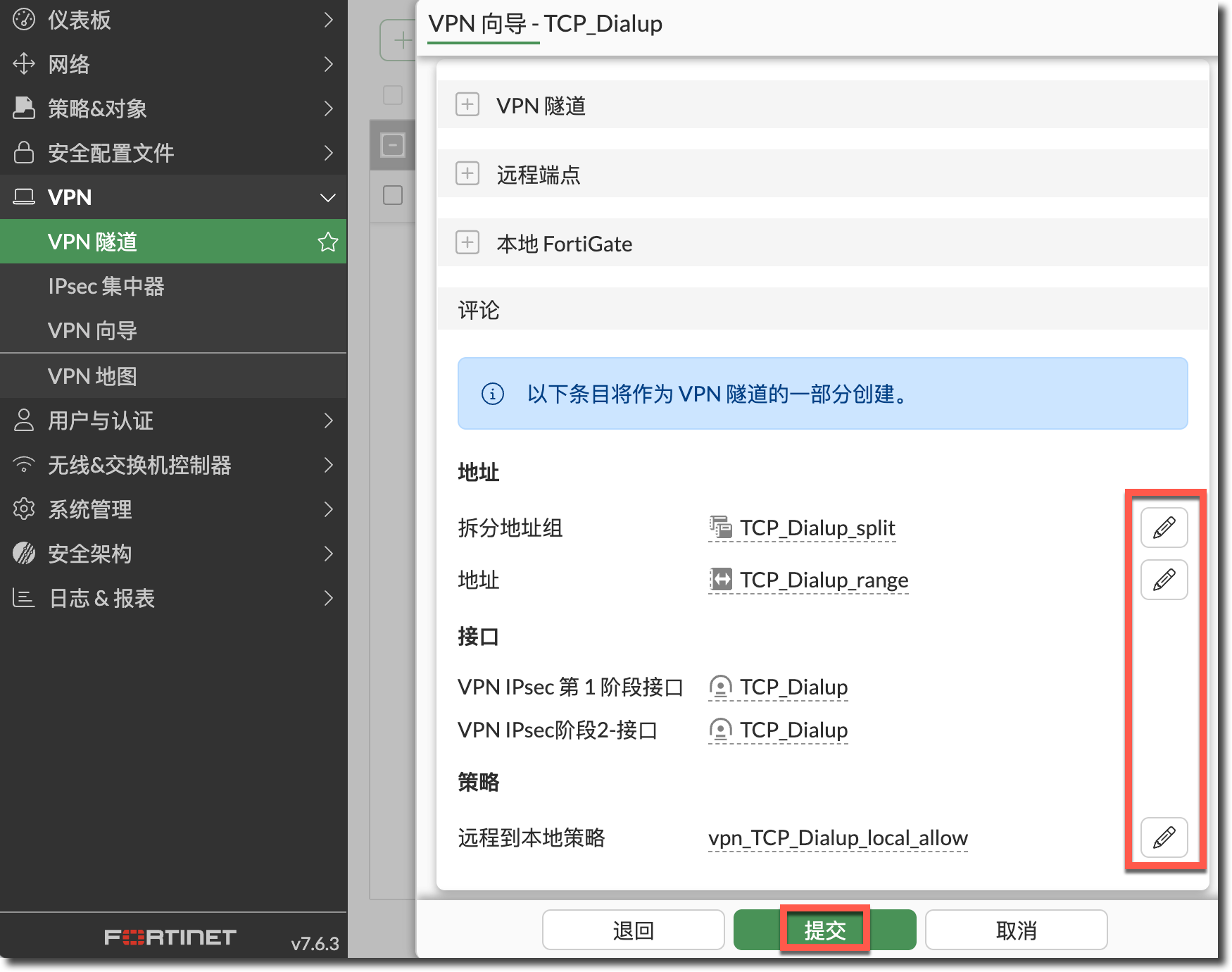
IPSec VPN 连接创建完成。

查看通过向导自动创建的地址和地址组对象。
地址(分配的IP地址池):
config firewall address
    edit "TCP_Dialup_range"
        set type iprange
        set comment "VPN: TCP_Dialup -- Created by VPN wizard"
        set start-ip 10.100.1.100
        set end-ip 10.100.1.200
    next
end

地址组(隧道分割网段):
config firewall addrgrp
    edit "TCP_Dialup_split"
        set member "192.168.90.0/24"
        set comment "VPN: TCP_Dialup -- Created by VPN wizard"
    next
end
查看通过向导创建的 IPSec 隧道一阶段和二阶段 CLI 配置。
config vpn ipsec phase1-interface
    edit "TCP_Dialup"
        set type dynamic
        set interface "port6"
        set ike-version 2
        set peertype any
        set net-device disable
        set mode-cfg enable
        set proposal aes128-sha256 aes256-sha256 aes128gcm-prfsha256 aes256gcm-prfsha384 chacha20poly1305-prfsha256
        set comments "VPN: TCP_Dialup -- Created by VPN wizard"
        set dhgrp 20 21
        set eap enable
        set eap-identity send-request
        set wizard-type dialup-forticlient
        set authusrgrp "VPN"
        set transport tcp
        set ipv4-start-ip 10.100.1.100
        set ipv4-end-ip 10.100.1.200
        set dns-mode auto
        set ipv4-split-include "TCP_Dialup_split"
        set save-password enable
        set psksecret ENC iEMCQpp6y6RY3YqsG30txAPygrAppFQYI9fCj5fb/3SVQKJv4rQ4AkexsTC+z3KnXxUpDygDUCc8znjJQnx06jI0CKMHOR++uVgfEOAoMwwfnNQCHrCBO+I479zBKhDC11kWOGp7IfOX2vWEsZ4LH/MXIuP+vzvD70RqPthkGGz+bnKMgjsr0fkVUwUghtV6PryzeFlmMjY3dkVA
    next
end

config vpn ipsec phase2-interface
    edit "TCP_Dialup"
        set phase1name "TCP_Dialup"
        set proposal aes128-sha1 aes256-sha1 aes128-sha256 aes256-sha256 aes128gcm aes256gcm chacha20poly1305
        set dhgrp 20 21
        set comments "VPN: TCP_Dialup -- Created by VPN wizard"
    next
end
查看通过向导自动创建的防火墙策略,默认开启 SNAT,可根据实际需求调整配置。
config firewall policy
    edit 22
        set name "vpn_TCP_Dialup_local_allow"
        set srcintf "TCP_Dialup"
        set dstintf "prot7"
        set action accept
        set srcaddr "TCP_Dialup_range"
        set dstaddr "192.168.90.0/24"
        set schedule "always"
        set service "ALL"
        set nat enable
        set comments "VPN: TCP_Dialup -- Created by VPN wizard"
    next
end
通过 CLI 配置(FortiOS 7.4)
创建用于分配 IP 的地址对象和用于隧道分割的地址组对象。
地址(分配的IP地址池):
config firewall address
    edit "TCP_Dialup_range"
        set type iprange
        set start-ip 10.100.1.100
        set end-ip 10.100.1.200
    next
end

地址组(隧道分割网段):
config firewall address
    edit "192.168.90.0/24"
        set subnet 192.168.90.0 255.255.255.0
    next
end

config firewall addrgrp
    edit "TCP_Dialup_split"
        set member "192.168.90.0/24"
    next
end
配置 IPSec VPN 一阶段。
type:dynamic,拨号模式。interface:port6,选择用于接入 IPSec 连接的接口。ike-verison:2,只有 IKEv2 支持基于 TCP 的 IPSec 模式。mode-cfg:enable,开启为客户端分配 IP 和 DNS 功能。proposal/dhgrp:一阶段安全提议,与 FortiClient 配置一致即可。eap:enable,IKEv2 客户端认证使用 EAP 模式。authusrgrp:VPN,认证使用已创建的 VPN 用户组。transport:tcp,使用 TCP 封装 IKE 协商报文和 ESP 报文。ipv4-start-ip/ipv4-end-ip:为 FortiClient 分配 IP 的地址池。dns-mode:auto,使用系统 DNS 分配给 FortiClient。ipv4-split-include:选择需要隧道分离的地址组对象“TCP_Dialup_split”,这里既可以选择地址组,也可以选择地址对象,但只能选择一个,所以这里以地址组为例,可以包含多个地址对象。save-password:enable,允许 FortiClient 保存密码。psksecret:预共享密钥。
config vpn ipsec phase1-interface
    edit "TCP_Dialup"
        set type dynamic
        set interface "port6"
        set ike-version 2
        set peertype any
        set net-device disable
        set mode-cfg enable
        set proposal aes128-sha256 aes256-sha256 aes128gcm-prfsha256 aes256gcm-prfsha384 chacha20poly1305-prfsha256
        set dhgrp 20 21
        set eap enable
        set eap-identity send-request
        set authusrgrp "VPN"
        set transport tcp
        set ipv4-start-ip 10.100.1.100
        set ipv4-end-ip 10.100.1.200
        set dns-mode auto
        set ipv4-split-include "TCP_Dialup_split"
        set save-password enable
        set psksecret 1q2w3e4r
    next
end
重要
可选配置:
transport:- tcp:强制使用 TCP 封装 IKE 协商报文与 IPSec ESP 报文,TCP 端口会使用已配置的
ike-tcp-port。 - auto:优先使用 UDP 封装 IKE 协商报文,如果 UDP 连接超时(默认超时时间为 15s)。
- tcp:强制使用 TCP 封装 IKE 协商报文与 IPSec ESP 报文,TCP 端口会使用已配置的
fortinet-esp:- enable:使用 Fake TCP 头部封装 ESP(RFC8229),仅适用于 FortiGate 之间建立的 IPSec。
- disable:使用标准 TCP 头部封装 ESP(RFC9293),使用 FortiClient 连接时,一定要关闭此选项。
authusrgrp:- 配置用户组:在 IPSec 阶段 1 配置中手动选择需要认证的用户组,只能选择一个用户组。
- 不配置:在 IPSec 相关的防火墙策略中指定需要认证的用户组,适用于有多个用户组的情况。
dns-mode:- auto:分配系统配置的 DNS 服务器给 FortiClient。
- manual:手工指定给 FortiClient 分配的 DNS 服务器,然后通过
set ipv4-dns-server1 <ipv4_address>、set ipv4-dns-server2 <ipv4_address>等命令设置手工指定的 DNS 服务器。
配置 IPSec VPN 二阶段。
phase1name:绑定的一阶段名称。proposal/dhgrp:二阶段安全提议,与 FortiClient 配置一致即可。
config vpn ipsec phase2-interface
    edit "TCP_Dialup"
        set phase1name "TCP_Dialup"
        set proposal aes128-sha1 aes256-sha1 aes128-sha256 aes256-sha256 aes128gcm aes256gcm chacha20poly1305
        set dhgrp 20 21
    next
end
创建防火墙策略,放通 FortiClient 到 VPN 资源的访问,可根据实际需求调整配置。
config firewall policy
    edit 22
        set name "vpn_TCP_Dialup_local_allow"
        set srcintf "TCP_Dialup"
        set dstintf "port7"
        set action accept
        set srcaddr "TCP_Dialup_range"
        set dstaddr "192.168.90.0/24"
        set schedule "always"
        set service "ALL"
    next
end
FortiClient 配置
在 FortiClient 的“Remote Access”界面新建连接。
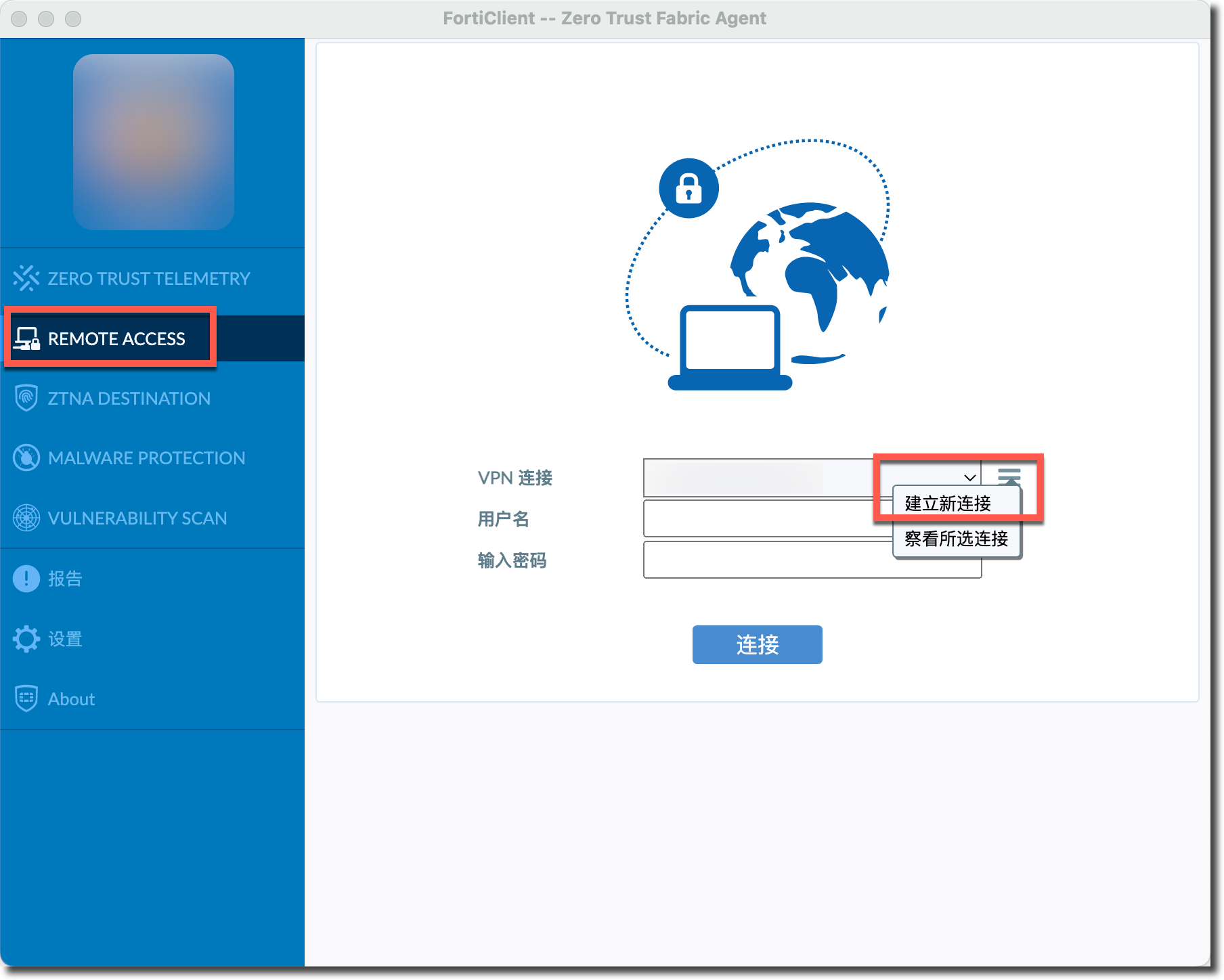
配置 VPN 连接的基本信息和“高级设置”中的“VPN 配置”。
VPN类型:IPSec VPN。远程网关:填写 FortiGate 侧接入 IPSec 的 IP。验证方式:共享密钥,并填入 FortiGate 配置的 IPSec 预共享密钥。Authentication/用户名:保存登录名,填写用于 EAP 认证的用户名。IKE:Version2。选项:Mode Config。Encapsulation:IPSec over TCP。IKE TCP Port:4443,填写 FortiGate 上配置的ike-tcp-port。

重要
可选配置:
Encapsulation:- Auto (UDP fallback TCP):优先使用 UDP 封装 IKE 协商报文,如果 UDP 连接超时(默认超时时间为 15s),需要 FortiGate 的 IPSec 一阶段中的
transport也设置为auto才能使用。
- Auto (UDP fallback TCP):优先使用 UDP 封装 IKE 协商报文,如果 UDP 连接超时(默认超时时间为 15s),需要 FortiGate 的 IPSec 一阶段中的
配置 IPSec 一阶段与二阶段,配置的算法包含在 FortiGate 配置的安全提议中即可。点击“保存”按钮创建 IPSec 连接。
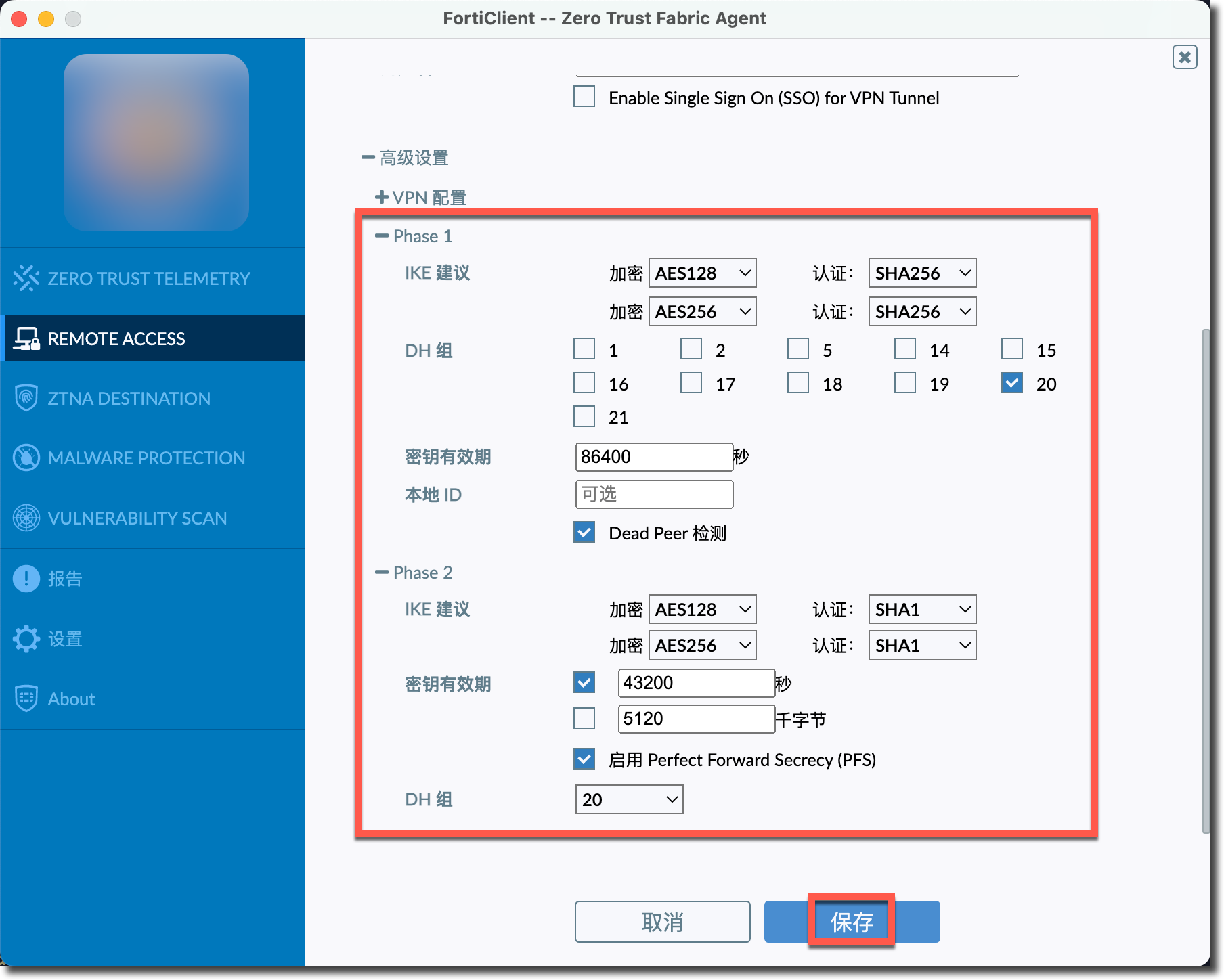
结果验证
在 FortiClient 中输入账号/密码,点击“连接”,FortiClient 拨号成功。

FortiGate GUI 显示 IPSec 一二阶段均建立成功。
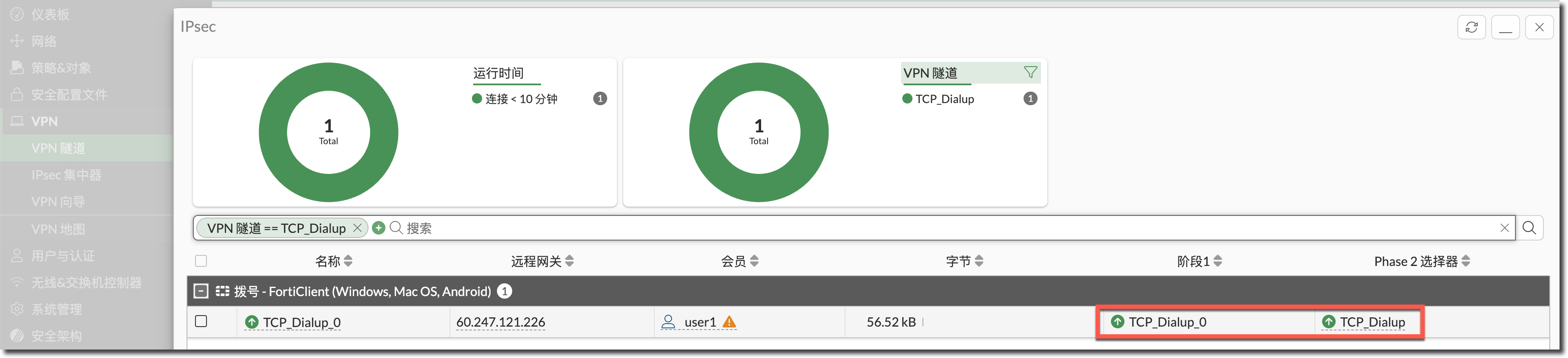
在 FortiGate 上查看 IPSec 一阶段状态,可以看到传输模式为 TCP。
FortiGate # diagnose vpn ike gateway list name TCP_Dialup_0

vd: root/0
name: TCP_Dialup_0
version: 2
interface: port6 12
addr: 123.112.241.45:4443 -> 60.247.121.226:59961
tun_id: 10.100.1.100/::10.0.0.15
remote_location: 0.0.0.0
network-id: 0
transport: TCP    //传输协议为TCP//
created: 7s ago
eap-user: user1    //EAP认证的用户名//
2FA: no
peer-id: Summerices-MacBook-Pro.local
peer-id-auth: no
FortiClient UID: 20835405F599455B9842348F3C690201
assigned IPv4 address: 10.100.1.100/255.255.255.255    //分配的IP地址//
nat: me peer
pending-queue: 0
PPK: no
IKE SA: created 1/1  established 1/1  time 120/120/120 ms
IPsec SA: created 1/1  established 1/1  time 0/0/0 ms

  id/spi: 70 de71e2a0d62b8736/24365703d2c80d80
  direction: responder
  status: established 7-7s ago = 120ms
  proposal: aes128-sha256
  child: no
  SK_ei: 9e8bbde335eec3a5-885365f407bc0db2
  SK_er: 00eb55dc186eebfe-fba2d0f60debd94e
  SK_ai: 73c01df8a38dacbb-4d79c9eb83842232-affb78dcf6a39117-996de329f3049a45
  SK_ar: dd98c48c5201681a-b979d55de179487c-184da864964c75fa-8464b07fdc107016
  PPK: no
  message-id sent/recv: 0/6
  QKD: no
  PQC-KEM (IKE): no
  PQC-KEM (all IPsec): no
  lifetime/rekey: 86400/86122
  DPD sent/recv: 00000000/00000000
  peer-id: Summerices-MacBook-Pro.local
在 FortiGate 上查看 IPSec 二阶段状态。
FortiGate # diagnose vpn tunnel list name TCP_Dialup_0
list ipsec tunnel by names in vd 0
------------------------------------------------------
name=TCP_Dialup_0 ver=2 serial=1d 123.112.241.45:4443->60.247.121.226:59961 nexthop=123.112.241.1 tun_id=10.100.1.100 tun_id6=::10.0.0.15 status=up dst_mtu=1500 weight=1
bound_if=5 real_if=5 lgwy=static/1 tun=intf mode=dial_inst/3 encap=none/74664 options[123a8]=npu rgwy-chg rport-chg frag-rfc  run_state=0 role=primary accept_traffic=1 overlay_id=0

parent=TCP_Dialup index=0
proxyid_num=1 child_num=0 refcnt=7 ilast=45 olast=231 ad=/0
stat: rxp=670 txp=519 rxb=58809 txb=43596
dpd: mode=on-demand on=1 status=ok idle=20000ms retry=3 count=0 seqno=1
natt: mode=none draft=0 interval=0 remote_port=0
proxyid=TCP_Dialup proto=0 sa=1 ref=2 serial=1 add-route
  src: 0:0.0.0.0-255.255.255.255:0
  dst: 0:10.100.1.100-10.100.1.100:0    //目标感兴趣流是为FortiClient分配的IP地址//
  SA:  ref=3 options=6a6 type=00 soft=0 mtu=1438 expire=42398/0B replaywin=2048
       seqno=208 esn=0 replaywin_lastseq=0000029e qat=0 rekey=0 hash_search_len=1
  life: type=01 bytes=0/0 timeout=43190/43200
  dec: spi=1a0ea8ca esp=aes key=16 04866c80174edb4312e10f6b793f94c9
       ah=sha1 key=20 7d7024df2395a9861182343865a6d00d636cedbe
  enc: spi=0ac10c0a esp=aes key=16 0abce89fea1f16aaf2b6e5b7411f5bcc
       ah=sha1 key=20 195e92517ac09ed37e7de8ab851fd69d3ba61802
  dec:pkts/bytes=670/58809, enc:pkts/bytes=519/78888
  npu_flag=00 npu_rgwy=0.0.0.0 npu_lgwy=0.0.0.0 npu_selid=0
  dec_npuid=0 enc_npuid=0 dec_engid=-1 enc_engid=-1 dec_saidx=-1 enc_saidx=-1
查看 FortiClient 所在终端 IPv4 路由表(以下为 macOS 查看 IPv4 路由的命令,Windows 可以使用
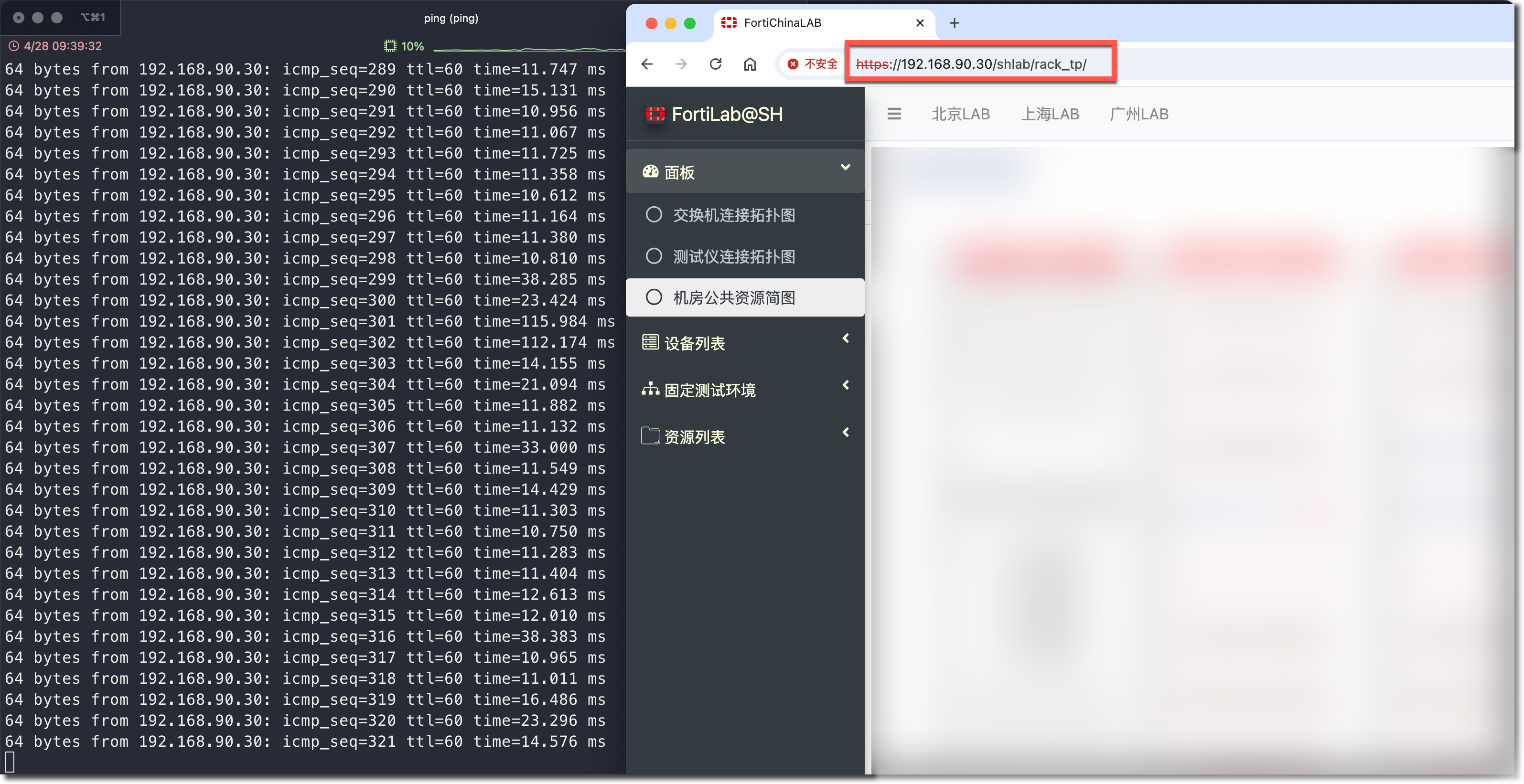
route print -4查看),192.168.90.0/24 指向 FortiClient 获取的地址 10.100.1.100。::: important netstat -rn -f inet ::: Routing tables Internet: Destination Gateway Flags Netif Expire ...... 10.100.1.100 10.100.1.100 UHr utun8 10.100.1.100/32 link#34 UCS utun8 192.168.90 10.100.1.100 UGSc utun8 ......使用 FortiClient 所在终端访问 192.168.90.30,可以通过 IPSec 正常访问。
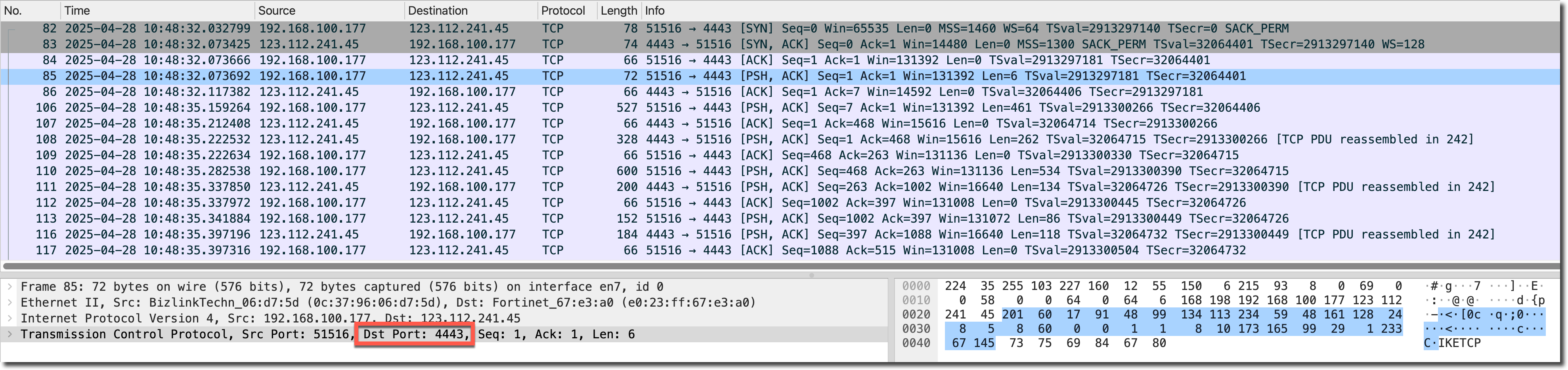
抓包查看 IPSec over TCP 的协商过程与业务流量,可以看到 IKEv2 协商与 ESP 流量都被 TCP 4500 封装(RFC 9293)。
查看 FortiClient 访问 VPN 资源的会话,基于 TCP 的 IPSec 流量(未开启
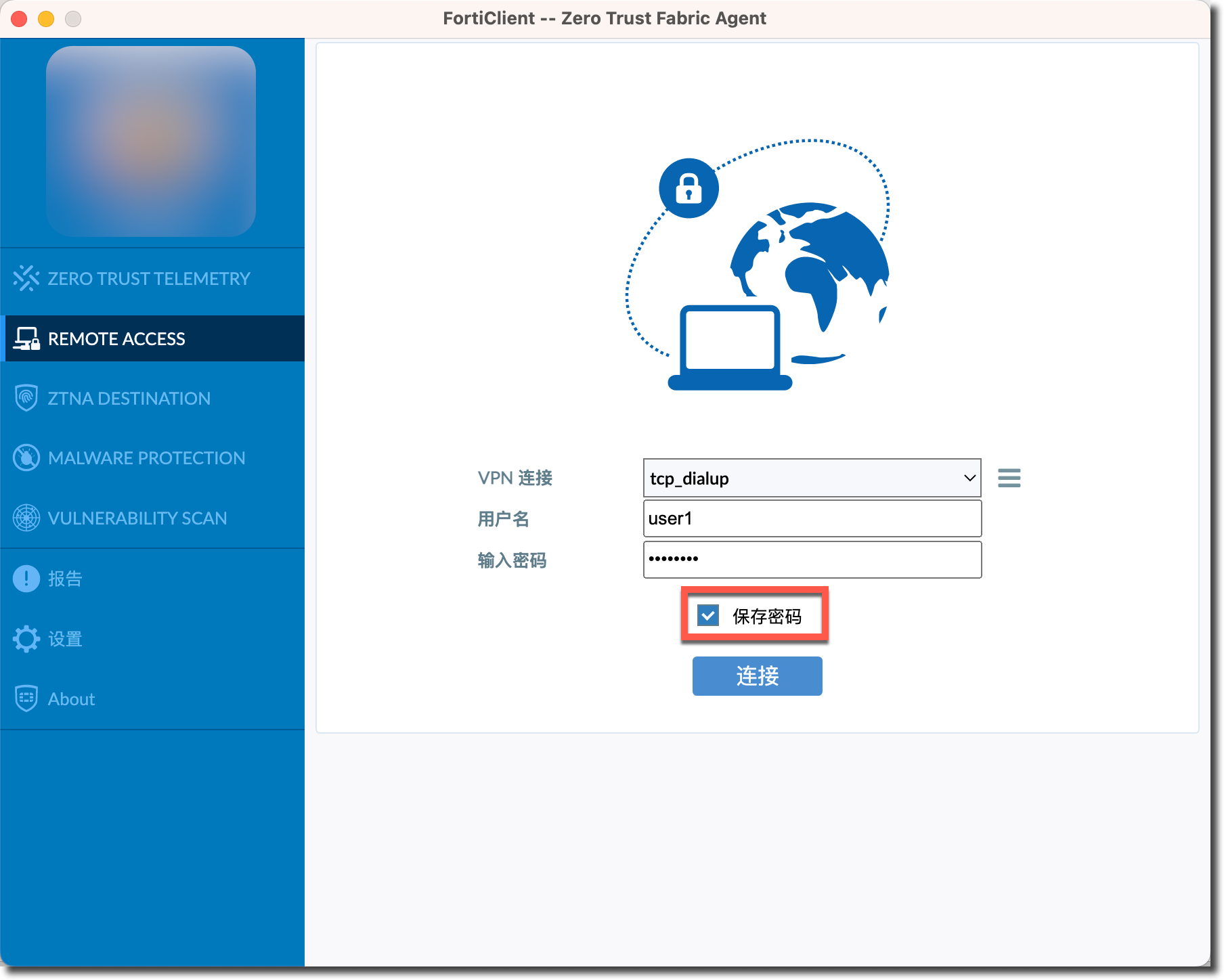
fortinet-esp)无法被 NP 加速。session info: proto=1 proto_state=00 duration=14 expire=59 timeout=0 refresh_dir=both flags=00000000 socktype=0 sockport=0 av_idx=0 use=3 origin-shaper= reply-shaper= per_ip_shaper= class_id=0 ha_id=0 policy_dir=0 tunnel=/ tun_id=0.0.0.0/10.100.1.100 vlan_cos=0/255 state=may_dirty statistic(bytes/packets/allow_err): org=1260/15/1 reply=0/0/0 tuples=2 tx speed(Bps/kbps): 83/0 rx speed(Bps/kbps): 0/0 orgin->sink: org pre->post, reply pre->post dev=53->13/13->53 gwy=0.0.0.0/0.0.0.0 hook=pre dir=org act=noop 10.100.1.100:44090->192.168.90.30:8(0.0.0.0:0) hook=post dir=reply act=noop 192.168.90.30:44090->10.100.1.100:0(0.0.0.0:0) misc=0 policy_id=1 pol_uuid_idx=1904 auth_info=0 chk_client_info=0 vd=0 serial=0000034d tos=ff/ff app_list=0 app=0 url_cat=0 rpdb_link_id=00000000 ngfwid=n/a npu_state=0x000100 no_ofld_reason: npu-flag-off //流量无法被NP加速//查看 FortiGate 的硬件/软件加解密统计,可以看到基于 TCP 的 IPSec 流量(未开启
fortinet-esp)虽然无法被 NP 加速,但可以被 CP 加速,CP 芯片统计计数一直在增长,而 SOFTWARE(CPU)统计计数一直为 0。FortiGate # diagnose vpn ipsec status All ipsec crypto devices in use: np7_0: //NP统计计数始终为0// Encryption (encrypted/decrypted) null : 0 0 des : 0 0 3des : 0 0 aes : 0 0 aes-gcm : 0 0 aria : 0 0 seed : 0 0 chacha20poly1305 : 0 0 Integrity (generated/validated) null : 0 0 md5 : 0 0 sha1 : 0 0 sha256 : 0 0 sha384 : 0 0 sha512 : 0 0 ...... CP9: //CP统计计数一直在增长// Encryption (encrypted/decrypted) null : 0 0 des : 0 0 3des : 0 0 aes : 47 464 aes-gcm : 0 0 aria : 0 0 seed : 0 0 chacha20poly1305 : 0 0 Integrity (generated/validated) null : 0 0 md5 : 0 0 sha1 : 47 464 sha256 : 0 0 sha384 : 0 0 sha512 : 0 0 ...... SOFTWARE: //CPU统计计数始终为0// Encryption (encrypted/decrypted) null : 0 0 des : 0 0 3des : 0 0 aes : 0 0 aes-gcm : 0 0 aria : 0 0 seed : 0 0 chacha20poly1305 : 0 0 Integrity (generated/validated) null : 0 0 md5 : 0 0 sha1 : 0 0 sha256 : 0 0 sha384 : 0 0 sha512 : 0 0FortiClient 第一次连接成功后点击“中断连接”,就会显示“保存密码”选项。